

Image Resize
-
I want the “percentages” back for sizing my images. So easy, so fast. This option being taken away is a major let-down. It already takes ages to upload images in the first place (my connection is slow), so the last thing I needed was yet another labour-intensive process. In fact, I’ve not been able to figure it out yet.. sigh.
-
Martinpugh – it seems there has been some more tinkering with the product. The reintroduction of image resizing doesn’t seem to work and this morning I can no longer paste from Word using the simple cut and paste technique that I have been using for 4 years. I have raised the issue in the Forum and the advice is – “yes, that’s intentional – in future use Windows Live Writer.”
WP seems determined to develop the product in the style of FB & Twitter at the expense of serious bloggers. -
Apetcher, Image resizing (Edit Image/ Scale Image) works OK for me, albeit much more clumsily than it used to. If it doesn’t work for you, it is probably due to the theme you are using or other choices you have made. There are loads of bugs like this, I suspect.
Ladyofthecakes, percentage resizing is gone and not coming back “as of right now” (whatever that means and they won’t say). In response to this situation I made a post on my blog Resizing images in WordPress (as I have mentioned previously on this thread).
The main point of this for me was a macro to almost instantly resize all images to constant size. This works provided you use standard aspect ratios when cropping and have captions for all images.
There is also an Excel utility that calculates new dimensions for resizing to a constant size. In response to your post, I have made a minor modification to output adjusted values for resized by percentages. You can then type these in under Edit Image/ Scale Image. This is much more cumbersome than the old interface but at least it makes it possible. I hope you find that useful.
-
I am also unhappy with the new image editor–I always used the advance options percentage method so I could most of the time size images to be about 600 pixels wide because those images worked best in my columns. Now I am guessing… why change something that worked so well?
-
Right on revmyke! If it ain’t broke don’t fix it seems to be something WP has never heard. Change for the sake of change is their new motto. Once upon a time not so long ago and far away, WP gave you a running count of how many shares posts have. This was a very helpful resource but it has now disappeared. Just another WP improvement, I guess.
-
Yes, the update restores some important features, but tooltip dimensions, the most essential tool for fast editing with the corner drag method, is still missing.
-
@musicdoc1
Thanks for this. I have found a couple of solutions but they are all tedious and unnecessary. The changes added nothing positive to the product and it seems that WP unhappiness engineers are completely unable to deal with the consequences of the changes that they have made! -
Today I noticed that for some images the visual editor “Display Settings” size options are not present. Normally the image editor includes a choice of standard size options (e.g. thumb, medium, full) as well as a custom size option with the box for precise width and height input.
On my page Body and Soul, for example, there are no size options at all available (under Display Settings) on the first five images of the thirteen embedded on the page. The remaining eight images all have the usual size options.
-
Same as others have said on here, I’m able to readjust the size of photographs in the editing program but it doesn’t translate to my published blog posts (haikuthehelloutoflife.com). Also, when I insert pictures from the mobile app it now enlarges them from the size they used to be. Please let me know what can be done to correct this as I like to have my photographs uniform size. These are both still issues as of minutes ago when I tried to resize based off advice on this forum. Thank you!
-
Hi!
I really don’t have the time to browse through 13 pages of topic posts so here’s my lament regardless if related statements already exist:
Pretty sure that by now the advanced picture settings (alignment options, especially the ‘move by pixel’ feature) are nonexistent.
I don’t know about ‘linking pictures to other media data that opens in a new window’, but a few days earlier that also didn’t work.
PLEASE PLEASE bring those back. Because if not, a post such as this one:
http://knowyourgods.wordpress.com/2014/04/04/art-wall-02/
takes aeons – and serious HTML knowledge – to execute.
PLEASE! Give us opportunity to make our posts artful!
-
I am in agreement with everyone else. However, I would like to add that I cannot resize images that I bring in as a URL. I store my pictures on photobucket and am resizing in HTML coding right now.
-
My “add media” button is nonfunctional, but even if it was, based on what I’m reading here I will not be able to enable such functions as resizing and, most important to me, the “wraparound” feature which allows text to wrap around an image box. I don’t just want my images hanging out above a block of text. I’d like them to be a part of the paragraph that is talking about them. Any word on how this is developing?
-
A GREAT FAIR DEMAND ON WORDPRESS TEAM
Please, dont ever, ever sign again as Happiness Engineers.
It sounds ironic, if not ridiculous.I propose ‘Silence Engineers’ instead.
Because your silence in all these hundrends of posts, shows that no one doesnt even bother to write at least that they are trying on to fix all these problems, cancel the totally failed new stuff and tells us that our hard work will not be in vain.
-
@musicdoc1-
Please note if you want to adjust your image size by px, please insert the image via your Media Library as seen here:
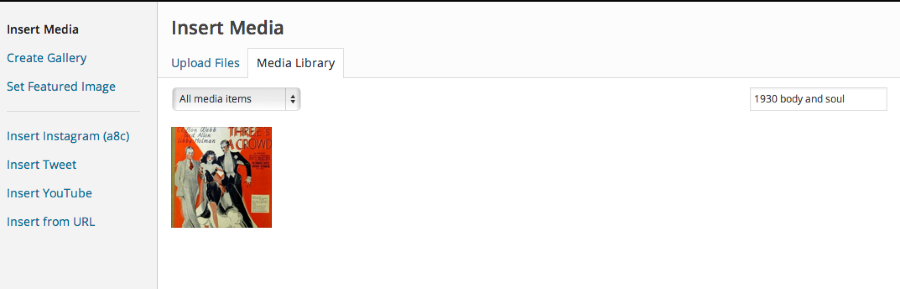
If you insert it that way you can edit the size by px as seen here:
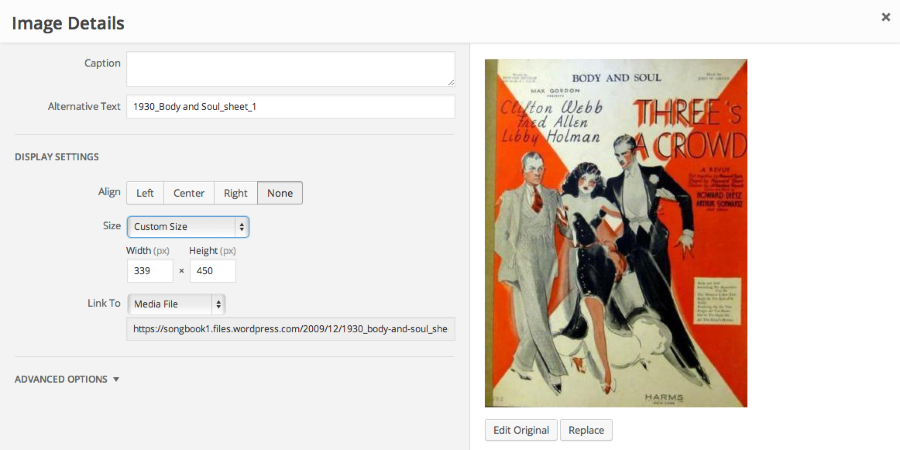
If you insert from say a URL, you can only resize by dragging the corners in/out.
-
I was wondering why was the ability to adjust the image size of images from URLs by px removed and will this ability get restored again in the future?
Because 98% of the images on my blog are from URLs, and I rather adjust them by px instead of by dragging the corners/borders.
Thank you,
-John Jr -
I see some Advanced Options are finally back! Have a look in the Image Edit screen today. You can adjust by px again.
-
I’m having problems with the visual editor for the images. The visual editor it used to have the option for resize my images, but it is gone.
Please tell me how can I resize my pics? and if this option came back it would be great, my blog is basically full of pictures that I post from another URL that I dont want to upload to my gallery of worpress.
Thanks!
(Sorry if this question was resolved already) -
The new UI looks great, but functionally it’s nowhere near as good as it used to be. Being able to resize images in-line is a nice addition but if, like me, you’re resizing numerous images per post, it’s not a good way of consistently resizing images within a post.
Manually inputting dimensions is a more cumbersome solution, but as far as I can see this element is broken and doesn’t work at all, so it’s not really an option currently. I’d really rather you bring the percentages back in addition to these new features because right now its absence is making writing on my blog is a frustrating experience, which it really shouldn’t be for the world’s biggest blogging platform!
-
Perhaps this has already been mentioned, above, but I didn’t see it. I chose to use image framing on a few images on one of my sites, but did not want them everywhere. But now _all_ of them there seem to have a default frame. Which I can’t remove (even in text editor: border says “0”!). This has messed up formatting of some pages, so of course I wonder how to remedy it. Any progress yet? I am eager to hear of solutions, and perhaps a return of some of the more adjustable features! Thanks… for anything you can suggest.


- The topic ‘Image Resize’ is closed to new replies.
 WordPress.com Forums