

Image Resize
-
Some have suggesetd that the average WP user functions as an informal “beta tester.” I don’t mind being treated as a “beta tester,” but Beta testers — even “de facto” beta testers — deserve better information regarding what is being tested, why and what to look for in a beta “release” of a new function or group of functions. Give us the option — as do many subscription websites — of trying out the new process or platform alongside the old one. After all, the general user provides the best possible feedback as to the value of the proposed changes. And they instead simply tell us this is it, deal with it. Even assuming good intentions on the part of WP, the feedback they’re going to get — and ARE getting in this case — is angry, and less apt to be constructive for everyone involved. Bad way to run a business: dumping last-minute, major changes without thorough explanation on customers and then simply expecting them to “deal.”
-
@Balsamean
The first problem that you mentioned is effecting/affecting me and others as well, maybe you should post your issue in this topic like I did so that it can be in one topic:
https://en.forums.wordpress.com/topic/more-tag-keeps-moving?replies=2#post-1711052
-John Jr
-
Hi Grace (Staff),
Thank you! for pointing out the use of the toolbar link icon rather than the “open in new window” checkbox in the old image editor. THIS is a nice improvement, if it was not there before. (The Image Settings and Image Links support pages haven’t been updated for the new editor yet, and they don’t mention using the toolbar link icon. I’m sure the pages will address it when they are updated.)
The typed spacing you suggest does not address vertical spacing, and typed spaces for positioning don’t work when the image is positioned for left or right text wrap, rather than none/in-line as in your example. In any case, thanks for working on this, and for reporting progress.
-
Thanks jackiedana, so here is the retype of my issue
Hello,
pictures in my blog did not change size to imported size (850px wide), if i use full-width-template. All imported pictures bigger than 620px wide have a pulished size maximum 620px wide. This corresponds to maximum picture size in template with sidebar. It seems like a bug in used theme “The Triton Lite Theme” or in Visual Editor. Before updating the Visual Editor the integration of pictures bigger than 620 px wide worked fine. Example before update http://usa3weeks.wordpress.com/reisen/usa-2013-far-far-away-tour/the-city-of-angels/
Example after update http://usa3weeks.wordpress.com/reisen/usa-2013-far-far-away-tour/lauf-forrest-lauf/
Looks really stupid, if pictures in a coherent report have different sizes. Please help!!!//Edit: this a retype of my problem from a single thread
-
Honestly, I am stuned with this change. How can we downgrade something that was working perfectly as the advanced image editor. I miss terribly my border feature, since I could round up my corner… desappointing. Why investing so much time in reducing user experience… a total mystery!
-
-
-
Well saying it made me feel better.. Now, I am looking for other solutions… WP is one among other solution!
-
It reminds me a story! If you want to know how loved is your brand, take it away from your client….for me it is a bit the same way I feel… taking away part of services, reminds WP that improving does not always go hand in hand with better customer experience!
-
Hi John Jr.,
Yeah I think you’re right. The More Tag is a separate issue. Has nothing to do with Image editing. Catch you on the other wire.
-
For the record, I have begun the process of researching alternatives to WordPress.com as well.
-
@Balsamean
Good, I look forward to seeing you there Balsamean ;) , and maybe this issue will be fixed for us eventually. :)
-John Jr
-
@johnwhays: the thought of changing my whole site to another platform brings on major anxiety….ugh!
-
Agreed! Unanticipated, unwelcome, untimely, and in my opinion, unnecessary anxiety. Oh, joy!
-
I can’t emphasize enough how much I’d like the old image UI back, especially the option to open a picture in a new tab. Going back and forth will lead to both artificial inflation of a post and the high likelihood that the reader will navigate away from the page rather than read the rest of the content.
Also, percentages came in very handy when uploading iPhone/iPad photos. Returning that option would be greatly appreciated.
-
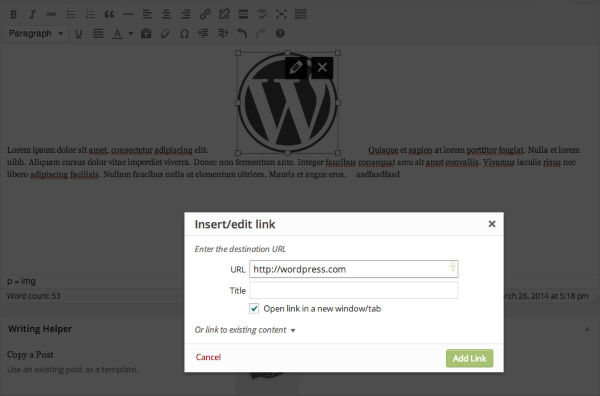
@justinbaisden: Re: opening pics in a new tab, one of the staff posted this today on page 5 of this thread:
In order to open up an image in a new window/tab, please click directly on the image and then click on the link icon. A small window will pop up and you can check off “Open Link in a new window/tab”. Click “Add Link” and you should be set. Here’s a screenshot of this:
-
Yes, but keep in mind that previously this could be done within the image editor pop-up box, all at once with the other functions in the advanced image editor — no need to exit the image editor and go to the tool bar to bring up the link editor as is now the case. This might not seem a big issue unless you are editing multiple images, in my case often 50 or more per post.
-
HELP!!!!!! Where did the simple and VERY useful change spacing around image go??? I need to add space around my image – so that it does not look clunky – is there a work around????
-
OK, I added my style=”margin: 2px;” in text mode – but what is the value of removing this option – REALLY A bit or warning before removing a tool please!!!
-
Now that is interesting – you remove it! Why? Looks like you have added a default spacing and in doing so, hope everyone is willing to conform – WOW! That is not cool, but for me it works for this posting. Please give me back my ability to define the spacing!!!


- The topic ‘Image Resize’ is closed to new replies.
 WordPress.com Forums