

Image resizing
-
Why doe my image editor (in posts) not show a resize scale anymore?
The blog I need help with is: (visible only to logged in users)
-
Usually when I add my images into a post when in visual edit mode, I resize them quickly by clicking on each image to open in post editor, and then I use the percentage resize scale editor as seen on this support page:
http://en.support.wordpress.com/images/image-settings/however this entire pop up screen has now changed and doesn’t show any option to resize using quick percentages anymore. Can anyone tell me why or how I can get this back? The theme I use is Suits.
Thank you!
-
Hi there!
There have been recent changes to the image editor. We no longer have an Advanced Settings pane for image settings. We have also disabled the image border feature. You can read more about the on going conversation about these recent changes here:
If you’re interested in sharing your thoughts on these changes, you can post a response in this thread:
https://en.forums.wordpress.com/topic/image-resize-1
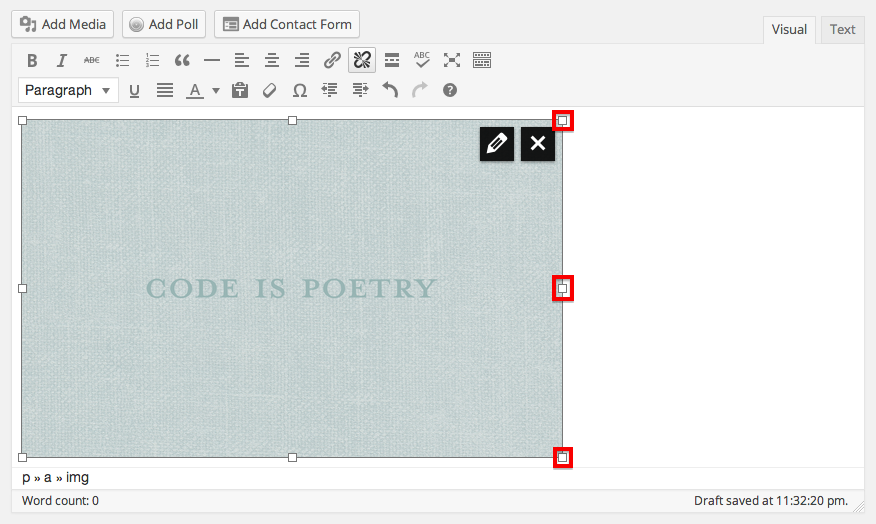
We are currently working on updating our help documents for resizing images. You can edit your image size by dragging the boxes that appear around the outer edge of your image when you click on it:
Let me know if I can answer any other questions for you!
-
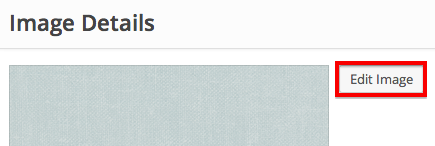
I’m sorry, I forgot to include another way you can change the size of your image. Once your in the image editing menu through the pencil in the upper right hand corner of the image, click on Edit Image:
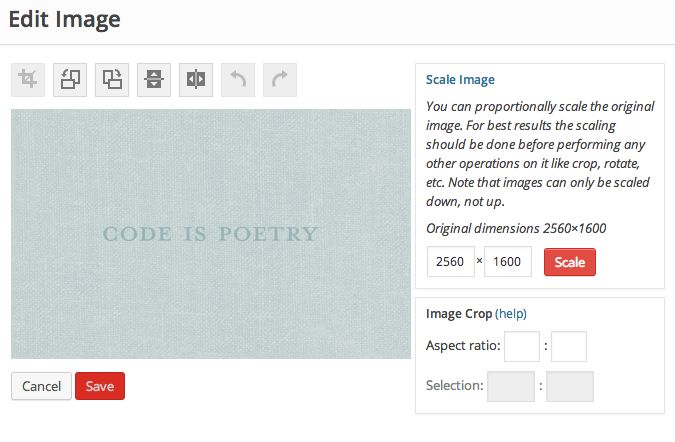
Then you can crop or scale the image:
Let me know if I can help with anything else!


- The topic ‘Image resizing’ is closed to new replies.
 WordPress.com Forums