image sometimes not loading correctly on page
-
Thanks for giving that a try. The issue has resolved for some but not all and our developers are still working on it.
-
We are still developing our site and have not yet announced it to our audience. But we can’t roll it out with this issue ongoing. Questions:
Is this a software issue (so it would be seen on other WordPress.org hosting sites) or is it unique to WordPress.com? I’m wondering if we should look at another hosting solution.
Or: We are still on the free plan. Does converting to a paid plan make it go away?
-
Hi –
Your plan will not affect the gallery display.
Check out step #7 here: https://en.support.wordpress.com/gallery/ Can you let me know if unchecking the randomized order of the gallery fixes it’s distorted display?
-
-
Yes, I’ll outline the exact steps with screen shots. Can you share a link to an affected gallery in a post or on a page?
-
It happens to the images on this page
https://folderizehelp.wordpress.com/app-permissions/
Does it happen for you? -
Thanks for the link. The images on that page are clear in my browser. Here’s a screen shot.
These were not added as a gallery but rather one at a time on to that page.
-
I never said this was a gallery problem. Please see original post above.
Here is a screen shot of how that page looks to me https://folderizehelp.files.wordpress.com/2017/04/screen-issue-2.png
This is from the page https://folderizehelp.wordpress.com/app-permissions/
I’m looking for any ideas how to prevent this, as it is not user friendly to instruct viewer to refresh in order to display correctly.
-
Aha. Now I can see what you are referring to in that screenshot.
On my side using Chrome and Safari I am not able to replicated the wrongly sized image, the image size loads correctly with no refresh needed.
What size screen are you using with Edge? Is it a tablet?
I’m looking for any ideas how to prevent this, as it is not user friendly to instruct viewer to refresh in order to display correctly.
I completely agree with this but am wondering if it is something localized to your environment. Are there any browser extensions enabled?
-
-
-
I’m going to try and replicate the issue in those browsers. Which version of Firefox does this happen in?
I’m also curious if it happens for you on different devices or if it is only this one PC?
-
Now I’m seeing no problem in Firefox. Something changed (for the better).
But still getting same issue in Edge.
I did test on another Windows 10 pc and it happens in Edge on that machine also.
-
I’ve tested both Edge 13 and 14. Which version are you using?
For this image: https://folderizehelp.files.wordpress.com/2017/04/screen-issue-2.png I am not able to replicate the squished appearance. Here’s what I see in both versions (13 and 14).
This is what I see in the Mobile Basics section.
-
Windows 10 updates Edge automatically so our machines are more or less always on the latest version. Here’s what it says today.
Microsoft Edge 38.14393.0.0
Microsoft EdgeHTML 14.14393I don’t know why this is happening here on multiple pc’s. Could it be related to the wordpress.com CDN interacting with my ISP? This is Verizon FIOS.
-
Hi @folderize. I’m popping in to try to help test the bug you reported. Thank you for all the details so far! I tested and was unable to reproduce the problem where images appear too small on the first page load—another colleague also tried testing and couldn’t see the problem in action.
> Could it be related to the wordpress.com CDN interacting with my ISP?
That’s unlikely since Liz mentioned earlier she able to see the problem at least once and one other person below mentioned seeing the same problem on their site. The trouble right now is that it seems to be intermittent, sometimes in one browser or another and doesn’t happen every time for everyone who tests it. That makes it a bit harder to troubleshoot.If possible, we would be interested in seeing a screenshot of a Right Click -> Inspect Element output… that way we could try to check if the first render it’s getting bad width/height parameters or not.
If anyone else in the forums has a moment to try testing, please have a look at the following two posts either with the Edge browser or with Firefox, and on the very first pageload without refreshing, check to see if the image on the right side of the page looks normal or if it looks too small:
https://folderizehelp.wordpress.com/using-the-mobile-interface/Thanks for your help providing any extra data! This issue seems like it might prove to be a tricky one to track down.
-
Well, as soon as I posted that, someone pointed me to another thread where they’re talking about fixing this issue in Edge 15:
https://developer.microsoft.com/en-us/microsoft-edge/platform/issues/7778808/So it may in fact be a browser-related bug and we’ll want to re-visit the issue after Edge 15 comes out.
-
In case this helps you investigate on the WordPress.com side:
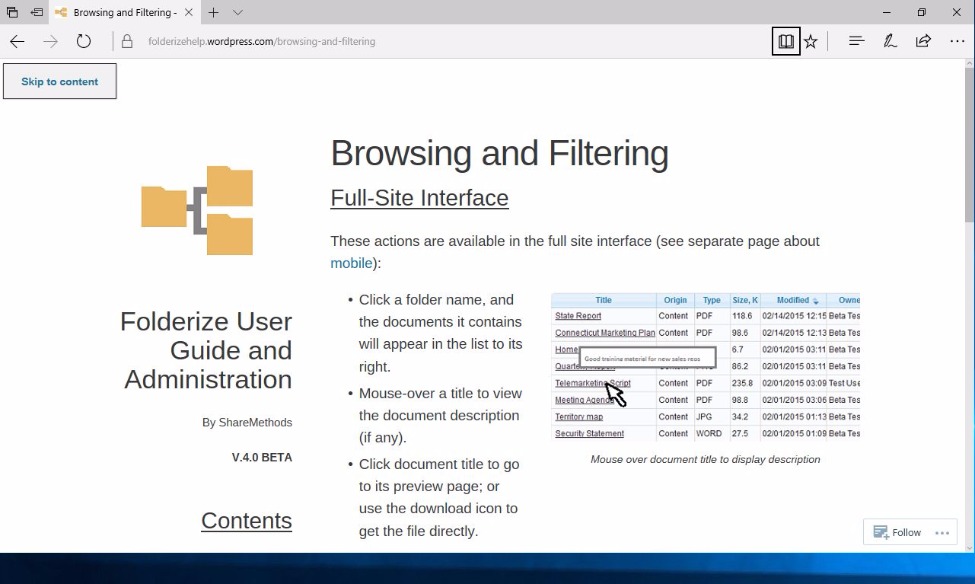
Here is the inspect element display of a shrunken image
https://folderizehelp.files.wordpress.com/2017/04/inspect-element1.pngHere is a screen shot of the shrunken image that I right-clicked to get the inspect element output above
https://folderizehelp.files.wordpress.com/2017/04/compressed-image1.pngThis comes from page https://folderizehelp.wordpress.com/browsing-and-filtering/
-
I tested https://folderizehelp.wordpress.com/browsing-and-filtering/ using Edge 15 on Windows 10 just now and the images on that pages appeared normally sized in my test. Here is a screenshot for reference: https://cldup.com/jZh4peI7L2.jpg


- The topic ‘image sometimes not loading correctly on page’ is closed to new replies.
 WordPress.com Forums