

Image URL opening as a separate page
-
I used to be able to have the photo link in my blog open as a separate web page. The new image editor doesn’t have such a setting. How do I get the my photo’s custom url to open as a separate web page, rather than replacing the page on which my blog is displayed?
The blog I need help with is: (visible only to logged in users)
-
Hi Kenn,
In order to open up an image in a new window/tab, please click directly on the image and then click on the link icon. A small window will pop up and you can check off “Open Link in a new window/tab”. Click “Add Link” and you should be set. Here’s a screenshot of this:
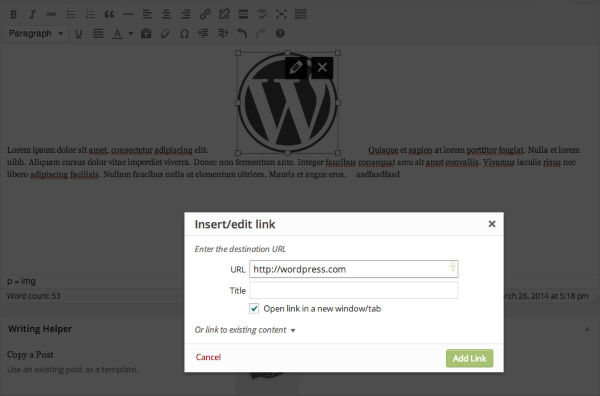
Feel free to reach out if you have any questions!
-
-


- The topic ‘Image URL opening as a separate page’ is closed to new replies.
 WordPress.com Forums