

Images displaying incorrectly
-
images displaying incorrectly – in the past week or so, something changed with respect to inserting images I’m pasting into a post.
Images used to go exactly where I placed my cursor, and an image at the very top, above text, would fit snugly below the heading.
Now there is a large white space above my images that pushes them down too low and it looks awful.
I haven’t changed anything, but noticed the editing icons on an image when I click on it, look different than they did and the editing screen has changed as well.
Have you made changes recently? Something is not working correctly.
Thanks,
-
Hi there!
There were some changes to the editor a few weeks ago. Can you give me a link to one of the posts you’re having trouble with?
-
Hi Shawna,
Thank you for taking a look. In this post, I used a left alignment on the photo of David, and it left a big white space above the image. It never used to do that.
There is also a bigger space above the centered images at the top of my posts now, whether I choose centre or no alignment at all, it doesn’t make a difference. The space between the heading and the image is now twice what it used to be. Way too much.
I certainly hope WordPress will correct this. Editor has always been straightforward and easy to work with but now the images are out of control with a mind of their own.
Thanks,
Molly -
Thanks for that link! Did you copy your content from another text editor like Microsoft Word?
There are a couple of things I’m seeing here:
First, it looks like there are a bunch of extra
<div>tags in your code: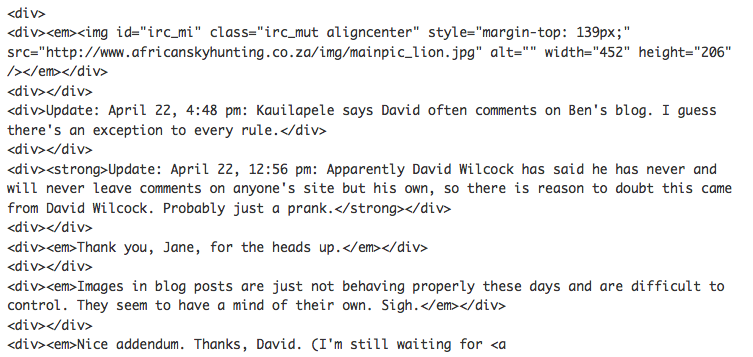
Second, it looks like you’ve added a top margin of 139px:

I’ve removed all of these extra tags, so go check it out now!
Let me know how you’re building your posts so I can figure out why you got all those extra formatting tags.
-
Thanks, Shawna. I’m mystified as to the code, etc. I don’t do anything except copy and paste an image. I don’t often modify anything in the code and don’t use <div> tags.
I open “Add a New Post” insert text, insert the image, select the alignment, maybe add a caption, but that’s it. I don’t really understand code much.
I have, on a rare occasion, added a “<p><break> and changed a font to <h2> or something, but that is the extent of my editing capability with code.
I didn’t change anything that I’m aware of, so don’t understand why my posts began having extra <div> tags. It began when I noticed changes to the editor and I never had the problem before that.
Am I the only one who had this issue?
I will check the other posts where the extra space occurred and delete them.
Thanks again for looking into that for me. Crazy.
Molly
Molly
-
I haven’t seen this particular issue anywhere else, but we do see these extra tags when you copy and paste from other sources. Here are some tips on using the copy and paste functions to create posts:
Let me know if you find any posts that you can’t fix up!
-
Thank you very much, Shawna. I think I’ve corrected all the older posts that were troublesome, learning from your comments. Much appreciated. I’ll check out the tips you sent, too.
Have a great weekend!
-


- The topic ‘Images displaying incorrectly’ is closed to new replies.


 WordPress.com Forums