

images not showing
-
Second message, disregard the first. I have placed a vignette of the background in, solving the text issue.
None of my images are showing up… the placeholder boxes are indicated with an X.
Are things reloading?Thanks,
BarryThe blog I need help with is: (visible only to logged in users)
-
The best way to make sure your images show up as expected on the front of your site is to add the image as a featured image in addition to having in the post. Here’s a bit more info on how featured images work.
Let me know if you need any more help!
-
Thank you for replying and am not sure how to accomplish this.
The featured images are not an independent static page. They are part of the latest images within posts
If you click on each box, you are taken to the page and visible image
Still need help please
-
No problem. I’ll walk you through how to add the featured image to one of the posts, then you’ll have a better idea of how to do the rest on your own.
Let’s start with this post.
http://barrycomersblog.com/2015/04/07/things-beginning-to-bloom/
The first step is to open the post in the editor
https://barrycomersblog.wordpress.com/wp-admin/post.php?post=843&action=edit
From here, you can add the featured image in the right column. (If you use the new editor the featured image options will be in the left column.)
Once you add the featured image it will appear at the top of your post, so you’ll want to remove the image from the area where you have it now–just leave the text.
Finally, save your update.
Now the image will show on the front page of your site.
You’ll make change for all of your posts.
Let me know if you have any questions about that.
-
I am embarrassed to say that “I still don’t understand” within the dashboard and options I can find.
Important: I don’t have 1 featured image. It scrolls down, so there could be 2 dozen.
Can I speak live to you?
-
Can I speak live to you?
I’m not a member of our live chat team so there isn’t a way to talk to me specifically in live chat, but we do have wonderful Happiness Engineers who do live chat. Any time you see the “Howdy, How can we help” message at the bottom of your screen someone is available to help you in real time. In the meantime, I’m happy to work with you here. One way or the other we’ll get your site looking the way we want it to.
I notice you’ve changed your theme since we last spoke. Are you sill interested in getting the other one setup or are you happy with your new theme? I’ll explain a little more about how to make the featured images work in the other theme below in case you change your mind.
Important: I don’t have 1 featured image. It scrolls down, so there could be 2 dozen.
This is important and explains why this has been difficult. I understand your goal was to get the images to appear on the front page of your site, but the process to do that is an indirect one. To get the images on the front page, you actually make the changes not to the front page, but to each individual post page.
When you create or edit a post you will see the option to add a featured image in the left column (of the new editor). It looks like this
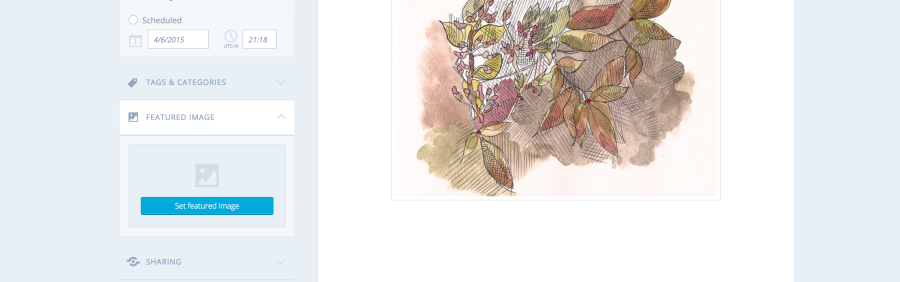
In your old theme, adding the image for the individual post there would also add it to the front page.
I hope that makes more sense than before.
-
Thank you liz. I decided that it was too much trouble and requested a refund.
Your support is very much appreciated.
Barry
-


- The topic ‘images not showing’ is closed to new replies.


 WordPress.com Forums