Import from WordPress
-
After 24 hours, my import from a wordpress document still won’t work.
The blog I need help with is: (visible only to logged in users)
-
I have reset your importer for you. You can try your import again at any time.
If you continue to have trouble with this, please let me know what kind of export file you have, where your blog was before, and how large a file it is.
-
Thanks for the help, I uploaded a wordpress xml before. I’m going to try it again but I’ll post if it doesn’t work
Thank you for the help again.
-
Hi, the import was successful but the drop down menus don’t work and some of the drop down displays aren’t showing. I checked the menu option and everything was set correctly, but it doesn’t work on the actual blog
-
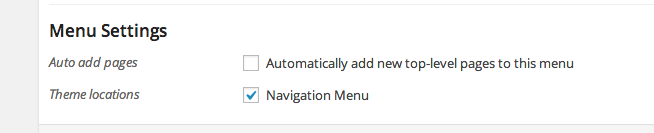
In your Custom Menus area, you need to select a theme location:
https://i.cloudup.com/fC5cLgCxaV.pngOnce that’s done, your custom menu will be activated. In this case I’ve gone ahead and done that for you, so everything should be working properly now.
-
-


- The topic ‘Import from WordPress’ is closed to new replies.


 WordPress.com Forums