Important Mobile Version
-
Hello, I am using the revelar theme and I would like to know if there’s a way to fix the following issue.
I recently uploaded a post to my Twitter but instead of appearing as it would on the regular site, it appears differently. If you take a look at my media content I took 2 secreenshots from the mobile version . The second to last screen shot shows the post from internet as it should appear, but the last screen show it directly from the twitter link and it looks completely different, is there a way to fix that so my links can direct to the website exactly as it look on the screen from the second to last?
The blog I need help with is: (visible only to logged in users)
-
-
It seems that it’s now working properly.
I have a snippet request if possible. On my posts I use the feature of justify for my body text. Is there a snippet for me to keep using that justify body text on the computers but once I check that post on any mobile device the body text is normal and not justify?
-
Hi, what we can do is to set the default text alignment for post and page content to justify, and then use a Media Query to set it back to left aligned for 600px and narrower screens. This will however not override the justify settings you have actually put into your post or page content from within the post/page editor. You would have to edit each post and page where you have done that and “undo” it and then save the post. When you put the justify directly into the page or post in the editor, that cannot be overridden with CSS.
.entry-content { text-align: justify; } @media screen and (max-width: 600px) { .entry-content { text-align: left; } } -
It worked perfectly thanks.
Would there be a snippet to make another media query so I can have the title of my posts be smaller just on mobile devices? Only the title while reading the article.
-
Add a site-title rule to the 600px media query, so that it looks like this and then adjust the 2.5rem value I have (it was originally 3rem).
@media screen and (max-width: 600px) { .entry-content { font-size:15px } .site-title { font-size: 2.5rem; } } -
Thank you.
If you look at my main page there would be a post at the bottom of the top two posts. Is there a snippet to make the title of that particular post (or let’s say that row cause it’s supposed to be 3 posts under those) be smaller but just on the ones in the bottom and not the top two?
-
Hi, this would allow you to change the font size for the bottom 3.
@media screen and (min-width: 53.125em) { .blog .hentry:nth-of-type(3) .entry-title, .blog .hentry:nth-of-type(4) .entry-title, .blog .hentry:nth-of-type(4) .entry-title { font-size: 1.8rem; } } -
It worked great, thanks.
Would there be a snippet to make the tittle of my blog be a logo image instead of the text (The Moxie Blog) that is currently there?
-
Hi, this would be the basics. What you would want to do is add this and then replace URL_OF_IMAGE between the quote marks with the URL of your uploaded title image. There could be some adjustments necessary to this code since I haven’t seen your site title image.
.site-title a { background: url('URL_OF_IMAGE') no-repeat scroll left top / contain; color: transparent; } -
Thank you and would there be a snippet to change the color of the black background from that site title? and also when you click on a category page in the menu bar the background is black. Would there be a snippet to change both for the same color?
-
This will allow you to change the background color of the site title area on all pages and posts. Edit the color code as desired.
.site-branding { background-color: #cc0000; } -
It worked perfect on the site title but once you click or point into a category in the menu bar, the background still black instead of blue like the site title. Is there a way to fix that?
-
Hi, I see blue when I go to https://themoxieblog.com/category/futbolito/.
Screenshot: https://cldup.com/jir2DwiHdV.png
I checked in Safari, Firefox and Chrome. Are you not seeing that?
-
Indeed it does in all of my browsers as well. What I tried to say and sorry for misdirecting you, is that for instance if you go to the main page and go to the menu bar in the top right, in the “Liga Mx” category or any other category in that bar, you will see a black background color once you point the browsing arrow into a category. I would like for that to be blue like the site title.
-
Hi, I’m confused. I don’t see “Liga Mx” at upper right on https://themoxieblog.com/.
If you are wanting the hover color on menu items to be the same blue, then add the following.
.main-navigation a:hover { background: #1b4b6d } -
The hover is what I meant. Thank you. It worked perfect on the computer version but on the mobile device it looks like this https://elcapicap.files.wordpress.com/2017/06/img_0104.jpg
Is there a way to fix the black part from where it says menu from that picture so that the whole title matches with blue.
-
Oops, change the last CSS rule I gave you to the following.
.main-navigation a:hover, .site-header { background:#1b4b6d } -
The menu button stays with a black background. I think it looks better with the contrast between the black and the blue, but if you also want to change that to blue also, use the following instead.
.main-navigation a:hover, .site-header, .menu-toggle { background:#1b4b6d } -
Both of those snippets work great. Thanks.
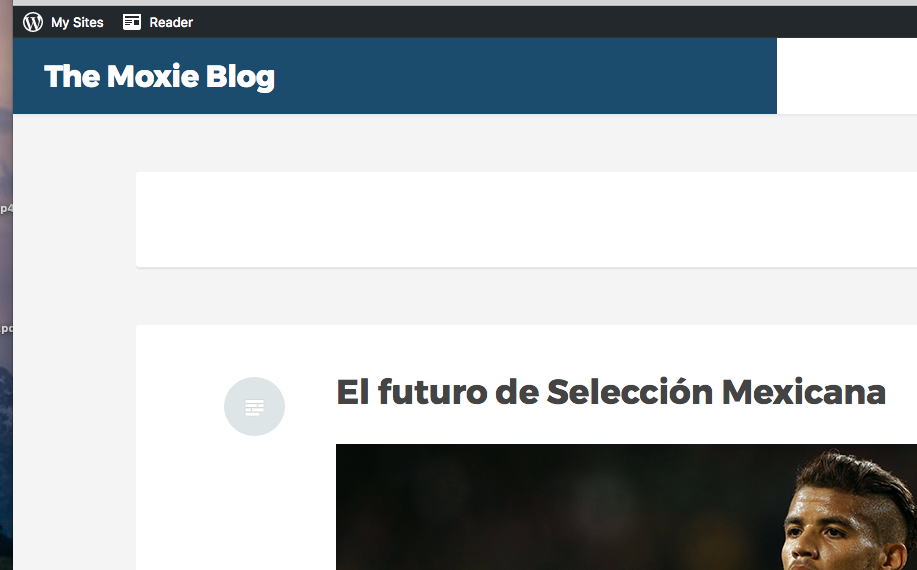
If you click on the “Futbolito” category or any category in the menu bar, it will take you to the posts. On top of the first post there’s a white rectangle. Is there a snippet to hide it and put the first post to start in that position?


- The topic ‘Important Mobile Version’ is closed to new replies.
 WordPress.com Forums