

Importing new comments from wordpress.com to a wordpress.org setup
-
I have been running a wordpress blog on a rented server for a few months now. Importing old content and getting erevything working wasn’t any problem… I only now got the sense to do an actual site redirect to move all the readers to the new site.
My problem is that I have new content and comments on my new blog but I have got a few new comments on my old blog’s posts as well.
So my question would be: is there a way to import only the “missing” comments from my wordpress.com blog to the new one?
The blog I need help with is: (visible only to logged in users)
-
Hello there!
Comments cannot be transferred individually from one site to another, however I have another solution which might work for you.As comments are “attached” to Posts, you can export a date range of Posts that contain the new comments. Then upload them to your self-hosted site. New comments will be added, and duplicates will be discarded automatically.
I hope this helps! Best wishes to you.
-
Thanks for the info! Will have to try that out.
How about a situation where I have a post with “branching” comments (the same post has got some new comments on both websites)?
Appreciate all the help. Cheers!
-
Hello there! This is going to take a test to confirm a successful import. It should work as the import is setup to add new content, without deleting existing content, but I do not want to put your ‘branching’ comments in danger. My suggestion is to do a mini mockup of your export/import. Starting by creating a new post in WordPress.com, adding couple comments (I can help with this, if you’d like…just send me the link to anything you want me to comment on), exporting by date, and importing to your self-hosted site.
The new WordPress.com post can be backdated so it doesn’t appear at the top of your reverse-chronologically-ordered blog page. You can even make the post private, so it’s only viewable to you (and the WordPress staff).
Once the post is added to your self-hosted site, we can add comments to both your sites. Then, you’d do the export/import again.
As I don’t have access to your self-hosted site, I cannot assist with the export/import process, but I am happy to help recreate your scenarios by commenting wherever necessary.
Let me know how and when I can help with this. Wishing you the best!
-
Hey! Sorry for the late reply! I’ve been a bit busy with the final weeks of school and got this week left to go. I’ll be most probably testing the importing after this week. I will be posting again after that (hopefully a successful test and actual migration).
Thanks :)
-
Hi there,
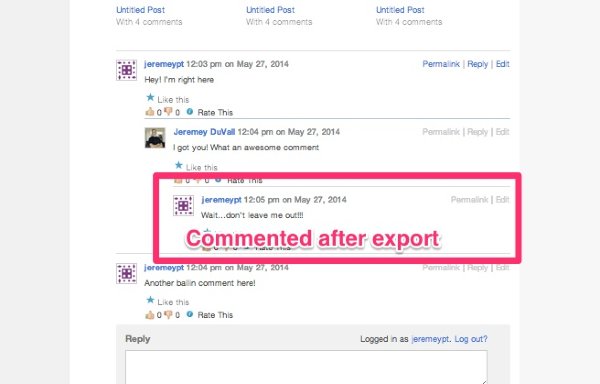
I created a test to see what would happen in the situation you mention. It looks like comments that were added to your WordPress.com blog after the export was completed will be added to the end of the comment section as a separate comment regardless of whether or not they were in reply to another comment. Does that make sense?
I created a few screenshots to demonstrate.
Here’s a shot of the comment section of my WordPress.com blog with a comment added after the export:
Here’s a shot of that same comment imported into a WordPress.org self-hosted site:
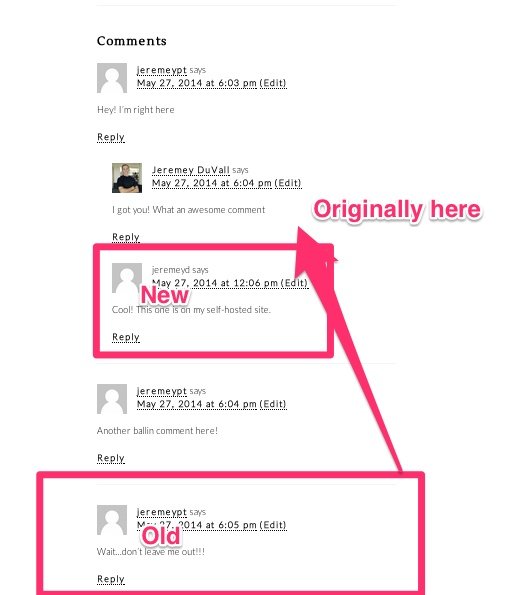
So, in short, if you have normal comments (not in reply to other comments), those should import fine. However, if you have “reply” comments on your WordPress.com site that were created after the export, they will be added out of line to the bottom of the comment section. Does that make sense?
-
Hi,
thanks for the help! I will be trying this out next week. So I guess in short: I will make an export on my self hosted site as a backup. Then export the wanted posts by date and finally import them.
-
-
I did the imports and everything seems to work like they did before. The reply-comments imported to the bottom as jeremey said.
Thanks to you both!
-


- The topic ‘Importing new comments from wordpress.com to a wordpress.org setup’ is closed to new replies.


 WordPress.com Forums