

inserting a link
-
I would like to insert a link to a web page without the whole link displaying with the text body.
The blog I need help with is: (visible only to logged in users)
-
Hi there,
Do you want to link a certain word or group of words like this? :
You can do this by selecting the text you want to link and clicking on the link icon:

Then, you can enter the link you want as seen here:
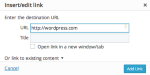
Take a link above for more information as well!
Feel free to reach out if you have any questions!
-
How do I activate the link option, mine is greyed out. Nothing happens when I press the link button.
-
How do I activate the link option, mine is greyed out. Nothing happens when I press the link button.
-
Have you selected text? If you don’t select text the link will be greyed out. If you look at the screenshot I provided you the text is selected in blue.
Let me know if you have any other questions with this!
-
okay so I select the text/link and highlight it then press the link button.
It then takes me to a section where I can name the link, that is fine so far. But then It still displays the whole link and not the name.I tried to use this link http://www.carlabrownmakeupandbeauty.co.za/
With the heading of Carla Brown. I checked on preview still the whole link. I then Published it to see if that was the problem. Still the whole link appears. ARGH!Help.
-
Please view the screencast below on how to link text:
If that is what you are doing and it is still not working, let me know exactly which post and text you want linked. I can try it for you.
Cheers!
-
AAAH now that make sense. Thank-you. The word “text” was throwing me off and I was typing in the link on the page. Doh!
Thanks again.
-


- The topic ‘inserting a link’ is closed to new replies.


 WordPress.com Forums