

Inserting a table from Word
-
Hi,
I’m trying to insert a table into my post (homework calendar for my class), however, the rows with the dates won’t transfer over. I’ve done the same copy/paste method the whole time I’ve had this blog, but unfortunately it won’t work today.
Thanks in advance for your help,
Lisa B.The blog I need help with is: (visible only to logged in users)
-
Hey Lisa!
I’m happy to help you out with this. First, when you’re pasting from Word, are you using the Paste as Plain Text button as described here?
Judging by the current text on your post here, it looks like this is entering some data that is messing up the layout of your site:
https://lardinfo.wordpress.com/wp-admin/post.php?post=555&action=edit
If you click the Text tab as explained here, you’ll see quite a few “width=132” sections:
Going forward, I would highly encourage you to try to use HTML formatting to setup tables rather than copying and pasting from Microsoft Word or another word processor. This will ensure that your tables look great all the time. The basic formatting is the following:
<table>
<tr>
<td></td>
<td></td>
</tr>
</table>
That would create a table with one row and two columns. I realize this sounds a bit complicated, but I promise it’s easier once you get the hang of it. Here’s an online tutorial that breaks the table codes down a bit more:
http://www.w3schools.com/html/html_tables.asp
Going forward, first, can you let me know if you’re using the Paste as Plain Text button? Second, look over the table HTML and see if it makes some bit of sense. If not, I’m happy to explain more!
-
Hi Jeremy,
Thanks for responding.
I have tried everything except using HTML formatting.
In the past I’ve simply created a table in Word & then copied/pasted into WordPress. There have been some minor formatting changes when I’ve done this, but nothing that I couldn’t fix in WordPress. I’ve never seen this total change happen before. I did try the Plain Text button, but that removes all the table formatting & I need the homework/assessment calendar to be in a table.
I did look over the link to create an HTML table, but it’s like reading a foreign language :).
Any other suggestions?
Thanks,
Lisa -
Hey Lisa,
Unfortunately, copying and pasting a table from Microsoft Word is a bit dicey. I don’t really have any suggestions to make sure it works out 100% of the time. Copying and pasting from other word processors tends to carry along some other HTML, which messes with the layout. The fool-proof method is to build the table in WordPress.com using HTML.
I believe the main concern here is the dates that are being displayed as a list up and down rather than running across the table. Is that correct? Here’s a screenshot just so we’re on the same page:
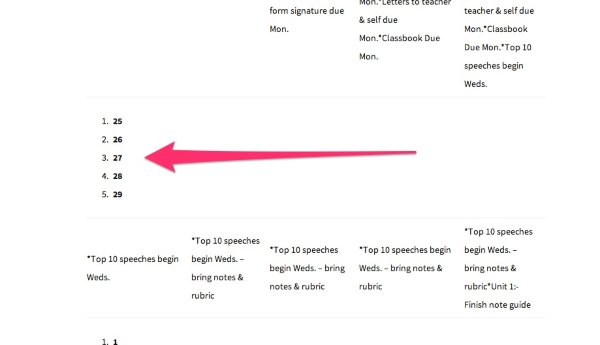
If so, the cause of this is that the HTML is reading the numbers as an ordered listed (likely because they’re in numerical order). So, rather than splitting them up into cells, it added them into one cell. To fix this, we’re going to have to dabble a bit in HTML. I’m happy to show you everything you would want to know! I just want to make sure we’re talking about the same main issue. Can you confirm?
-
Hi,
The row for date is definitely one of the main issues. The other issue is that the formatting for the content of the rows below (where I list daily HW) is off & I can’t move it. I like things to look neat/be ordered, & WP won’t let me line things up. I tried copying/pasting in a table from an older post & that worked. I’d just have to go in & manually change the info. in each cell.
I think using html might be beyond me. It looks complicated.
It’s weird that this issue only occurs at times.
Thanks again for your help. -
Hi there,
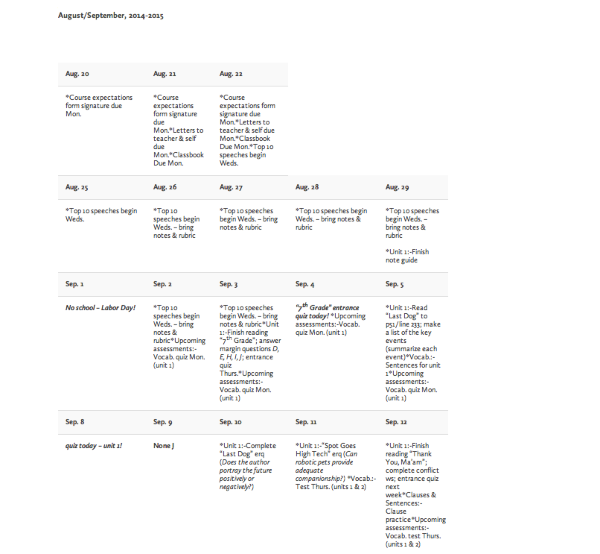
Ah – I understand. There’s quite a bit of wonkiness within this table I believe. I’m happy to help you reformat it. In fact, if you would like, I can reformat this one in HTML and save it as a post draft on your blog so you can take a look. This might not be a long-term solution with regards to the pasting, but at least we’ll get this post figured out!
Here’s an example of how it would look after we clean it up a bit so you can get an idea:
-
Hi,
I found a site that creates tables in html (tablesgenerator.com). I can easily set up the table, but when I insert it into WordPress it gets messed up. Have you used this site with any success? I also found a plugin called Tablepress that’s supposed to work on WordPress, but when I try to download it it says that power pc apps. aren’t being recognized.
If you have time to reformat my table & post it as a draft I would really appreciate it. Do you have any suggestions as to how I can create tables for my site in the future? They really are an imperative part of the main page of my site & an important method of communication between myself, my students, & their parents.
THANKS!!! -
Hi!
I’ve reformatted your table and pasted the contents as a new post on your blog titled “Reformatted Table – Happiness Engineer”. You can see it here:
https://lardinfo.wordpress.com/wp-admin/post.php?post=652&action=edit&message=10
Could you preview that post and let me know if it’s close to what you’re looking for?
Regarding tablesgenerator.com, I haven’t personally used it, but it looks like it could work. First, you’ll want to click “HTML Tables” at the top (it defaults to LaTeX, which is not what we want). Then, be sure to check “Do not generate CSS”. Can you give that a try and create a test table?
-
Hi Jeremy,
Thanks again for your time & effort. It’s much appreciated.
My issue with the table is that the assignments & assessments don’t line up & words are cut off in odd spots. As an English teacher I feel I need to have it look good, especially as that’s what I expect from my students. It seems like when I put a table in (whether I copy it from Word or create it on tablesgenerator.com), WordPress seems to change the formatting. The columns are initially evenly spaced, but then WordPress changes them. Perhaps that’s affecting how things line up, where words are cut off, changing spacing, etc.
It’s so frustrating as this used to work perfectly, but over the last year there seem to be more & more issues (with tables). I’d hate to change over to a new format, but a clear homework & assessment calendar is key for me.
Do you have any last words of advice?
THANKS!!!!!
-Lisa B. -
Hey Lisa!
I definitely understand your frustration. When I originally adjusted the table, I removed all sorts of width parameters from the text. Basically, it looks like Word is passing along some column widths that look great in Word, but not so great in WordPress.
Let me take one more crack at this. If we can get it to look like how you want it, I can help you create a template you can use going forward. Just to clarify since I’m not sure, when you say the assignments and assessments don’t line up, you’re referring to something like the following correct:
*Outsiders:-Finish tableau preparation & handout-Read chapter 5*Upcoming assessments:-Outsiders: quiz Tuesday on chapters 1-6-Vocab. quiz Thurs. (unit 5)That example should look more like this:
*Outsiders:
-Finish tableau preparation & handout
-Read chapter 5

*Upcoming assessments:
-Outsiders:  Quiz Tuesday on chapters 1-6
-Vocab. quiz Thurs. (unit 5)
Am I on the right track?
-
Hi Jeremy,
Thanks again – seriously!
The way you have things lined up is perfect! There were some extra columns (all the stuff with The Outsiders). The table I need is the one that starts Aug. 20. If you could create a template that’s easy to use, that’d be great. It’d save me from having to create something new somewhere else.
Regardless, thanks for the help!
Sincerely,
Lisa -
Hey Lisa,
Alright – I did some reformatting. Take a look at the preview and let me know how my spacing is:
https://lardinfo.wordpress.com/wp-admin/post.php?post=652&action=edit&message=10
Closer to what we’re looking for? I promise – once we get it looking how you would like it to, I’ll have a template for you to use going forward.
-
Hi Jeremy,
Unfortunately, when I look at the page in preview mode the spacing’s all off again. I hate to admit defeat, but I wonder if WordPress just can’t handle tables anymore. That’s frustrating because I just paid for the yearly domain fee, I’ve used it for several years/feel comfortable with using the site, and I only have a week to create an entirely new site on another platform.
That being said, I really do appreciate all of your help. Do you know if WordPress is going to add a table creator directly into the site? I did find an addon online, but it seems to only work for PC’s (I work on a Mac).
Enjoy the day,
Lisa -
Hey Lisa,
WordPress.com can definitely handle tables! Right now, however, the only way of implementing them is through HTML, which is a bit difficult. I’ve raised the issue to others on the team concerning adding an easier method for adding tables to posts.
For right now, perhaps you could upload a screenshot of the table formatted correctly in Word to your Media Library? Once I see exactly what we’re going for, I’ll be able to help create it at WordPress.com. Instructions for uploading a screenshot can be found here:
-
-
Hi Jeremy,
The table I create through tables generator seems to be fine (looks okay in preview), but the formatting (or at least the way it looks) changes once I import it into WordPress.
Bummer,
Lisa -
Hi Jeremy,
I’m not sure how to attach a screen shot here. I don’t see an “attach” button.
You’re a gem for not giving up :)
-Lisa -
Hey Lisa!
Can you upload the screenshot to your Media Library? Instructions are here:
http://en.support.wordpress.com/media/media-add-new/
Let me know once it’s there!


- The topic ‘Inserting a table from Word’ is closed to new replies.
 WordPress.com Forums