

Inserting from a URL
-
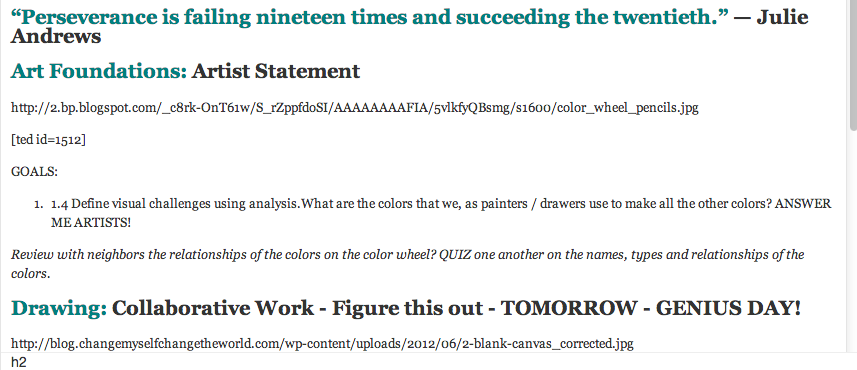
Images from URL will show up in the insert media window but not on the new blog post. I have been inserting images for YEARS and this has never happened. What is going on?
The blog I need help with is: (visible only to logged in users)
-
Hi there,
I’m so sorry about this! I took a look at your recent posts and I found that there were images in the posts. Let me know if you are still having issues with this and I can take a further look!
Feel free to reach out if you have any questions!
-
Thank you for the response… the problem I am encountering is that the images aren’t visible while I am building the page but do show up until I publish. I cannot add captions and cannot “see” that it is working the way I want it to. It looks like WordPress has updated and maybe I am just need to adapt.
Thanks –
Frank
-
Hi Frank,
Oh wow, that is strange! Can you please try clearing out your cache and cookies using the guide below?
We did make a new change to images inside the editor, but that shouldn’t be happening. Can you try it after clearing the cache and see if it still happens? If it does, please provide me a screenshot of the issue and upload it to the Media > Library page. I can take a further look for you.
Cheers!
-
Ok… Cache Cleared – NO LUCK. I did this at work and at home. 2 different computers (same google account – same CHROME browser. I have uploaded screen shots to my MEDIA > Library…
First Image is: Insert Media Window Korb 3 26 3 10pm
Second image is: Media inserted and NO PICTURE Korb 3 26 3 11 pmTHANKS!
Frank
-
I have been using WordPress for YEARS now and this is the first time this problem has happened. I am not doing anything different than I have done over the past 630 posts… hmmmmmm.
:)
-
Hi there,
I just looked into the screenshot and tested it out on my browser and could not reproduce your issue. Here’s what I see:
As you can see the links to the images are there, so I’m thinking this might be a browser issue. I am also using Google Chrome. Can you please make sure your browser is updated to the latest version:
If that doesn’t work, can you try Firefox and see if it works there?
Thank you.
-
Unfortunately – it looks like a Chrome issue. I tried internet explorer and it seemed to be fine. Problem is, I do not WANT to use internet explorer (or other browsers). Ugh. Thank you for your help. If anything comes to mind or if I can figure anything out on my end… I will share it with you (or WordPress for that matter). An appreciative blogger / educator / artist / father / comedian…
Frank
-
HI Frank,
Try re-installing Google Chrome. That might work because it is working fine on my Google Chrome browser. :)
-
Ok… I’ll try that. Should i remove old chrome first? How do i send you a thank you note?
-
The only thing is… the same issue is happening at work and home. I can get images to show up, just not as smoothly and bodily in the planning stage as they did 2 days ago. I’ll give a new chrome a shot.
-
It does seem a bit unlikely that it would be happening to both your work and home computers. Can you tell me what version of Google Chrome you are using at work and home? I know it can be a hassle to update every time, but that could also be the issue.
-
Version 33.0.1750.154 m
Google Chrome is up to date.This is the statement that Google Chrome says it is… up to date. I am curious if Google Chrome ran an update yesterday and it did something to WordPress.
-
I see. You are currently up to date. Do you have any add-ons or extensions? Can you disable them all for the time being? You can do this by going to Settings > Extensions in the Google Chrome browser.
Let me know how this works out!
-
I tried just now… I think things are BACK TO NORMAL… cross your fingers and thanks for the coaching. Tell your boss you deserve a raise!
Frank
-
Haha! I will!
I’m glad everything is working! If anything changes, let me know and I’ll take a look!
-
Well… hmmm… not so much. It worked ONCE at school but NOT at home. Fine in Explorer.. but explorer is SO SLOW and I can’t figure out how to find the URL for images. Shucks. I have Google on the other line trying to figure out the issue too. I want to get everyone on the telephone so we can problem solve. https://productforums.google.com/d/topic/chrome/v72Oa6aMGT8/discussion is the link to the Google Conversation I am having – helpful but no answer…
-
I’m assuming it has to be the Google Chrome browser installed on your computer since it’s currently working on mine. Can you try completely uninstalling it and then reinstall it?
If the support in that thread replies please let me know and I can see what they are saying and see if there’s something we can do on our end!
-
I am still having issues. Ugh… i am going to Rove chrome and reinstall it. When you insert a jpeg using an URL… does it show up in the create a new post window a picture? Can you modify its size? Can you edit it and add a caption? I see different editing buttons in the upper right corner when i insert from An upload. These are issues i am still not able to do the same. Frustrating.
-
HI there,
If you want to edit an image that you embed with an URL you can do that in the Text Editor using HTML. Here’s a guide on adding height’s, widths and captions that may help:
http://www.w3schools.com/tags/tag_figcaption.asp
If you aren’t, then it would be best to download the image, upload to your Media > Library page and edit it using our Image Editing features as seen here:
http://en.support.wordpress.com/images/image-editing/
Let me know how it works out with the browser!


- The topic ‘Inserting from a URL’ is closed to new replies.
 WordPress.com Forums