

Instead of information about my blog, google says in which theme is my blog
-
When someone searches in google the address of my site (where my blog from WordPress is implemented), under the words “blog” is written this: “blog at wordpress.com, theme: Twenty Ten. registration…” – this is not good. Instead should be written information what the blog is about.
The blog I need help with is: (visible only to logged in users)
-
Hello there,
Generally, what is seen when a site name is google is an excerpt from the blog’s latest post, a snippet of content, or the tagline of the site.
It doesn’t appear as if you’ve yet utilized our Webmaster tools which can help when it comes to the way search engines index the content on your site:
http://en.support.wordpress.com/webmaster-tools/Incidentally, when I search by your site address, I see this in Google:
Sep 7, 2014 – לקבלת פרטים נוספים כתבו לי לאימייל: (email visible only to moderators and staff) או היכנסו לדף “צור קשר” פה באתר והשאירו את שמכן ואת האימייל שלכן. ניתן להירשם פה …
I am not seeing the theme information anywhere. I’ve looked in other search engines as well, and am only viewing bits of your site’s content, not WordPress.com information.
Please let us know if you have any other questions. Looking forward to hearing from you. Thanks very much.
-
Hello,
Here is what appears under the word “blog” in Hebrew:בלוג l
נשים בתנועה · בלוג בוורדפרס.קום. ערכת נושא: Twenty Ten. הרשמה …You can recognize the words “Twenty Ten” which is the theme of my blog. The words “WordPress.com” are written in hebrew.
I shall look later in the link you sent me (it`s late at night here now).
Thank you,
Shina -
Shina,
Thanks for your note. I do see the Twenty Ten name listed within the Hebrew words. Google has that information saved about your site in its cache. We can’t clear that cache — although eventually Google will do it — but we can encourage Google to index more important content on your site. That’s why I suggested the Webmaster Tools.
When you get a moment, do try out the link I sent. I think it will be quite helpful.
If you have any question about the tools, or if you have other concerns, please let me know! Thanks again.
-
-
Excellent! Although it will take some time to change online, please do stay in touch and let me know how it goes! Best to you :)
-
-
O.K,
I deed the process through Webmaster tools –
Do you have an idea how long it should take till it will be corrected?
And how do I enter in the future to see information about my blog ? -
One more question –
When Google will “find” my blog, they view it`s history and the visits that were in the blog untill now? Or only from that moment on?
Thank you’
Shina -
Hi Shina,
Do you have an idea how long it should take till it will be corrected?
I’m not seeing the theme information when I search your site in Google now (“women-in-motion.com”). Can you let me know what you’re searching for when you see the theme information in the results?
And how do I enter in the future to see information about my blog ?
I’m not sure I understand what you mean here. Could you clarify what you’re looking to do?
When Google will “find” my blog, they view it`s history and the visits that were in the blog untill now? Or only from that moment on?
So, it sounds like you setup the Webmaster Tools per Robyn’s suggestion. Google is constantly indexing your entire site, not just the information you’ve added after setting up the Webmaster tools. As far as views go, they’re all shown here:
https://wordpress.com/my-stats/?unit=1&blog=64308579
We don’t offer stats through Google at this point. Is that what you’re asking for?
-
Hello,
Unfortunately I see that although I have setup the Webmaster Tools almost a month ago, still the text did not change; still appear the words “Twenty Ten” instead of information about my blog –
Is there something else that can be done?
Thanks,
Shina -
Howdy Shina,
I ran a Google search using “women-in-motion.com”. Here’s the result:
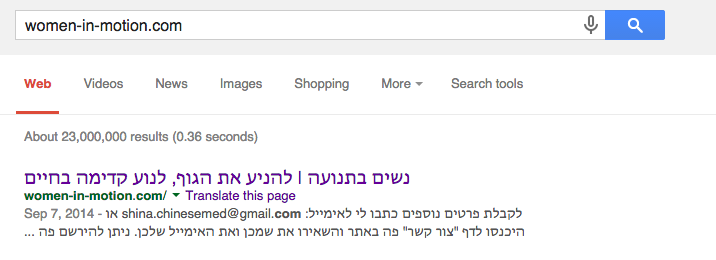
I ran that content through Google Translate just to be sure, but it doesn’t appear to read Twenty Ten. Could you clarify what term you’re searching for when you’re finding the Twenty Ten text? I’m not finding the Twenty Ten text that you mentioned previously here:
בלוג l
נשים בתנועה · בלוג בוורדפרס.קום. ערכת נושא: Twenty Ten. הרשמה ...
Alternatively, if the interpretation was wrong, please let me know!
-
O.K. – I looked at the link you sent me, and here it`s o.k.
But if someone searches in google “www.shinabendavid.co.il” (which is the name of my site, where my blog is implemented) there the text under the headline of the blog is wrong, and there you`ll see the thyme “Twenty Ten” instead of “To move with the body, to move in life” and so on.
Thank you,
Shina -
Hi Shina,
Thanks for clarifying. I do see the reference you’re referring to. However, I think this is due to how Google is indexing the link reference on shinabendavid.co.il, not women-in-motion.com. We don’t have any influence over how the former is indexed as it’s not hosted at WordPress.com.
-
-
Hi Shina,
Unfortunately, I don’t have any suggestions for you. I’m not entirely sure why Google is pulling different information for your site when it’s linked from shinabendavid.co.il. I’m sorry!
-
-
-
You did help in some way – I understand that the problem is not in WordPress, and I shall go back to my site`s system and check there.


- The topic ‘Instead of information about my blog, google says in which theme is my blog’ is closed to new replies.
 WordPress.com Forums