

Intergalactic theme – picture alignment
-
Hello
I think this issue is recurring but would be grateful if someone could help.
I want to control how the images in my post are aligned, but they always revert to left alignment once the post is loaded. I know there is a way to override this with CSS, however I don’t know how to do this.
I am in the intergalactic theme.
The post in question is this one if it helps:
http://tareqhaddad.com/2015/10/06/a-syrian-love-story/Thanks
TareqThe blog I need help with is: (visible only to logged in users)
-
I assume you are not referring to the featured images https://theme.wordpress.com/themes/intergalactic/
re: image alignment in posts and pages
See here please > http://en.support.wordpress.com/visual-editor/#alignment
The alignment icons in the WordPress editor are for aligning text; they are not for aligning images. They are used to achieve wrapping text around images on either the right or left hand side, or to display an image that’s centered without text on either side of it.
Align-left means position left, with the rest of the content wrapping around the right side of the image.
Align-right means position right, with the rest of the content wrapping around the left side of the image.
Align-center means position center, with no wrap-around (= the rest of the content below the image).
If the text beside the images does not occupy the same amount of space that the image beside it does then the text wrapping will continue and the images and text that follow will have a staggered appearance.
To prevent the staggered effect what you do is insert the following snippet of code into the Text (HTML) editor after each image/text pair:
<div style="clear:both;"></div> -
I know there is a way to override this with CSS, however I don’t know how to do this.
If you have an upgrade that includes the ability to edit the CSS then you can use this link https://en.forums.wordpress.com/forum/css-customization#postform so you can create a thread that will appear in the CSS Forum where you will get the help you need with CSS editing.
-
Apologies, but this has not helped.
I want to align the pictures and wrap the text around them.
It looks fine in the editor, however in the published version, pictures are aligned to the left with no wrapping, regardless of what the settings on the picture are.
-
I actually explained how to create text wrapping around images in posts and pages above. However, as you are having trouble with this you can type modlook into the sidebar tags on this thread for Staff help. How do I get a Moderator/Staff reply for my question? https://en.support.wordpress.com/getting-help-in-the-forums/#how-do-i-get-a-moderatorstaff-reply-for-my-question Then please subscribe to this thread so you are notified when they respond. To subscribe look in the sidebar of this thread, find the subscribe to topics link and click it.
-
Hi there!
You can align your images by clicking on them, then selecting one of the alignment buttons in the popup menu. Here’s a screenshot of that:
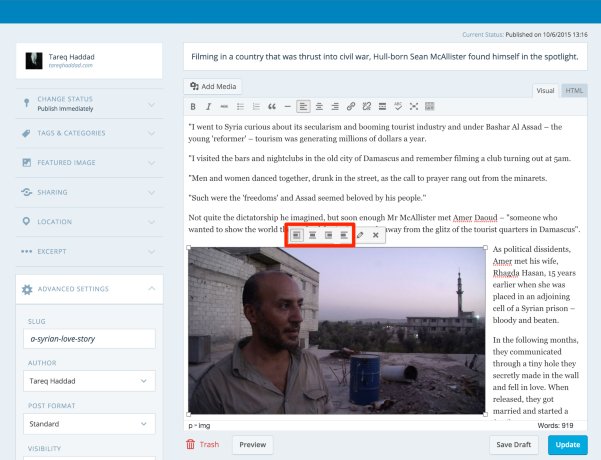
Let me know if I can help with anything else!


- The topic ‘Intergalactic theme – picture alignment’ is closed to new replies.
 WordPress.com Forums