

"Invite New Users" doesn't work, Forum solution from 2013 doesn't work
-
Someone is trying to send me an invite to contribute to their blog and is getting the message: “Invitation not sent, the user has blocked invite emails.”
Checked forums and there have been many postings with this same problem, only one solution that I can see, which was posted in 2013. It says the user must have previously blocked emails (which I don’t think I did.) The fix starts out:
“On https://subscribe.wordpress.com/ enter the email address used on WordPress.com and click on “Request details”.”The Subscribe page says all functions are now in Reader, and I can’t find anywhere there to enter my WordPress email address so WordPress can send me a copy of my settings so that I can change them.
I have been wandering in the invite desert for ages – please help!
The blog I need help with is: (visible only to logged in users)
-
Hi there,
This is timethief. I am logged in under my other username account for my personal blog.Please uncheck the option for “Block all email updates from blogs you’re following on WordPress.com” at the bottom of this page
https://wordpress.com/settings/notifications/ Then click save changes. -
Hi timethief – almost didn’t recognize you. Thanks for the quick response. That was the first thing I did this morning when the invite wouldn’t go through. From the old support response it appears that ever having that checked creates some kind of problem, but I can’t figure out how to implement the solution they provide on the “subscribe” page.
-
What is posted above works for me and I know it is correct so that means you need Staff help and I tagged this thread so you will get it.
P.S. I changed gravatars and used the same one for both username accounts so no one would get confused.
-
Hi there,
Can you please follow those instructions, but make sure you are logged out of WordPress.com. When you log out, you will see the Request Details button.
Let me know if you have any questions with this!
-
Hi Grace,
I logged out, then got through the point where WordPress sent me a link to manage my subscriptions. When I click on that, I get the “subscription management” page and all is shows is one of the blogs I subscribe to, with the option to unfollow. Should there be something else on this page for me to do?
Thanks for your help. -
Hi Grace,
I’m the person trying to send Peg an invite to be an user/editor on The Nudge Wink Report:
https://nudgewinkreport.wordpress.com
I’m using Peg’s user name, pegoleg, and also tried inputting her email but both ways, I get the message:
“Invitation not sent, the user has blocked invite emails.”
Has the problem been resolved yet or is there something Peg, I, or both, need to do?
Thanks for the help!
-
Hi there,
If you log out of WordPress.com you should get this page:
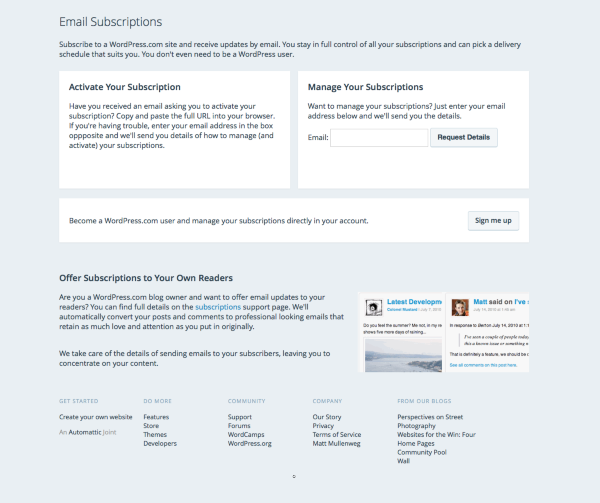
I entered your email address and clicked Request Details. You should receive an email soon. Once you unblock all emails, you should be able to receive the invite.
-
Hi Grace,
Peg said she got the email and it still not working. I still get the same message when I try to send her an invite to my blog.
Any other way to make this work?
The site I’m trying to get Peg on is:
-
-
-
-
-
-
-


- The topic ‘"Invite New Users" doesn't work, Forum solution from 2013 doesn't work’ is closed to new replies.
 WordPress.com Forums