

Is there a known issue affecting publicize between WordPress and Tumblr?
-
When I use the sharing option to publicize my posts to my Tumblr page, there’s a bug, or error that causes the main image to duplicate. (see example here: http://punditfromanotherplanet.tumblr.com/post/81503797438/photos-going-in-heavy-the-leland-yee-scandal-weapons) Making the Tumblr version of the post look ridiculous, as though it’s intentional. It happens whether my post contains a single image, or multiple images. When displayed in Tumblr, one image is large, the other, medium. Or one medium, one small. Same image. Duplicated.
This behavior is irregular, it happens to about 35-40% of the posts. With no discernible pattern. I’ve tried all recommended fixes, I’ve looked at “featured image”, to see if the behavior is connected to that, it’s not. I’ve tried clearing cache, etc., I’ve tried invoking and revoking the publicize link, both from WordPress side, and the Tumblr side, and that has no effect. I checked here first for help, was sent to Tumblr, then had a lengthy correspondence with Tumblr Help, in an effort to troubleshoot it. (I’ve saved that correspondence)
Tumblr Help’s concluding comment, after recommending I revoke and invoke the link between WP and Tumblr, and other basic fixes, was that they can’t control the unwanted duplication, it’s a third party (WordPress) that’s feeding the content to Tumblr.
I also think it’s likely a WordPress issue.
I suspect it might be related to my particular theme, since it doesn’t appear to be afflicting other WordPress-to-Tumblr users, but even that is uncertain.
I really need help with this. The duplicate-image bug has been making the publicize feature problematic, and I can’t find the source of what’s causing this unwanted behavior.
The blog I need help with is: (visible only to logged in users)
-
Hi there!
When you originally published the post to Tumblr using Publicize, did you have both the image inserted into the post and set as the featured image? I’ve tested this multiple ways and the only way I can have it Publicize as you show is to have the Feature Image set and also insert the image into a post as shown here:
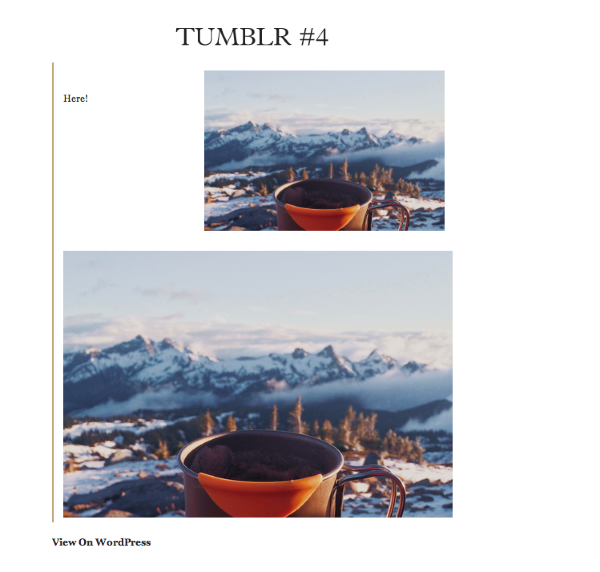
However, currently, it doesn’t look like you have a featured image set for that post.
Let me know if you did originally!
-
I have done both — set featured image, and not set featured image, and have confirmed that setting featured image won’t protect it from the duplication error, or cause it to have the duplication error.
However, since you’ve tested it, too, I’ll experiment again and see if I can see the conclusion you reached, and see if it helps.
Note: My theme didn’t even include the ‘featured image’ option until recently. (an update appears to have added the option, in the last month or so) Most of the time I’ve been using this theme it wasn’t an option. The unwanted duplication behavior predates that.
So…you’re suggesting that in your tests, inserting the image + setting the image as the featured image causes the duplication?
-
Hi,
When I was testing with the Clean Home theme, setting a featured image while also inserting the image into the post caused the issue. However, I just did another test and that sequence did not create a duplicate image. Can you give this another try and let me know if you experience the issue? I haven’t been able to recreate a duplicate image again.
-
Tell me the sequence again?
Do you mean, just avoid using featured image?
It’s not clear what instruction you’re offering. I’d like to try it.
-
Yep! So, here are the steps I followed:
- Create a new post
- Insert the content and the images within the post, don’t set a featured image
- Publish the post and use Publicize to push the post to Tumblr
In my tests, that did not duplicate the image at Tumblr.
Can you give that a try and let me know if it works for you?
-
Quick question. Did you do additional text, formatting it like a news article?
The reason I ask, is that if I simply post a photo, with minimal text, it doesn’t duplicate.
But when it has richer content, it does, at least half the time.
-
Hi!
I think I may have uncovered the issue. I tried publishing a copy of your post that was publicized here:
When I published that post, it did duplicate the image on Twitter. However, I noticed your initial image was wrapped in h4 tags in the Text Editor. When I copied that post but removed the h4 tags around the initial image, the image was not duplicated. So, I think the issue has to do with wrapping the initial image in header tags. Can you try this out and make sure the image is not wrapped in h4 tags?
Just for reference, you will need to check this in the Text Editor explained here:
-
Okay, perhaps we’re making progress.
Since I only do minimal html editing (flipping over to text editor every once in a while to make an adjustment) I’m mostly html illiterate, and depend on the automatic html features to create the post when I’m in the editor. And fortunately it works quite well, errors are rare. And I’m able to write and post in a natural way, without using much–or any– code.
However, If I knew what specific code to go in, and remove it.
Or avoid adding it.
(since I’m not sure how it gets wrapped, or even quite what that means)
I could learn to edit a specific thing, to avoid an unwanted outcome, or to insure the correct outcome.
Do h4 tags get added, in the editing process? Unseen when I’m preparing and posing images and text?
I’ll go and look for an ‘h4’ tag, in some of my older posts, to see if I can identify what you’ve observed.
Thanks, bear with me…we may have a fix. If i can learn a quick edit to prevent the duplication.
-
Update: I went to the post you mentioned ([PHOTOS] Going in Heavy: The Leland Yee Scandal..) flipped over to the text editor, and identified the h4 tags you mentioned.
Seeing it helps. I see exactly what you mean.
My thinking is, it’s a tag that lingers there because of the during editing, when sizing or resizing text, after image is added, resizing between paragraph-sized, and larger h4-sized text. I have on occasion removed that tag (but not in text editor) unaware that it affects how the image appears.
Now that I know what tag to look for, I can proceed with testing. To look for that tag and remove it before posting.
Thanks for your help. I look forward to using this, to see if it might be a permanent solution! I’ll check back.
-
My first test confirms your finding.
It also helps explain why it seemed arbitrary. It didn’t duplicate the image with regularity, it only affected some posts, not others.
Is it a bug? Or an expected outcome of some lingering code that doesn’t belong there?
Just curious.
I’ll continue to use this recommendation, with hopes the duplication error has been solved.
-
Hi!
First, I’m glad this ended up removing the duplicate image! To your question about how the h4 tags end up there in the first place, this is likely caused by the order of when you add an image/header tags. For example, if you create all of the text and formatting (adding header tags), then upload an image, the image will most likely get stuck inside the header tags. What I generally recommend is adding all of the images and text, then going through and setting up the headers, bolded text, etc. This way, you can select the exact text you want for the header without affecting the image. Does that make sense?
-
Yes, it makes sense, and again, it helps reveal why the unwanted behavior seemed arbitrary. And made it especially difficult to trace. Though, it appears that you cracked it pretty quick, by using the Clean Home Theme and doing a few tests, and discovered it. I’m glad you spotted it early.
Here’s another (minor) bit of odd behavior that showed up recently. When I employ the <!–more–> feature, in the Visual Editor, it sometimes jumps to the bottom of the text, instead of where I’m placing it. If I go into the Text Editor, and use the <!–more–> button, it shows up where it’s assigned. That behavior is new, only appeared a few weeks ago.
When it jumps like that, I flip over to Text Editor and correct it.
There’s a few other minor things that have changed after a recent update, tiny bits of unexpected behavior, but none are significant enough to raise questions about here.
Right now, I’m celebrating the resolution of the duplicate image problem. It’s gratifying to no longer have to see the Tumblr version of images in my posts in double vision. With your help, Jeremy, it’s solved.
Remind me to send you a case of our finest champagne!
-
Just in case I’m celebrating too soon, can you take a quick look at this?
http://punditfromanotherplanet.tumblr.com/post/81698358578/noonan-a-catastrophe-like-no-other
And the original:
http://punditfromanotherplanet.com/2014/04/04/noonan-a-catastrophe-like-no-other/
The duplication happened, caught me off guard. If there are h4 tags interrupting the image, I’m not seeing them, not wrapped like before, this one got away from me, and duplicated again.
Hopefully it’s minor, and I just missed something.
-
Hi!
In the example here, it looks like h4 tags are not to blame. Instead, it looks like the caption tag is the culprit:
http://punditfromanotherplanet.com/2014/04/04/noonan-a-catastrophe-like-no-other/
Here’s the difference:
[caption id="attachment_33937" align="alignnone" width="553"]<img class="size-full wp-image-33937" src="SRC URL" alt="TEXT width="553" height="369" /> <span style="color:#333333;">Bunch of text here</span>[/caption]Here’s the “correct” version that shouldn’t produce a duplicate image:
<img class="size-full wp-image-33937" src="SRC URL" alt="TEXT width="553" height="369" /> [caption id="attachment_33937" align="alignnone" width="553"]<span style="color:#333333;">Bunch of text here</span>[/caption]In the second example, the img is not wrapped in the caption brackets. Here’s the difference on Tumblr:
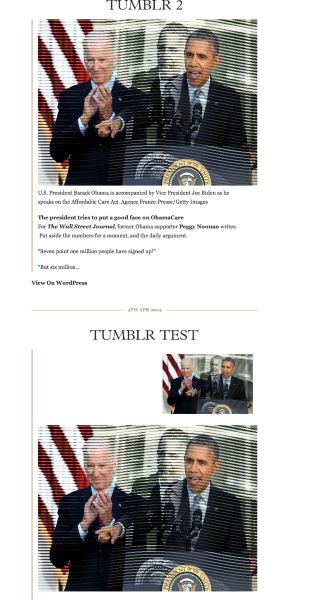
The second example is at the top without the duplicate image.
To avoid having the image duplicate on Tumblr, I would advise having it on its own. By that, I mean do not have it wrapped in any other elements. Does that make sense?
Regarding the “More” feature, just to make sure I understand, when you insert the tag within a blog post, occasionally, it gets bumped down and inserts at the bottom of the post for no reason? Then, you need to manually move it back up to where you want it. Is that correct?
-
Thanks for the quick reply. I’ll tune in and learn to recognize wrapping elements, brackets, how to avoid them. (prevent them from appearing, or quickly edit them out when they do get attached) I’ll take a moment to explore your response, look at the links.
In the meantime re: the “More” feature. Yes, exactly. It bumps down unexpectedly, to the bottom of the text, instead of where I’m placing it. Is this a known thing? Perhaps I’m not the first to encounter it.
Interesting to discover that it’s not just h4 tags that can cause duplication, but these other elements as well.
JUST when I thought I’d mastered the fix. More fine-tuning ahead.
-
Update: Until today, I hadn’t realized Tumblr has editing features that include an html editor. I just posted a new item, found it had duplicated, and was able to correct it (after some trial-and-error) within Tumblr, and repost it.
Though not the ideal solution (which would be to not create the problem to begin with) it’s a really useful thing to have in the toolbox.
Because I’ve viewed the auto-sharing to my Tumblr site as secondary, a lesser priority, I’ve neglected to explore its editing features. Good to know i can do a quick fix there if needed.
-
Hi!
That’s great to know. I haven’t used Tumblr much either so I didn’t know and didn’t check to see if you could edit the code there.
Regarding the more tag, it looks like this was an issue within the last week. However, it should have been fixed. Can you let me know if you notice it happening again?
-
It does seem to be fixed, yes, I haven’t noticed the “More” but in last several days.
Re: the duplication. I really miss being able to just assemble a post and upload it, and move to the next one. I feel something did change, somewhere along the line. I used to be able to post freely, without checking formatting. 3 or 4 months ago, I didn’t see duplication.
Now I need to be vigilant, and look out for formatting issues, or stray tags, and make corrections. Correct either in WP, or Tumblr’s html Editor.
Is it possible something did change? At WordPress? Or Tumblr?
-
We recently changed the editor around a bit, but I don’t believe any of the changes would affect how WordPress publishes to Tumblr. It looks like the tags are acting as they normally do. If you set headers after you’ve already inserted an image, there’s a good chance the header tags are going to wrap around the image. Another solution would be to insert the header tags using the Text Editor. That way, you could be sure what elements you’re wrapping.


- The topic ‘Is there a known issue affecting publicize between WordPress and Tumblr?’ is closed to new replies.
 WordPress.com Forums