

Is there a problem with notifications orange button ?
-
Thank you Gonzalo! I’ll add that screenshot to my report.
With this new screenshot it also looks like you get the “working” wheel, which wasn’t present in other incidences. If you leave the notification pane open long enough, does the working wheel ever go away?
I only ask because a long loading time likely has a different cause than never loading. We’ll be looking into it either way. :)
-
Gonzalo,
One more question for you! If you visit the following URL, do your notifications load?
-
Hi Alex,
the ‘working wheel’ appears intermittently, and broken in two halves: first, the left, then the right, and so on… and no ‘notifications’
And https://widgets.wp.com/notifications/ loads a blank page with only a ‘NOTIFICATIONS’ header…
-
-
Hi Gonzalo,
We’re still looking at a couple possible causes, but we’re not seeing it to be widespread so I’m a little stumped.
Could you check another possible browser cause for me?
In Firefox, you can choose to Accept cookies from third party sites, we need this setting to be either “Always” or “From visited”, choosing Never will prevent notifications from loading like you describe.
You can check on that setting with these steps:
-Alex G.
-
Hi Alex,
All settings are the way You say,
NoScript is configured to accept all WordPress (but Scripts are ‘Not Globally Allowed -Dangerous)
, and Firefox 35.0.1′ Self-Destructing Cookies is set to preserve WordPress cookies…
All settings were this way before ‘the incident’, and the notifications were shown without problems…
I wish I had not to deactivate all protection to use wordpress notifications… as always…
Perhaps it could be a mattter of Firefox 35… that should be checked out..
Thank You, Alex
Gonzalo//.
-
I know you mentioned that you had those add-ons running before the issue occurred, but those still may be the cause here.
Would you mind temporarily disabling them and visiting WordPress.com to test this issue?
Could you also try adding *.wp.com as a safe site in them?
If you have *.wordpress.com allowed, but not *.wp.com, that would explain why the notifications also fail when visiting https://widgets.wp.com/notifications/
-
Hi again, Alex
*.wp.com (and wordpress.com, of course) allowed and notifications, both in my wordpress page and in
https://widgets.wp.com/notifications/
keep appearing blank with only the blinking activity icon…
(
)
but no notifications at all…Note: all security/privacy plugins ‘bravely’ deactivated:
HTTPS-Everywhere
Privacy Badger
NoScript
Self-Destructing Cookies (all of them enabled the last time -long ago- when notifications still worked…)And Notifications keep disappeared…
# ! The ‘issue’ must be other…
(could be the Firefox 35.0.1 version…?)cia@
gonzalo//.
-
Hi Gonzalo,
Thank you for testing the notification without those plugins.
I’ve been tested on multiple environments including Firefox 35.0.1 (but always without plugins) and thus far not been able to replicate the issue.
I apologize that it’s taking so long to track down the issue’s cause, but browser extensions are the most common cause of similar issues — since we can’t replicate the problem yet our best way to track it down is to hypothesize and test.
Do you have any other plugins running, not security/privacy, that still might interfere with javascript or cookies? Ad-blockers, perhaps?
I still report back your tests to the developer helping me with this. And we’ll continue to look for other causes.
-Alex G.
-
Hi Alex,
Here is the link to a sample image of all my active extension (which, in the other hand, work fine with the rest of the pages…)Firefox 35.0.1 active extensions – 02132015 – 09:16:04 PM
Thank You, once more…
Gonzalo//.
-
Hi Gonzalo,
Thank you for that list. I’ll continue testing with each of these.
Thanks again for your patience.
-Alex G.
-
Hi Alex,
Not at all,
it’s every@ne’s business to make wordpress work better.
Thank You.
(Oh, and tell me if I could do something more to help…)G0//.
-
Hi Gonzalo!
So I did a bunch of testing on each of those add-ons and could not get any of them to break our notifications. The most consistent way I could break notifications was this setting in Firefox 35:
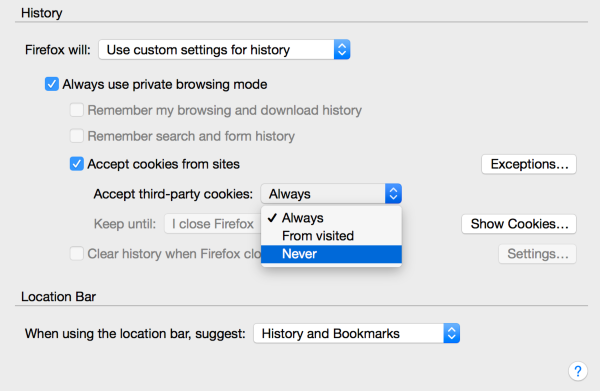
Setting that to “Never” will always break notifications. Could you please confirm that yours is set to either “Always” or “From Visited?” (These changes normally need a Firefox Restart to take effect.)
Additionally, we just launched a new version of Notifications — could you please let me know that’s had any effect?
-Alex G.
-
Hello Alex,
Following all the steps, notifications keep without appearing…
I hope this new screenshot can help….
Thank You.
:)
Gonzalo//.
-
Hi again, Alex…
Things go worse since I followed your last advice..
Not only that WordPress notifications keep without appearing but Firefox is behaving quite ‘strange’:
1) All my login information is lost from session to session in every page I’ve logged in…
2) Firefox doesn’t allow me to start the session with ‘my last opened tabs’
3) some plugins have lost their configurations and have stopped working…
To the point I’m thinking in reverting all Firefox modifications and quit using WordPress
notifications feature…(I hope I will b)e able to reset all my Firefox settings…)
Tell me more, If You’ve find out what can be done successfully…
Thank You again
ciao.
:)
-
Hi Gonzalo,
What did you change with “my last advice?”
The only thing I’ve mentioned was the cookies setting here:
And so far you only told me it was already set to “Always” or “From Visited.” Setting it to “Never” will indeed break cookies, which would affect both logins and several tools while logged into WordPress.com (and potentially many other services.) It is not my recommendation, rather if you had it set to Never, I was recommending you change it to “Always” or “From Visited.” But perhaps I misunderstood. What do you currently have that setting on?
-Alex G.
-
Hi Alex,
I Mean
1) … aside of ‘use custom settings for history -https://cloudup.com/cXMgwro3kAs- that has been changed following Your ‘instructions’,
2) I followed https://support.mozilla.org/en-US/kb/enable-and-disable-cookies-website-preferences?redirectlocale=en-US&redirectslug=Enabling+and+disabling+cookies
steps and ‘Notifications Panel’ keeps blank…Anyway, it seems Firefox doesn’t accept these settings: every time I open [Preferences – Privacy] It always appear as ‘Firefox will Never remember history…’
# ! Could It be the ‘Tracking settings’: they are set as ‘Tell sites I don’t want to be tracked’… and perhaps it should be set as ‘Do not tell sites anything…’ ??
Any more suggestions…?
Regards.
Gonzalo//.
-
Hi Gonzalo,
If Firefox isn’t saving the preferences, that could definitely be the problem. And if it’s always stuck on “Firefox will Never Remember History” then that will cause notifications to fail.
Mozilla has suggestions on the issues of preferences not saving:
https://support.mozilla.org/en-US/kb/how-to-fix-preferences-wont-save
Can you try those out and see if they will get the custom settings to save?
-Alex G.
-
# Thank You, Alex.
# there is a lot to check…
# I’ll tell You something ASAP:)
gonzalo//.
-
Hi Alex,
well, I finally tried Midori 0.5.9
and the notifications panel works fine…Anyway, it’s a pity, the Firefox malfunction….
that should be easier to fix.Thank You
:)
Gonzalo//.


- The topic ‘Is there a problem with notifications orange button ?’ is closed to new replies.
 WordPress.com Forums
