

Is there a way I can make the Landing (Home) page static but still have the Blog
-
I run my website as a CrossFit website. I want the Landing (Home) page to be static with general information about my gym. I still want to have the Blog page capability on another separate page which performs all of the functions it currently does. Is this possible? Also, I would like to add a Contact Form to the sidebar of my site. How do I do this? My website address is crossfitgeo.com.au. The WordPress template if Mystique. Thanks,
AdamThe blog I need help with is: (visible only to logged in users)
-
Hi Adam!
You can definitely set these up. Here’s some step by step for you to follow.
- Add pages for both your static homepage, and the blog page. Don’t put any content into the blog page’s body, just the title.
- Adjust your Reading Settings to have a static front page. This will let you select which page is static front page, and which holds your posts. Select your blog page for the posts. Remember to save the changes.
Following that, you’ll now have a static front page and a blog. :)
You can add a contact form to your sidebar using the Text widget. The simplest way to do this is open up a new post, create the contact form, and let the code appear in the post. Cut that code, and paste it into the Text widget.
Let me know if you have any more questions or hit any snags. :)
Best,
-Alex G.
-
Thanks for your help Alex. It’s very much appreciated mate. I haven’t had a chance to play around with the site yet but I will have a crack this week. Cheers,
Adam
-
Hi Adam,
Sounds good. :)
Just let me know if you hit any snags and I’ll help you through it!
Best,
-Alex G.
-
Hey Alex,
I just tried the steps you sent me to make the home page static. Went to Settings – Reading. I created a new “Home” page and then selected that to become static. I could not see an option though to make my “Blog” page the location for blog posts. I checked out the whole “Reading” page and did not see anything there. Can you help me out? Cheers,
Adam
-
Hey Adam,
Right now in your All Pages list it looks like you sent your “Home” page to the trash, and I don’t see a “Blog” page created. So first, add a new page called Home and a new page called Blog.
Once you’ve made those two Pages, go to your Reading Settings page, and we’re looking to adjust the very first setting:
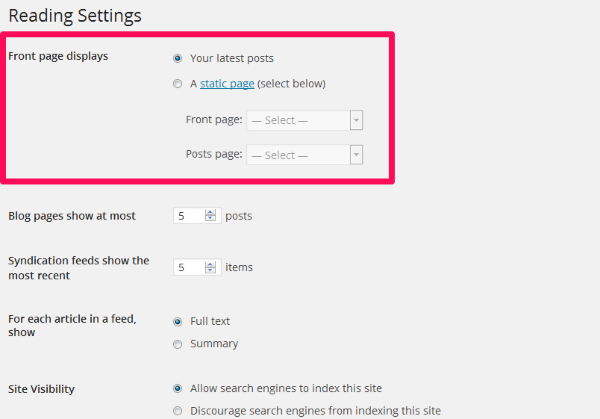
Once you change from “Your latest posts” to “A static front Page” you can select your preferred pages from those dropdowns, like this:
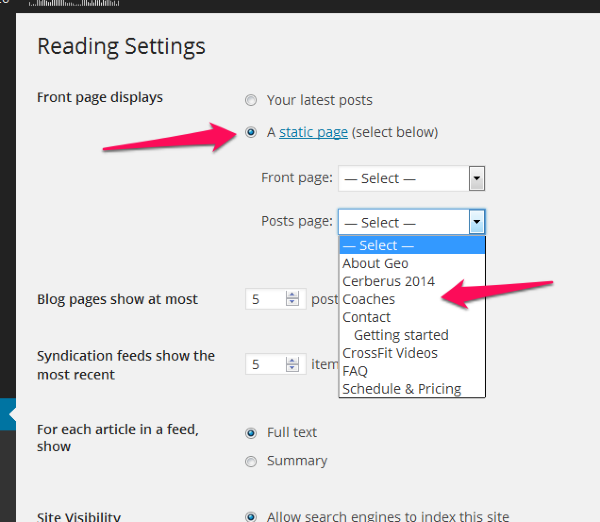
So using those dropdowns just select “Home” as front page and “Blog” as posts pages. The click Save Changes at the bottom of the screen.
Best,
-Alex G.


- The topic ‘Is there a way I can make the Landing (Home) page static but still have the Blog’ is closed to new replies.
 WordPress.com Forums