

Is there an option for a wider post layout in Oxygen theme?
-
Is there a way to have wider post layout in Oxygen theme, e.g. by disabling the widget area on the right hand side so that the posts would be a bit wider and therefore easier to read? Otherwise I’m extremely happy with the theme, but I feel the text area in a blog post is too narrow and not too “eye friendly”.
Thanks in advance.
The blog I need help with is: (visible only to logged in users)
-
Could you set the Page Template for some of your pages to Full Width Page and see if you got the desired result.
If you don’t see Page Attributes panel, please enable it from Screen Options.
Full width template should work for most of the pages except for blog page.
-
Page templates can be applied to pages, but generally not to posts. The full-width page template is a good option to get wider pages, they can’t be used on blog posts in Oxygen, which is what I think livenowdreamlater wants to do.
Removing the right sidebar in Oxygen would take some custom CSS – this should do it:
#tertiary {
  display: none;
}
#content {
  margin-right: 0;
}
Let me know how it goes.
-
-
Oh, if you want to make sure the change only applies to single blog posts, make it this instead:
.single #tertiary { display: none; } .single #content { margin-right: 0; } -
No, I definitely want it to apply to all posts. I just can’t test it right now but I will tell you as soon as I’ve tried it! :)
-
Right – I meant all single blog post views, as opposed to other views, such as the homepage or blog index page, which might be affected by the more general CSS I provided first. :)
-
-
I tested it on my hidden test blog first, and the CSS seems to work perfectly! But before doing that, I’d like to ask if there is a way to change all image settings at once? Currently the images on my posts are as per oxygen theme large (470 x 353). Once I make the post layout wider, the pictures could be bigger as well. But instead of going through all the images on every 153 blog posts that I currently have, is there an easy way to do this? :D
Thanks so much again!
-
Yes, you can change the maximum media with by overriding the theme’s default in the Media Width box, just below the CSS editor.
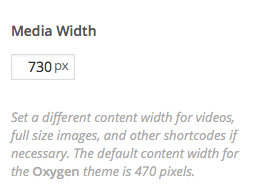
Something like 730 should probably do it but you can experiment. Let me know if this does the trick!
-
Yes, looks perfect on my test blog, thanks. I can’t imagine I haven’t noticed that Media Width box before! :D
Thanks so much for all your help, Kathryn. You’re my angel! :)
-
-
One more thing! :) On the front page, I got the right sidebar hidden with the first css you gave me, but how can I get the content wider there as well?
-
Sure – to cover both, just change:
.single #content {
  margin-right: 0;
}
to:
.home  #content, .single #content {
  margin-right: 0;
}


- The topic ‘Is there an option for a wider post layout in Oxygen theme?’ is closed to new replies.
 WordPress.com Forums