

Issue with Harmonic theme's portfolio spacing
-
In the portfolio section of my website, the spacing is uneven, leaving gaping holes on the page rather than filling in articles. Depending on the size of my browser window, the spacing issue shifts and the gaps change, leaving me to believe that this isn’t an issue between the projects I’ve posted but is instead a bug.
(you can see it here: http://katharineschwab.com/portfolio/page/2/)
Please help! I have no idea what is happening.
The blog I need help with is: (visible only to logged in users)
-
How many portfolio projects per page have you configured? You can check this from the Dashboard > Settings > Writing > Portfolio pages display at most ___ projects field.
Could you reenter the value, save the change and check?
-
I tried messing around with that number, but no matter what I set my portfolio spacing didn’t change. Do you have any other suggestions?
-
Could you let me know what is the:
- content of your portfolio page (I believe it is shortcode. If so, please paste the shortcode you are using here)
- the page template of the portfolio page
-
The page template is the portfolio page template.
I’m not sure what you mean by the content of the portfolio — it’s just a bunch of featured images with captions that link to standard blog posts. What is shortcode? I’m an amateur wordpress user here.
-
If you go to your Dashboard > Pages > All Pages screen, there will be a page named Portfolio corresponding to http://katharineschwab.com/portfolio/
I would like to know what is the content of this Portfolio page. I expect it is something like:
[portfolio columns=4] -
-
That’s interesting.
Please add the following shortcode and update the page:
[portfolio columns=4]Let’s see what is the result of this change on the http://katharineschwab.com/portfolio/
-
-
I am sorry, I could not be helpful.
I tagged this post for staff’s attention. Please be patient while a friendly staff member gets a chance to review and respond to this topic.
-
-
I am seeing the gaps you’re referring to and will report that to our developers so they can take a look. I’m not seeing it on the demo site – https://harmonicdemo.wordpress.com/portfolio/ – so we’ll need to figure out what’s different. We’ll keep you posted here.
I tried messing around with that number, but no matter what I set my portfolio spacing didn’t change.
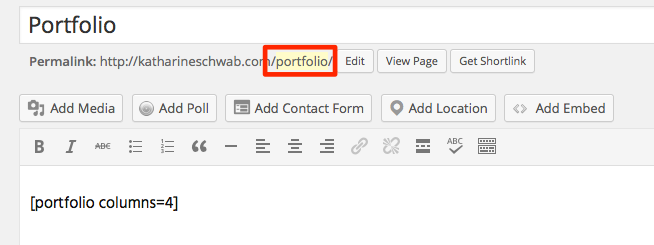
Just to clarify something: the way portfolios work is that the page displayed at the URL ending with /portfolio/ – i.e. in your case, http://katharineschwab.com/portfolio/ – is automatically generated. It does not correspond to any page in your dashboard, and overrides any page you may have created with the “portfolio” slug.
If you prefer to have more control over your portfolio display by using the shortcode, you’ll need to give it a different slug – something other than “portfolio” – here:
-
Did you happen to change anything in your settings recently?
Looks like your portfolio images are now all a uniform square size (480 x 480), which is set under the Customizer > Theme > Portfolio.
-
OK, I think I may have figured out what’s going on. It looks like one of your portfolio images is too small to be displayed correctly, since it’s only 366px high, but the square portfolio setting you’ve selected requires images that are at least 480px high.
Try replacing this image with one that’s at least 480px tall and let me know if that does the trick!

-
Yes, I changed the image size to the square instead of 4×3 because I thought the spacing irregularity might have something to do with image size.
Should I try and reset all the settings? Whenever I made changes it didn’t seem to make any difference.
-
I think our posts just overlapped – take a look at my last post and see if swapping out that one image for a taller one fixes the issue. Thanks!
-
-
Looks like you have at least one other image that is also too short, like this one:

Try going through all your portfolio projects’ featured images and making sure none is less than 480px high.
-
-
Looks like you also changed the portfolio image ratio back to landscape format again. :-) To sort this out, it would be helpful to stick with one format (i.e. square, landscape, portrait) until we can get the gap issue resolved. Let me know which format you’d like to keep and we’ll take it from there – square or landscape?
Landscape images get cropped to 480 by 360 pixels, so they need to meet those minimum dimensions. This image is only 460 pixels wide so I think it may be the culrpit with your current layout:

There may be others that do not meet the minimum as well, but this is the one I spotted to start with. Once you decide which format you prefer we can take a closer look at all the images.


- The topic ‘Issue with Harmonic theme's portfolio spacing’ is closed to new replies.
 WordPress.com Forums