

Issue with long word in title on mobile display
-
Hi there,
I’m having an issue. It would be super easy if I could post pictures but I don’t seem to be able to. Essentially, when I’m customizing the layout of my site for mobile, it looks perfect. Under the logo, it reads “Annual Graduate Interdisciplinary Conference,” each word getting its own line.
But when I go on the site on my iphone to make sure the customization worked, Interdisciplinary is cut off, reading “Interdisciplin,” and because it’s too long, the site actually has a blank white section to the right that runs all along it. Any help would be appreciated.
The blog I need help with is: (visible only to logged in users)
-
I see what you mean by visiting your site on iPhone. I think it is because of the long word “Interdisciplinary” in your site title.
The white space on the right is disappears if I double tap the screen. I am not sure if there is a better solution that doesn’t require to shorten your site title.
-
Ya, I thought that it was just because the word is too long, but when I preview it for mobile while I’m editing it, it’s completely fine and the words fit. It’s only when it’s published that it does that.
-
I see the white space on the right of the content area on my iPhone 5s (logged in). On my iOS simulator with an iPhone 6 (not logged in), the white space isn’t present.
I’m going to report this to our developers so they can have a look and see if we can get rid of that blank area.
The word “Interdisciplinary” probably still won’t fit once the space is removed, since this is what I see in the iPhone 6:
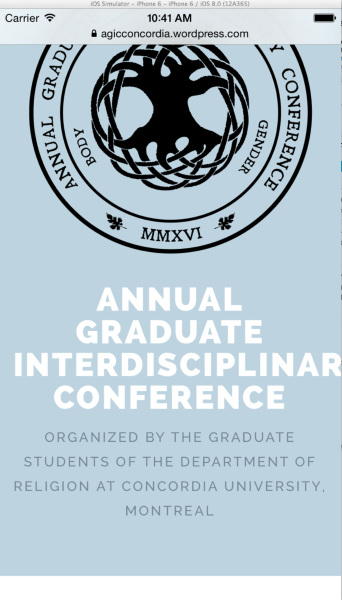
You can see that even without the white space, there still isn’t room for the full word.
You would need some custom CSS to make the site title smaller, in order to fit a very small screen – that word is simply too long to fit the space at this theme’s default font and size.
Something like this would reduce the size of the site title on small screens:
@media only screen and (max-width: 480px) {

  .site-title {
    font-size: 27px;
    font-size: 2.7rem;
  }

}
If upgrading the site to a Premium plan — which would give you access to custom CSS — isn’t an option, the other workarounds I can think of are:
– using an acronym for the site title and putting the full event title in the tagline instead.
– switching to a theme that uses a smaller default font for the site title. You could preview them in the Customizer before activating to make sure the word fits.p.s. I’m a Concordia grad!
-
I noticed that the Plane demo is not showing the white space to the right of the content when logged in on iPhone 5s, so it looks like there’s something specific to your site causing that. I’ll do some more investigation and keep you posted.
-
Could you please try replacing your current Twitter widget with the new Twitter Timeline widget? The one you’re currently using is the older version and deprecated (no longer supported). Let’s see if that affects the white space, which I haven’t yet been able to recreate on my test site.
-
Hey Kathryn,
Thanks for your help, and always good to work with a fellow Concordian! I’m glad you noticed that the demo isn’t showing the white space, ’cause I was sure it wasn’t just because the word is long. I figure the system is a little more intuitive than that. I just switched the twitter widgets, but I don’t see a difference.
Thanks again!
-
I figure the system is a little more intuitive than that.
The way responsive CSS generally works on websites is that you define “breakpoints” for various screen widths, where elements change. For example, at a certain width the site title size is reduced. The problem here is that even with the smaller size on phones, the word is simply too long to fit into the width of the phone.
I’ll keep you posted if we can find the source of the white space.
-
Just wanted to let you know that two of my colleagues had a look at this. Unfortunately white space to the right of your content is caused by the long word in your site title.
We aren’t going to be able to change the theme’s display as that would affect all users of Plane, so the best options remain custom CSS, tweaking the site title to remove that long word, or choosing a different theme. If I can help with any of the options, just let me know.
-
Isn’t it strange that in the preview on the Plane theme it has the words all fitting perfectly, but when it’s published it doesn’t? Wouldn’t that suggest that the theme can handle such a long word, and the issue must be somewhere else? Thanks for your help, though, I appreciate it.
-
You’re welcome – wish I had a better solution to offer. Sometimes a site’s display works differently on a real device than in other contexts – this is one of those situations.


- The topic ‘Issue with long word in title on mobile display’ is closed to new replies.
 WordPress.com Forums