

Issue With The Editor
-
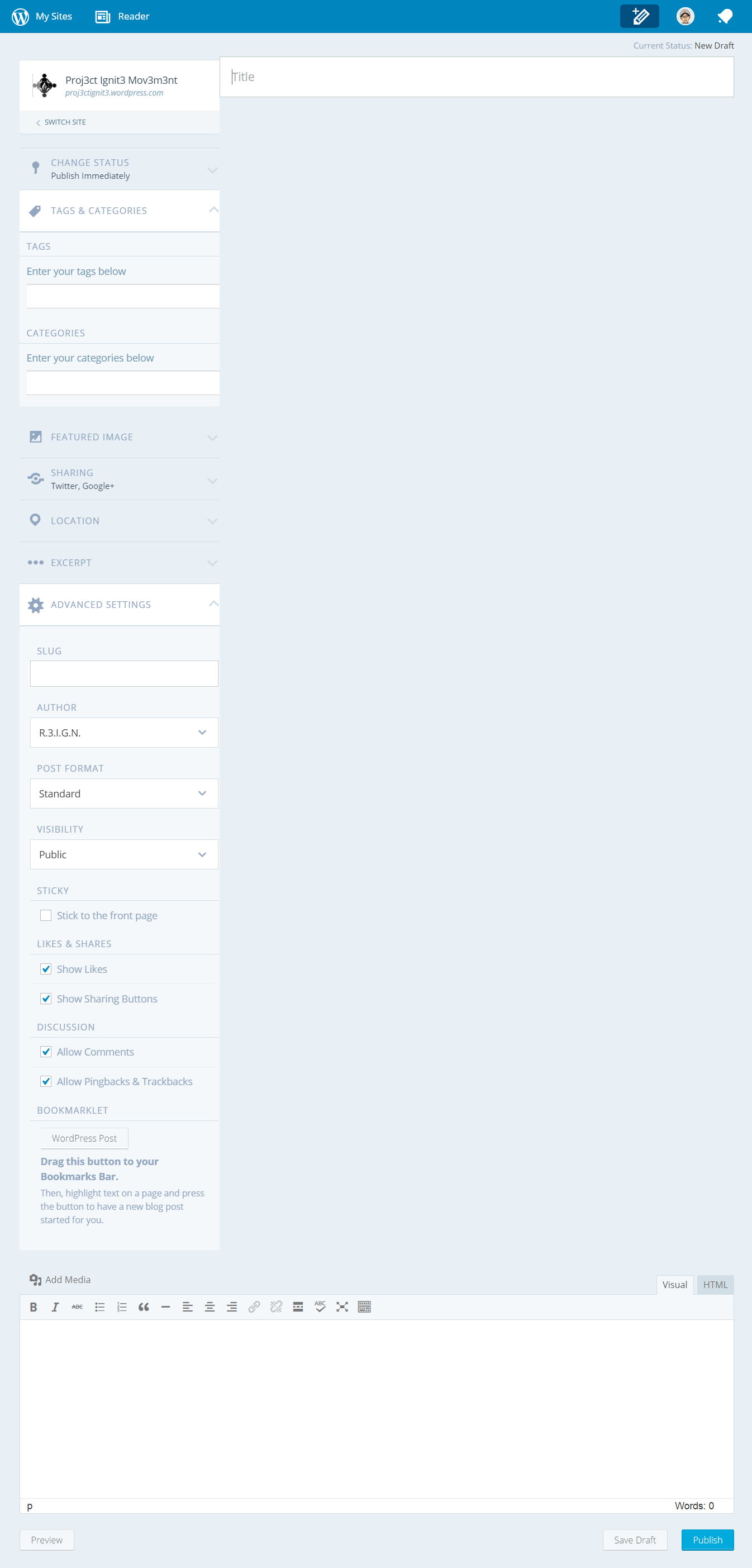
I am having an issue with the editor. Instead of appearing right below the title bar, the text box goes all the way to the bottom of the screen and I have to scroll down pretty far to get to it. Could someone please look into this issue?
The blog I need help with is: (visible only to logged in users)
-
I tagged this thread for Staff assistance. Please subscribe to it so you are notified when they respond. To subscribe look in the sidebar of this thread, find the subscribe to topics link and click it.
Please let Staff know:
(a) Exactly what kind of device you are using to connect to the internet and to WordPress.com.
(b) Exactly which browser (and version of it) you’re using by checking here if necessary http://supportdetails.com/
(c) Exactly what you experience including what any error reports you receive state. Note that you can use http://snag.gy/ to share screenshots and link to them here. -
I am using a Windows 8.1 laptop. It is a Toshiba Satellite radius with a 1 terabyte hard drive.
I am using Firefox to connect to WordPress.com.
-
Like I said, I have to scroll all the way down to the bottom of the screen to get to the actual editor.

-
-
I’m having the same issues as well. :(
Windows | 8.1
Chrome| 42.0.2311.39
Screen Resolution | 1366 x 768
Flash Version | 17.0.-1Screen Capture 1
https://www.dropbox.com/s/dagnh94ic11mhlw/sc02.png?dl=0Screen Capture 2 What I see on my screen
-
-
I sure hope they get this fixed soon. Surely, we are not the only ones experiencing this problem.
-
Okay the first post was Mar 12, 2015, 11:07 PM and yet still no response from staff? If this issue remains to go on noticed I may consider blogging somewhere else after choosing this platform many years ago. :(
-
-
@sl1k
It’s been a long time since we connected. Staffing is slim on weekends and I apologize to you and to dwarren57 and 3ddasdaggiding.@everyone
This thread is tagged for Staff and they have a backlog. What’s required is your patience as Staff work through all forum threads tagged for their attention and through all email support tickets in chronological order based on datestamps and timestamps – first posted first served, as would be expected.How long it takes to clear the threads and support tickets depends on how many Happiness Engineers are working on them at any given point in time. It also depends on how complex the issues in each thread and ticket are are.
Please don’t bump your thread here by posting into it again because it’s not in your best interest to post to it after it has been tagged for Staff help. Doing that moves the timestamps forward and it takes longer to get a response.
-
Hi there,
Sorry for the trouble! We received other reports of the same issue, and our developers just launched a fix for this problem in the editor.
Can you please take a look and see if it’s working for you now? If you continue to have trouble with it, please let me know!
-
Its still the same after I have complete the following options using Firefox 36.0 chrome is the same as well.
_____________________________________________
Disabled all Firefox extensions
pressed F5
cleared browser cookies cache and offline site data
______________________________________________
Screen capture what I am seeing on my screen

-
@sl1k
It’s been a long time since we connected. Staffing is slim on weekends and I apologize to you and to dwarren57 and 3ddasdaggiding.@TimeThief, Yes too long my friend… @everyone I apologize for my impatiences, I should of taken that into consideration with staff and the weekend
-
@rachelmcr when I zoom my browser from 150% to 200% it fixes the editor issue by hiding the post options behind a gear icon then when the gear icon is clicked it places focus on the options which can be seen in the screen capture. The only issue now that the browser is zoomed to 200% is the admin bar icons are now huge.
So if maybe the dev’s working on the issue could hide the post options behind the gear icon at the browser zoom setting of 150% or lower it seems it could fix the issue.

-
-
Mine is still not working properly. It still pushes the text field to the very bottom of the page.
-
dwarren57 Have tried the browser zoom option?
If not here is instructions
IE
http://windows.microsoft.com/en-us/windows/zoom-webpage#1TC=windows-7
Firefox
https://support.mozilla.org/en-US/kb/font-size-and-zoom-increase-size-of-web-pages
Chrome
https://support.google.com/chrome/answer/96810?hl=en


- The topic ‘Issue With The Editor’ is closed to new replies.
 WordPress.com Forums

