

I've a problem with the drop down menu on my blog
-
It appears static. How can I change this? It’s not possible to scroll down in the menu. The viewer can not see the links to my categories England etc. On my Mac I see the whole menu as an open menu on the top. Many pcs only show a drop down menu on the right side, it appears “locked”. How can the viewers see all of it, including England, Quotographie etc and not only the upper categories?
Thank you so much for your kind support!
Best regards, HanneThe blog I need help with is: (visible only to logged in users)
-
Hi Dina,
Do you still have questions with this? Currently this is the menu that I see:
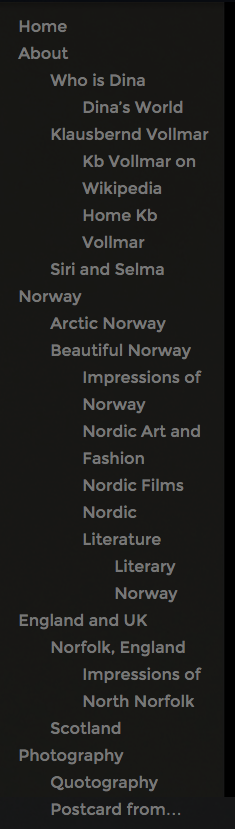
And this is also the menu that I see in your Appearance > Menus page.
Let me know if you have any questions with this!
-
Yes, Grace, this is my problem. On our screens, I’ve checked it on 7 different ones, the whole drop down menu is not visible. We can see about 50%. We can scroll the Homepage and the post, but the menu appears static and can not be scrolled or moved and thus most of it remains “invisible”. Why don’t we see what you see, I wonder?
-
Can you try clearing out your cache and cookies using the guide below?
If that doesn’t work, can you take a screenshot of what you see and upload it to your Media > Library?


- The topic ‘I've a problem with the drop down menu on my blog’ is closed to new replies.
 WordPress.com Forums