

I've created a static page but still have 'blog' as menu option, across themes
-
Hi
I want a static website with just three pages: a homepage, a CV page, and a Contact page.
Every [free] theme I try, includes ‘Blog’ as a menu option.
Is every free theme a blog?Also – looking for theme suggestions. I just want to be able to have a small logo at the top [with no gravatar image: it keeps appearing and now I can’t seem to delete it?]. Under that, a medium-sized square/vertical photo. Under that, a 2 or 3-paragraph block of text [film director’s bio]. So, I’ve tried quite a number of themes but can’t seem to find anything that would work for this, so am looking for [free] theme suggestions.
Thanks
LisaThe blog I need help with is: (visible only to logged in users)
-
Hi Wendy. Here is the thing, themes are 100% independent of the content. This means that you can choose any theme you like, you can have anything on your menus, regardless of what theme you are using.
In order to setup your menus just click on the “Customize” text you will see on the top black bar of your site (you need to be logged in) or directly on this link:
About your second question, most themes support custom logos. I suggest something really clean such as this one:
https://penscratch2demo.wordpress.com/Good luck!
-
Every [free] theme I try, includes ‘Blog’ as a menu option.
Is every free theme a blog?You can remove the “Blog” item from your menu by following mrfoxtalbot’s guidance above. Once you’re in the Customizer‘s Menus panel, click the main menu (in your current theme, look for “Primary”), find the Blog menu item, click the little arrow to open it, and click “Remove.” You’ll want to repeat the same thing for the “Invalid” menu item you also currently have.
Then, click the gear icon to select Publish and save your changes.
Screenshot: https://cloudup.com/cgLlrn1bGOB
If you don’t plan to have a blog, I’d suggest you use pages in your front-page Featured Content slider instead of posts – make sure each page has a large featured image.
Let me know if you’re happy with Dara (I think it’s looking good!) and if you need any other help getting it set up as you’d like.
p.s. I remember you from back in my film & TV days in Montreal – small world!
-
Hi Kathryn
I’m actually Lisa … I’ve known Wendy since I was 2 [!] and have been on her for a year + that she needs a website! This time I said I’d do it for her, as I want to refer people to her work. I did one about 10 years ago [www.lmighton.wordpress.com/background] and a one-pager recently [www.lisamighton.ca] but have been struggling with this. I set the email address etc to hers, as ultimately responses should go to her. But I will pass on your note, which I know she’ll find amazingly coincidental!
I switched to Penscratch per the suggestion above as I’ve been having a tough time with Dara. I followed all your directions but am a bit stuck on how to set more than one image for the slider.Can you help? And… I can’t just set the About page as the homepage, can I ? That would be ideal.
Lisa -
If anyone who’s not Kathryn in the forum has answers and any suggestions for the site, I’d be very interested in hearing these also.
Thanks -
Hi there
kathrynwp is on Staff and we Volunteers have nothing that we can add to her response. -
Perhaps you have not located the theme description page and set up instructions for Penscratch 2. It’s here https://wordpress.com/theme/penscratch-2
A blog is a website. The difference between blog and website is simply structure and semantics.
A blog is a post based website designed for interactive communication. As the posts are frequently updated and appear on the front page of the site it’s very attractive to search engines.
What most people call a website is merely a page based site that functions as a one-way noticeboard. As the structure is page based and as pages are for static content that rarely changes, and as pages do not have RSS feeds, and as others do not backlink to pages, it is not as attractive to search engines as a post based blog structured site is.
Any WordPress blog can be restructured from being page based to being post based – no upgrade required. For greater clarity read >
Build Your Website in Five Steps
https://en.support.wordpress.com/five-step-website-setup/Making a Business Website
https://en.support.wordpress.com/making-a-business-website/Using WordPress.com to Create a Website
https://en.support.wordpress.com/using-wordpress-to-create-a-website/See also Five Leads for Self-Help with WordPress.com https://dailypost.wordpress.com/2016/01/14/help-with-wordpress-com/
Note that you can browse free themes under the Business subject by using this link https://wordpress.com/themes/free/filter/business
-
Also… how do I get to that homepage? When I go to ‘Site Pages’, it is not listed.
Weirdly, the ‘Contact’ page re-displays on that homepage…I also need a bit of help with that.
Thanks muchly! -
The Home page of every site by default is the URL of the site.
https://wendyrowlandproductions.wordpress.com/If you do not create a static front page https://en.support.wordpress.com/pages/front-page/ then by default https://wendyrowlandproductions.wordpress.com/
is the Home or Front page. -
P.S. Note that the support docs I linked to above for creating a website do apply and do have detailed instructions.
-
-
-
Hi Lisa!
Right now, you’ve opted to use a static front page – but you haven’t actually selected the page you’d like to display on the front, so WordPress is just sort of “guessing” – that’s why you’ve ended up with the Contact form being displayed.
Go into your Customizer and select your About page there.
Here’s a screenshot:
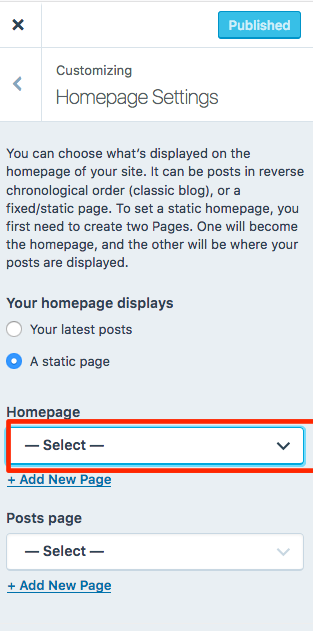
If you don’t plan to have a Blog/News section, you can leave the “Posts page” selection empty, as is.
Let me know how you get along from there.


- The topic ‘I've created a static page but still have 'blog' as menu option, across themes’ is closed to new replies.
 WordPress.com Forums