

I've paid for the "Premium" WordPress.com blogging last night… big problems..
-
I feel as if I’m running in circles, my dashboard is gone, I am still “icanface2moro” and I changed to Wendy L Geiger and registered that wendylgeiger.com as my website also.
I don’t understand this “Gravitar” thing it keeps sending me to, which then sends me back to my blog.
Having paid for the “Premium” I’m supposed to have full access now to all the amenities when creating a blog – underline, bold, bullets, etc. ; however I still do not have full access to these features.
Please help!!
Thank you, with utmost respect and sincerity,
Wendy L. Geiger
The blog I need help with is: (visible only to logged in users)
-
Hi Wendy,
Hopefully I can clear some things up for you.
I am still “icanface2moro” and I changed to Wendy L Geiger and registered that wendylgeiger.com as my website also.
Please note that icanface2moro is your username. That’s really just what you use to log into your site. If you want to change the name displayed on your posts and comments by changing the “display name” on your Personal Settings Dashboard:
http://en.support.wordpress.com/change-your-username/#change-display-name-nicknameYou can watch a video showing how to change your display name here:
http://en.support.wordpress.com/change-your-username/#change-display-name-nicknameHowever, if you need to change your actual username, please follow these steps:
http://en.support.wordpress.com/change-your-username/#change-usernameYou currently have the WordPress.com site: wecanlivenewlifewithgodshelp.wordpress.com which is pointing to the domain:
wendylgeiger.com
Note that only you will see wecanlivenewlifewithgodshelp.wordpress.com on your admin pages, but all your readers can find your site at wendylgeiger.com. Please note that the domain: wecanlivenewlifewithgodshelp.wordpress.com never deletes, which is actually a good thing so if you one day decide not to renew the domain or it expires accidentally all your content will still be available at wecanlivenewlifewithgodshelp.wordpress.com.
However, as long as you keep your domain renewed, your readers will see your site at wendylgeiger.com. Even if they go to wecanlivenewlifewithgodshelp.wordpress.com they will be automatically redirected to wendylgeiger.com.
I don’t understand this “Gravitar” thing it keeps sending me to, which then sends me back to my blog.
Gravatar is like your profile. Take a look at the link for more information. It will contain your profile pictures and the blogs in your account. You can also add social media links as well.
Having paid for the “Premium” I’m supposed to have full access now to all the amenities when creating a blog – underline, bold, bullets, etc. ; however I still do not have full access to these features.
I’m not sure what you mean by underline, bold, bullets, etc. because these are features on free sites. Take a look at what WordPress.com Premium upgrades are. They include a free domain (which you are using at the moment), No Ads, Custom Design, VideoPress, 10GB of space.
As for the underline, bold, and bullets, if you create a post/page, you will have access to all those functions. Go to Posts > Add new or Page > Add new you add what you want. To learn about the differences between posts and pages take a look here:
Cheers!
-
Please forgive me I am trying to be very patient, using this method of support is NOT my first choice, so trying to get my problems into words when I don’t know what to ask is difficult for me right now.
I much prefer Telephone Support or live CHAT. So that as you tell me what to do I can convey what I am seeing to you and you can dialog back to me whether I am in the right place, doing the right thing, getting the answers to my questions, and my problems resolved in a very timely manner – of which this is not, I’m sorry to say.
Once again, I am a WordPress.com Premium Member, I am not a “free use” client; and currently the “cookies are NOT on the bottom shelf” for the average everyday user, and a several people do consider me to be fairly computer savvy.
Unfortunately that “savvy” does not extend to the knowledge of what “strong”, “em”, “link”, “quote”, “ul”, “ol”, “li”, “code” or “close” means (as I see above this box), or how to manually type, otherwise utilize and even recognize HTML “language” which underlies a Post or a Page either one, which I still don’t understand the difference between those two.
All I know is that these must be something to do with: correctly spaced lines of sentences and paragraphs, having the correct paragraph alignment, or making a sentence, word or letter have specific emphasis by using such things as: bold, underline, italicize; or perhaps changing the size of the font, color of the font, and the type of the font entirely.
*****
When I am writing about any subject at any time for any reason in my Premium WordPress.com site, it is my desire to be able to change word or letter to create and emphasis using the features of bold, underline, italicize; or even changing the size of the font, color of the font, and the type of the font.When I am writing if I want to make a list of items using bullets or numbers in front of them with the list being indented then it was my understanding this would be available with the premium membership. When I am writing and I want to underline, italicize, and or bold a word or sentence, it was my understanding that with the premium membership these would be immediately available; however the aforementioned features aren’t available to me.
When I am writing, if I want to have a right indented, left indented, right alignment, left alignment, justified, or even a centered paragraph, it was my understanding that these features would be available to me as a premium member; they are not.
When I am writing if I want to indent one or both sides of a paragraph then also italicize and or bold the whole thing, it was also my understanding this would be available to me with the premium membership; however, I am not seeing this feature either.
I want it to be easy, not hard. Just open a new box and start typing, changing the characteristic of the type as I go along and as I see fit. I want to see these features to make this happen right when I open up a “New Blog”. I don’t want to be made to feel small or stupid or more ignorant than I already am about this subject.
I just want to write, I want it to look nice, and once in a while I would’t mind if someone stopped by to read what I wrote, does this make sense to you? I certainly hope so I have done everything I possibly can to make my problems clear and concise.
Once again, with utmost respect and sincerity, I also remind you I don’t have “Dashboard”, it’s gone and it takes me sometimes thirty-eight minutes to find “My Sites”, but that doesn’t include all of the other items I had before on the left-hand page.
Which I might add, if I may, allowed me to make many other changes to many other things all in one place; but can I find that page again, no. So I cannot tell you what it is called, except I can tell you it looks very similar to “My Sites” in that it has the WordPress logo to the left of the “Tab” and then thereafter is the “Tab” for “Reader”.
-
HI there,
Please note that we provide phone and Live Chat support only for our WordPress.com Business users. Sometimes we open it up to just paid users in general, but it is not guaranteed. If Live Chat is available you will see it in your Dashboard on the lower right hand corner like this:

If you would like to sign up for Business instead of Premium to get this support let me know.
You mentioned that you couldn’t find your Dashboard. Here is the direct link:
https://wecanlivenewlifewithgodshelp.wordpress.com/wp-admin/
It looks like you are confusing a couple things. These buttons:
“strong”, “em”, “link”, “quote”, “ul”, “ol”, “li”, “code” or “close”
are just for this thread. This is when you are communicating with me in this thread. You can completely disregard any of this as it doesn’t apply to making your site.
When I am writing about any subject at any time for any reason in my Premium WordPress.com site, it is my desire to be able to change word or letter to create and emphasis using the features of bold, underline, italicize; or even changing the size of the font, color of the font, and the type of the font.
Yes, you can do this on your site. Here is the direct link to make a post on your site:
https://wecanlivenewlifewithgodshelp.wordpress.com/wp-admin/post-new.php
When you are there, it’ll look something like this:
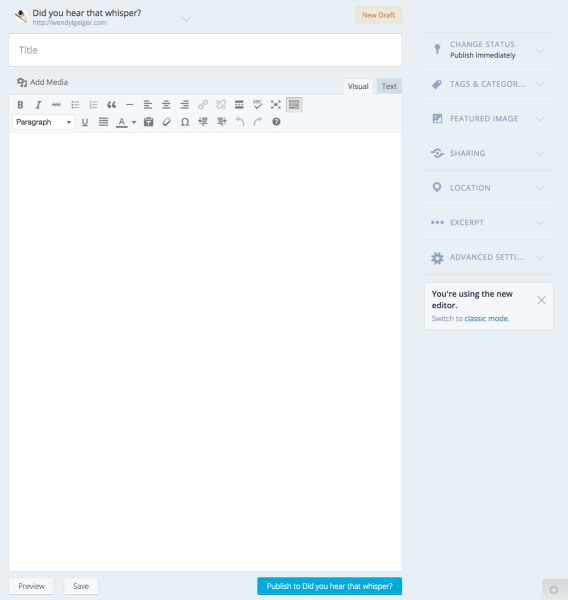
From there, you can bold by clicking this:

Underline by clicking this:
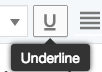
Italicize by clicking this:

You can change the size of the font by clicking this:
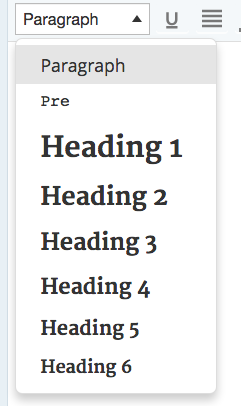
You can change the color of the font by clicking this:

If you want to change the type of font, you will have to go to Appearance > Customize > Fonts in your Dashboard. Here is the direct link:
Click on the Fonts tab and you can change your fonts there. You can also change colors all across your site from the Colors tab as well.
When I am writing, if I want to have a right indented, left indented, right alignment, left alignment, justified, or even a centered paragraph, it was my understanding that these features would be available to me as a premium member; they are not.
Can you tell me where you are getting this information because a lot of the features you are mentioning are free features that are provided to any WordPress.com user (free, Premium and Business). If there are any misleading support docs where you are reading this, I’d like to take a further look and fix them if possible.
As I mentioned above, Premium comes with Custom Design, a free domain, 10GB of extra space, VideoPress and No Ads. I provided you the link to the Premium support guide in my last message above as well. I will link you to it again:
As for indenting, you can do this in the page/post editor just like I showed you above with the Bold, Italicize, etc. So go back to your Add Post screen here:
https://wecanlivenewlifewithgodshelp.wordpress.com/wp-admin/post-new.php
You can indent, by clicking this icon:
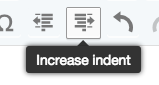
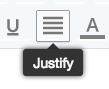
If you want to Justify it, click on the Justify icon:
When I am writing if I want to indent one or both sides of a paragraph then also italicize and or bold the whole thing, it was also my understanding this would be available to me with the premium membership; however, I am not seeing this feature either.
You can do this by selecting text and hitting all necessary icons. Here’s a screencast of this:
I want it to be easy, not hard. Just open a new box and start typing, changing the characteristic of the type as I go along and as I see fit. I want to see these features to make this happen right when I open up a “New Blog”. I don’t want to be made to feel small or stupid or more ignorant than I already am about this subject.
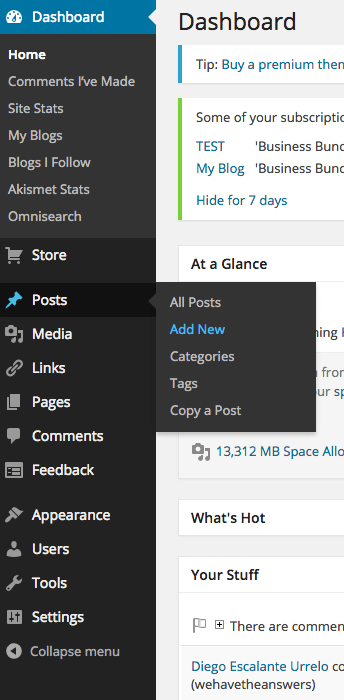
If you go to your Dashboard, you can create a new post by going to Post > Add new. So, go to your Dashboard here:
https://wecanlivenewlifewithgodshelp.wordpress.com/wp-admin/
Then hover over Post, and another dropdown will show up so you can hit Add new. It’ll look like this:
Which I might add, if I may, allowed me to make many other changes to many other things all in one place; but can I find that page again, no. So I cannot tell you what it is called, except I can tell you it looks very similar to “My Sites” in that it has the WordPress logo to the left of the “Tab” and then thereafter is the “Tab” for “Reader”.
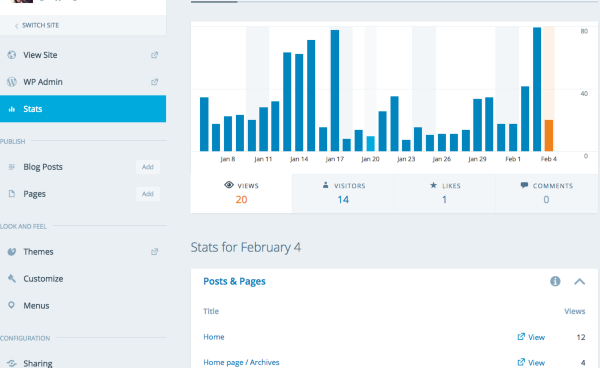
That is WordPress.com. When you go there, if you click on My Sites you will see your Stats on the right, and on the left if you click WP Admin, you will be taken directly to your Dashboard. It’ll look like this:
-
@gracejiyoung, staff – That’s just it, even though I have gone premium the “New Post” Tab, which pops up looks nothing at all like that for which you sent the link below… quoted below…
” “strong”, “em”, “link”, “quote”, “ul”, “ol”, “li”, “code” or “close”
are just for this thread. This is when you are communicating with me in this thread. You can completely disregard any of this as it doesn’t apply to making your site.
When I am writing about any subject at any time for any reason in my Premium WordPress.com site, it is my desire to be able to change word or letter to create and emphasis using the features of bold, underline, italicize; or even changing the size of the font, color of the font, and the type of the font.
Yes, you can do this on your site. Here is the direct link to make a post on your site:
https://wecanlivenewlifewithgodshelp.wordpress.com/wp-admin/post-new.php
When you are there, it’ll look something like this:
I really am telling the truth, it really does look like this:
First it shows an out of date “gravatar” picture, I replaced it a while back. Then Next to and below that:
Did you hear that whisper?
http://wendylgeiger.comTo the right of those two lines is a box which states “New Draft”
After that there is a white text box with the word “TITLE” in it.
Below that is an icon of a camera and a musical symbol overlapped and next to it is the words “Add Media”
Below this are two tabs – one says “Visual” the other says “Text”
Then all the way across the top of the test box where I would write – is a separate button for, each of what I had before, it looks like this:
“b” which I assume is bold, then
“I” which I assume is Italicize, then
“link” which I’ve no idea what to do with and is the same as I had before, then
“b-quote” which is the same for me as link above, unless it means bold and quote, then
“del” could I assume that to be delete? I can do that with my keypad, then there’s
“ins” which may I assume is for insert perhaps, that’s also a keyboard function, then there’s
“img” is this for image? then
“/ul” is this for underline? then
“/ol” I’ve no idea on this one, then there’s
“/li” again, I’ve no idea, then
“/code” again don’t have a clue what to do with that, then
“more” uh, don’t know, again, then
“close tags” again, don’t know, then
“proof read”, doesn’t tell me much,
If I click on any of these buttons I listed above they give something between these two symbols = < >
Below the white text box are three buttons: “Preview”, “Save”, and “Publish to Did You Hear That Whisper”.On the right-hand side of all of this are whole bunch more different options to choose from:
“Publish Immediately”
“Draft”
“Pending Review”
“Scheduled” with a calendar and time box below those, then“Tags and Categories”, which I think I’m finally figuring out the difference on, but I’m not sure. Then there’s
“Featured Image”
“Sharing”
“Location” I have that one figured out.
“…Excerpt”
“Advanced Settings”
and then there is a box with an X on the right side. In the box it states: You’re using the new editor.
Switch to the Classic Mode <—— that’s a link.So I hope I’ve described the page visually enough for you to give you a better word picture demonstrating that there is nothing at all like what is show in the link you showed you provided to me above.
I’m not sure what I’ve done wrong or fouled up, or if it can even be “fixed” so it looks like something I recognize. I’ve even trid using Ctrl U; Ctrl B; Ctrl C; Ctrl V, eve those don’t work – those commands seem to gum up the works in those text boxes even worse and send me into “netherregions” of computer jargon I don’t understand and everything I’ve written thus far disappears, and I must begin again.
So you see, I have been trying to write since I’ve Upgraded and it hasn’t worked. I did finally find a very nice “look” for my Blog page, thank you.
The physical pain of my disability is getting to be too much for me right now and I need to rest. I will try to read your posts again tomorrow, and pick up with you then, perhaps answer any questions I missed tonight. Have a good evening, I am sorry we cannot finish sooner, Oh – I cannot at this time become a “Business …” what ever that was, I can only remain a Premium writer at most. Anyway, I’m very tired, I shall talk to you more tomorrow, goodnight.
-
I really am telling the truth, it really does look like this:
First it shows an out of date “gravatar” picture, I replaced it a while back. Then Next to and below that:
Did you hear that whisper?
http://wendylgeiger.com
To the right of those two lines is a box which states “New Draft”
After that there is a white text box with the word “TITLE” in it.
Below that is an icon of a camera and a musical symbol overlapped and next to it is the words “Add Media”
Below this are two tabs – one says “Visual” the other says “Text”
Then all the way across the top of the test box where I would write – is a separate button for, each of what I had before, it looks like this:
“b” which I assume is bold, then
“I” which I assume is Italicize, then
“link” which I’ve no idea what to do with and is the same as I had before, then
“b-quote” which is the same for me as link above, unless it means bold and quote, then
“del” could I assume that to be delete? I can do that with my keypad, then there’s
“ins” which may I assume is for insert perhaps, that’s also a keyboard function, then there’s
“img” is this for image? then
“/ul” is this for underline? then
“/ol” I’ve no idea on this one, then there’s
“/li” again, I’ve no idea, then
“/code” again don’t have a clue what to do with that, then
“more” uh, don’t know, again, then
“close tags” again, don’t know, then
“proof read”, doesn’t tell me much,
If I click on any of these buttons I listed above they give something between these two symbols = < >
Below the white text box are three buttons: “Preview”, “Save”, and “Publish to Did You Hear That Whisper”.Ok I think you are in the Text Editor instead of the Visual Editor. Switch to Visual as seen here:

-
i finally figured it out, for some reason there is a toolbar toggle button to access all the other functions. Thank you.


- The topic ‘I've paid for the "Premium" WordPress.com blogging last night… big problems..’ is closed to new replies.
 WordPress.com Forums