

Ixion theme-header image
-
The header image is showing up way darker than what I uploaded. This problem only shows up when viewing my site on a normal computer. On a tablet or phone, the image looks fine.
The blog I need help with is: (visible only to logged in users)
-
Hi there,
Ixion adds a dark overlay to the image so that text easier to read when it’s placed over it, as can be seen in the theme demo.
If you’d like to remove the overlay, it would require custom css (example here), which is only possible if you upgrade to a Business or Premium plan.
-
I have some good news! Based on several requests brought to our attention by Gary, we’ve added a new option to Ixion to change the opacity of the overlays in Ixion, or even remove them entirely.
Go into your Customizer’s Theme Options panel and you should see the new options. Under “Header Image Overlay” and “Featured Content Image Overlay” – choose “None” if you’d like to completely remove the overlays, like in this screenshot:
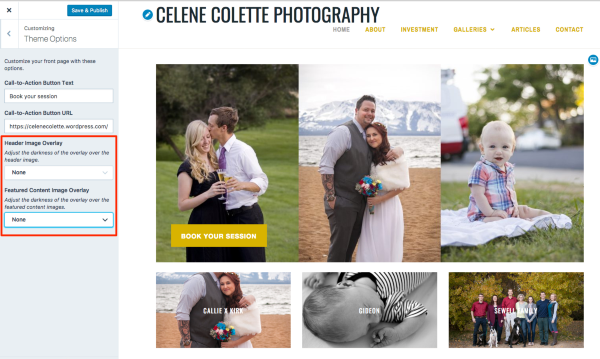
Just let me know if you need any help with it.


- The topic ‘Ixion theme-header image’ is closed to new replies.
 WordPress.com Forums