

Ixion Theme – remove washout look on homepage images
-
Hi! I wonder if you can help? Im using the Ixion theme and i want to remove the ‘washout’ look on the pictures (main one and three below it) on the homepage. Is this possible?
Looking forward to hearing from you! :-)The blog I need help with is: (visible only to logged in users)
-
The turquoise overlay over your header and featured pages is coming from the turquoise colour you’ve selected for Headings in the Customizer’s Colors & Backgrounds palette, as the two are tied together. I’d suggest you choose another colour there, ideally a dark grey. Here’s a screenshot to show you where I mean:
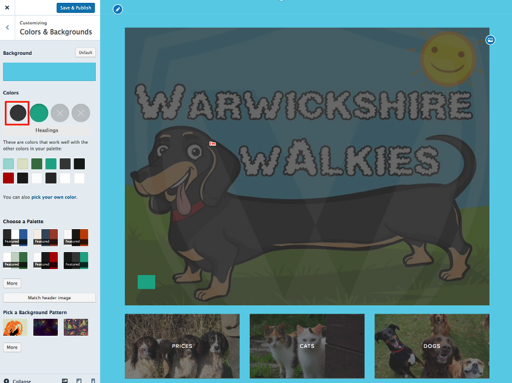
That’ll return the overlay on your images area to the normal grey.
If you want to then remove the coloured overlay on the header and featured content entirely, you can also add this to your custom CSS:
.header-overlay::before {
  background-color: transparent;
}
.featured-content .hentry .post-thumbnail {
  opacity: 1;
}
Let me know how it goes.


- The topic ‘Ixion Theme – remove washout look on homepage images’ is closed to new replies.
 WordPress.com Forums