

justify align requested for text in sidebar widgets
-
sir. Is it possible to “justify align” the text in the sidebar widgets ? i mean the first and last alphabets in the second row (and all below) to be exactly below the first and last alphabets in the first row.
The blog I need help with is: (visible only to logged in users)
-
Justified text is harder to read on screen, especially with the font size you’ve chosen. If you still really want to accomplish that, here’s the CSS:
#secondary .textwidget, #secondary .grofile-meta {
  text-align: justify;
}
This will justify text widgets as well as your Gravatar Profile widget. Other widgets may require targeting different elements, so feel free to start a new thread if you add more widgets later and need help finding the right element to target, or you can try using a browser inspector to find it.
-
-
hello kathryn. i copied and pasted the css you sent but still no change in the alignment. its still left aligned. it seems i have not entered the complete css. could you help ?
-
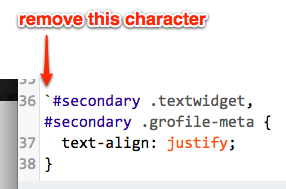
There’s a stray backtick character in front of the code that’s preventing it from working.
The CSS you added currently looks like this:
[code removed because it was getting mangled]
Try removing the very first character so it looks like this:
#secondary .textwidget, #secondary .grofile-meta {
	text-align: justify;
}
Let me know how it goes.
-
I had to remove the badly formatted code because it was getting mangled by the forum software. Here’s a screenshot:
-
thank you so much kathryn. yes its working now. maybe i will evaluate if i want to retain this alignment or go back to the left aligned option. once again thanks for your support.
-
another question please kathryn. the alignment has been justified for all the widgets in pages except the front page widget. is it possible to align the front page widget too ?
-
To target all text widgets — and not just ones in the Sidebar area — remove the #secondary selector in the CSS I gave you earlier, so it becomes this instead:
.textwidget, #secondary .grofile-meta { text-align: justify; } -
-
-
/* Justifying Text Widget – By Prakash */
.textwidget {
text-align: justify;
text-justify: inter-word;
}Just try this in custom CSS.


- The topic ‘justify align requested for text in sidebar widgets’ is closed to new replies.
 WordPress.com Forums