

Karuna Theme missing elements in my local install of my blog
-
I am having some trouble setting up my blog with the Karuna theme on WordPress.com so I am trying to get it working on a local install of wordpress on one of our computers to see if that helps.
I like the theme but just can’t get certain things to display as I like. In the local install of WordPress 4.8.1 the ‘gallery’ widget of the Karuna theme is not showing up. I checked the CSS sheet ‘style.css’ and the gallery shows there but it doesn’t show up as a widget so can’t use it. I have tried a couple of gallery plugins but they are much more complex than I need, I don’t need thumbnails you can click on to show the pictures in another window, I just want three pictures to show big enough that you can read them.
I really don’t know a lot about CSS yet but how can I get the gallery widget to show up?
The blog I need help with is: (visible only to logged in users)
-
The gallery widget is available on self-hosted installs through the Jetpack plugin, along with certain other features. If you don’t see it available on activation, search the Jetpack Settings search box for “Extra Sidebar Widgets” and you should find it there.
Just let me know if you need further help.
-
Thanks for the answer.
OK, got it installed, can’t use it:
While in Development Mode, some features will not be available at all as they require WordPress.com for all functionality—Related Posts and Publicize, for example.
Other features will have reduced functionality to give developers a good-faith representation of the feature. For example, Tiled Galleries requires the WordPress.com Photon CDN; however, in Development Mode, Jetpack provides a fallback so developers can have a similar experience during development and testing.
I have yet to find a fallback with a similar experience….
As a former programmer and manual HTML web page builder, is it me or is this much more complicated than it needs to be?
-
The Extra Sidebars widget (which includes the Gallery widget) is available in Jetpack while in development mode, I just tested it here. So are the Tiled Galleries and Carousel features. You can find the full list of modules available while in development mode by appending this to your URL: /wp-admin/admin.php?page=jetpack_modules
From there, you can activate any Extra Sidebar Widgets, Tiled Galleries, and Carousel, or any other available modules.
I’d also be glad to help you with whatever you need on your WordPress.com site, which I can see at gemrecovery.wordpress.com. If you need a hand with something specific there, just let me know and I’m happy to take a look.
-
Thanks so much for the response and offer of help, sorry for the sarcasm, just been working on this for weeks, banging my head against the computer and it is not as satisfying without an old 40 pound CRT monitor! :^)
Error establishing a database connection using MAMP on Windows 10
-
banging my head against the computer and it is not as satisfying without an old 40 pound CRT monitor! :^)
Still, ouch! ;-) Sounds frustrating indeed.
When you’re ready, do let me know if you need help with anything on your WordPress.com site and I’d be very glad to take a look and try to sort it out.
-
I’m back.
I am not seeing this ‘Extra Sidebars’ widget anywhere, not in widgets, not in Jetpack settings, not in appearance. I would share screenshots but I guess I can do that here…
-
but I guess I CAN’T do that here…
I can’t edit posts here either evidently, or proofread… -
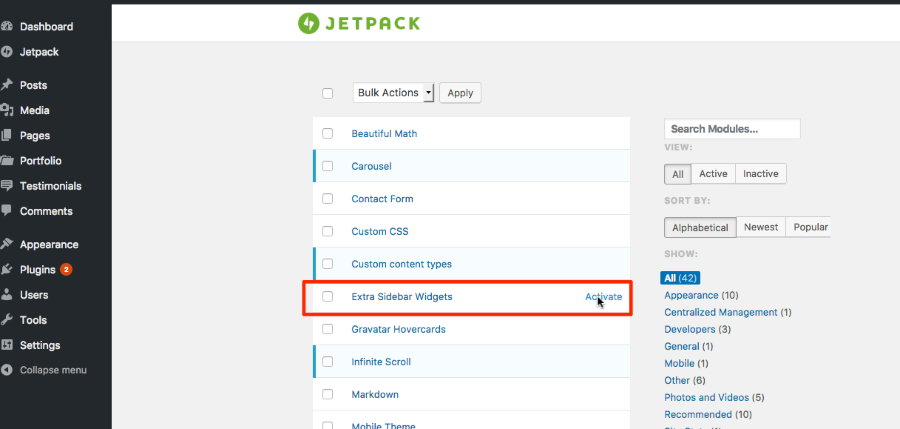
If you add this path
/wp-admin/admin.php?page=jetpack_modulesto the end of your test site URL, you should see the full list of modules.From there, you can activate Extra Sidebar Widgets.
-
Great! A whole bunch of hidden features! I wish it said something about this in the documentation! The docs are pretty detailed, I’ve been surfing around in it for days, I guess I missed this, thanks!


- The topic ‘Karuna Theme missing elements in my local install of my blog’ is closed to new replies.
 WordPress.com Forums