

Large Image first page
-
Hello:
I am using the theme called Motif. And in the demonstration page there is a main pictures in the first page (two man in front a computer). I have tried to create the same design but I can not, because I have only two option:
– or show a blog page, where the images looks small
– or show one of the menu pages.
So I want to make it look like the blog demonstration Motif, with a large image on the first page. How I can do that? ThanksThe blog I need help with is: (visible only to logged in users)
-
Hi,
So I want to make it look like the blog demonstration Motif, with a large image on the first page. How I can do that?
Motif relies on the featured image and a “Front Page” template to achieve the look you see on the demo site. There is a nice guide to setting this up here:
http://theme.wordpress.com/themes/motif/
In short, you’ll want to do the following:
1. Select the page you wish to show on home page by setting is as a Static Front page under Settings > Reading:
https://emoydes.wordpress.com/wp-admin/options-reading.php
2. Go to that same page and on the right side under Page Attributes select Front Page as the template:
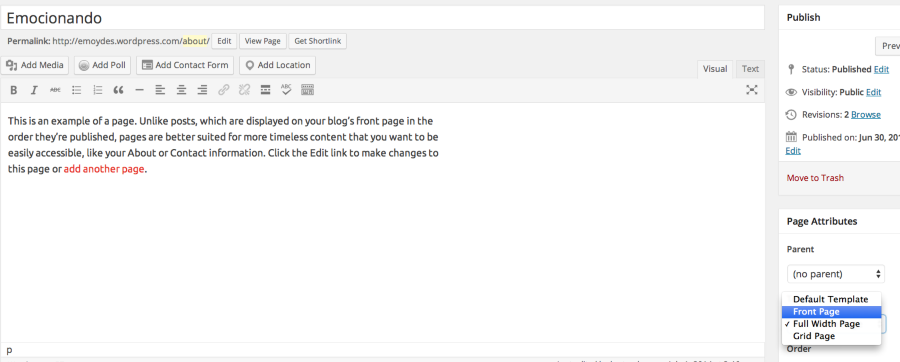
This should set the page of your choice as the front page, use the featured image as the background, and overlay the text of the page on top of that image.
Let me know if you have any questions!


- The topic ‘Large Image first page’ is closed to new replies.
 WordPress.com Forums