

Latest post is not showing up in Reader
-
Hi there,
Here is our latest post. Can you confirm it is featuring correctly.
http://ketchupmoms.com/2015/04/08/6-ways-to-get-health-and-active/
Also even though we have published it on April 10 it is showing up as the 8th.
can you help. -
Yep! It’s showing up in my Reader:
Is it showing up in yours as well?
If you’d like to change the publication date to April 10, you can do that using the edit link shown here:
Please note, since the date is included in the URL, the URL to the post would change if you change the publication date. So, if you changed it to the 10th, the URL would be:
http://ketchupmoms.com/2015/04/10/6-ways-to-get-health-and-active/
The previous URL would lead to a Page Not Found error message. Just wanted to let you know in case you’ve already shared the post on social networks at the original URL!
-
Thanks for looking into this. The publish date is showing up as apr 8 when in fact we published it on apr 10 at 1440 pm EST. The time stamp on the email that gets sent out is correct but the URLs and the reader has picked up apr 8! There is something wrong with the way our posts talk to WordPress. Either the date is wrong or they don’t show up in the a reader or both. Can you help? Thanks Puneeta
-
Hi Puneeta,
If you edit the post, you’ll it’s marked as published on April 8th:
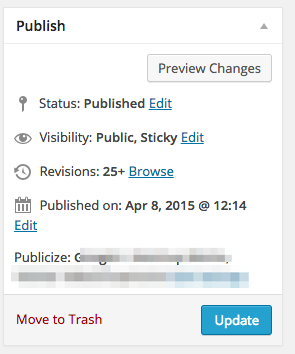
That’s why its saying April 8th in the Reader and in its URL
If you actually published this on April 10th, that it sounds like you have Backdated your post:
https://en.support.wordpress.com/posts/schedule-a-post/
Note: Sometimes you might want to backdate a post. For example, if you’ve just come back from a long trip, you might want to write a post for each day of your travels and have the post dates match the actual days you were away. To backdate a post, simply edit the date before you click Publish, as described above. In this case, the button will not change to Schedule.
It’s basically ‘scheduling’ your post, but into a past date instead of a future one.
You can edit that publish date and time and re-publish it to fix its date to April 10 in the reader. But like Jeremey said, that will also change the post’s URL so may be even more confusing to anyone who has shared links to your post.
-
Hello there,
Thanks for looking into this.
This has happened to our posts before where WordPress somehow picks up a random earlier date. The last time this happened it was a big blow since that article did not show up in the “Latest in the Reader” for our followers. Since then we have been scheduling our posts. Scheduling though is time consuming especially since all we want to do is Publish the article with the date and time when we hit Publish.
For this post in question I hoped that since our problem with Reader had been resolved on the 11th, our random date problem had been resolved (see above) as well.
That has not happened. We did not backdate or schedule. We just hit the Publish button. The publish date switched from April 10 to Apr 8 even though the email went out on Apr 10 at 1440 pm.
Thanks – Puneeta -
Hi Puneeta,
When there is a previous date (backdating) entered into the post editor, the button will still read “Publish” because it gets publish immediately, just with a past date assigned to it.
I understand the frustration, but the only way a post can have April 8th assigned to it when you click publish on April 10th, is if that date was saved in the post settings at some point.
Did you originally the schedule the post for the 8th, but then save it as draft instead?
For posts going forward to avoid this issue, the only recommendation I can provide is to check those Post settings that no past dates are assigned to it.
-Alex G.
-
Hi Alex,
That is not how it is working when I create a post at my end. At some point after a few revisions the status changes from Publish immediately to a specific date. As an example the article I am working on right now is in Draft stage but it has a “Publish on” date already assigned. Mar 26 in this case. I have not back dated it in any way. I started it on the 26th and that’s the date showing up.
Are you able to go into my account and see? If so, it is the article titled “7 female role models”
Is there a way to remove the pre-assigned date and go back to Publish immediately? -
Hi Puneeta,
Once a date is set for that ‘Publish on’ you’ll need to edit the date in the /wp-admin/ editor, or switch to the new editor and use the Publish Immediately setting.
This seemed a bit easier to explain over video:
-Alex G.
-
========URGENT===================
Can you confirm our latest article is showing up correctly in the Reader in all places. I just checked and it is not showing up under either Relationships, Role Models or TVO Kids
http://ketchupmoms.com/2015/04/15/from-dora-the-explorer-to-buffy-the-vampire-slayer/
Thanks – Puneeta -
Hello there,
Yes I see your post under the tags you assigned to it. Example https://wordpress.com/tag/dora/ -
Yes, very odd. In the past hr it has started to show up in Dora and even Gender. Wasn’t showing in any of the tags before. Still not showing up in Role Models right now. Curiouser and Curiouser!
-


- The topic ‘Latest post is not showing up in Reader’ is closed to new replies.
 WordPress.com Forums