

latest post not showing first
-
I have my blog to display the most current post as my front page. I have always had it set this way. My latest post I did just tonight is not showing first as my front page. I even tried altering the publish time and it still did not work. Please assist.
The blog I need help with is: (visible only to logged in users)
-
Howdy!
It looks like your latest post is showing in the featured content slider at the top of the page as shown here:
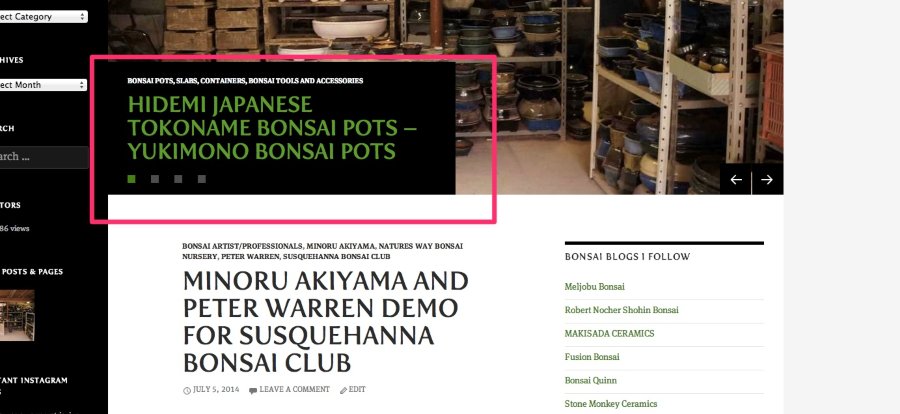
This is happening because you’ve tagged the post with “featured”, which is the tag you have specified for featured content. You can change this tag if you would like under Appearance -> Customize -> Featured Content.
When posts are included in the featured slider, they are not shown in the list of recent posts on the front page.
Let me know if you need anything else!
-
I understand how the “featured” post works but didn’t realize that when it’s “featured” it pulls it from the blog roll. So basically what your saying is when I initially publish a post do not set it up as “featured” and save that option for later on after I publish a new post?
-
Hi there,
That is correct – tagging a post with the “Featured” tag pulls it from the normal display feed and puts it in the slider. When the post isn’t one of the latest six with the featured tag, the post displays back in the normal order. So, a post only lives in the slider until it gets pushed out. Does that make sense?
The traditional use is to put new posts in the slider with the tag. Then, once more posts have been added to the slider, the post will get pushed out and display like normal. This way, the slider always has your best, newest content.


- The topic ‘latest post not showing first’ is closed to new replies.
 WordPress.com Forums