

latex path not specified errors
-
@shawnajroberts, I don’t think you went to every URL, because one of my comments was about how I created a free wordpress.com blog and was able to duplicate the issues, along with screenshots.
I cannot track down the issue because I don’t have access to the code behind latex.php on s0.wp.com.
-
I believe you are referring to this thread https://en.forums.wordpress.com/topic/latex-path-not-specified-errors-continue?replies=2#post-2502290
-
Yes, AND the comment above where I said almost the exact same thing: https://en.forums.wordpress.com/topic/latex-path-not-specified-errors-1/page/2?replies=42#post-2502277
-
-
Shawna:
Thanks much for your attention. Please see:
https://cyclostationary.wordpress.com/2015/11/20/csp-estimators-the-frequency-smoothing-method/
There are two latex fragments there and neither display correctly.
The code does not work for previewing or publishing.
-
When there are multiple threads posted on the same issue it can be difficult to unravel them. Please be patient while waiting for Staff to return to this thread after reading the others.
-
I understand, but it seems like my contributions are simply being ignored and dismissed, and I’m about done trying, to be perfectly honest.
-
Update: @shawnajroberts has closed the other thread as a duplicate, despite the fact that she hasn’t responded to my comments here beyond giving me the brush-off. I’m done. Good luck, folks.
-
@malcolmgin – As you know, I’m only human. I did not intentionally ignore your comment. I did visit the link to your post, but missed the link to the image of the error message.
Here’s a link to what I see when I visit your post:
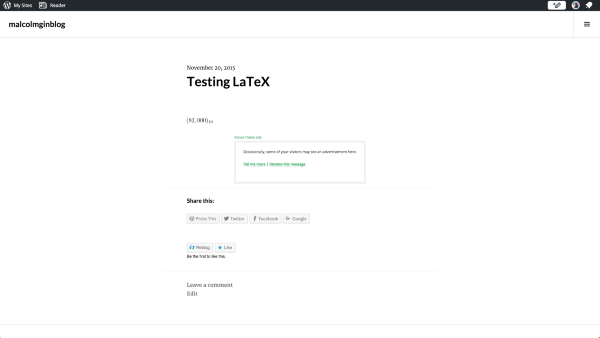
I’m currently running Chrome 46.0.2490.86 (64-bit) on Mac OS X 10.11.1. Can you please confirm your browser and OS for me? Can you also let me know if you have any add ons or extensions running in your browser?
@chadmspooner – Thanks for that link! Your LaTeX is rendering okay for me as well. Can you please confirm your browser and OS for me as well? If you’re not sure what yours is, you can visit this link and it will tell you:
-
Oh, crosstalk, okay. Here’s my info:
Chrome version:
Version 46.0.2490.86 (64-bit) on Mac OS X 10.11.1.I do have some extensions. Let me see if I can disable them and report back.
-
@shawnajroberts
Please also check on ccjou and bruceoutdoors who posted here
https://en.forums.wordpress.com/topic/latex-path-not-specified-errors?replies=10#post-2502278 -
I have disabled all Chrome Extensions, cleared my cache, restarted Chrome, and am still seeing the same issues with the test post: https://malcolmginblog.wordpress.com/2015/11/20/testing-latex/
The screenshot is the same, so I’m not going to take and upload a new one.
-
Thanks timethief! I’ll follow up with them. :)
And thanks malcolmgin. Do you happen to see any errors in your browser console? You can access the console by pressing Cmd + Alt + J on your keyboard.
I’ve also asked a few other Happiness Engineers here to visit that test page so we can do more debugging on our end.
-
I see this problem on various OS’s:
1. Fedora 22, 4.2.3-200.fc22.x86_64, chrome: 46.0.2490.86
2. Fedora 21, 4.1.12-101.fc21.x86_64, chrome: 46.0.2490.86
3. Windows 10, chrome: 46.0.2490.86 m
4. Windows 10, firefox: 42.0
I have adblock-plus running on all browsers except firefox.
-
@shawnajroberts No errors at all in any of the frames of the Console (dropdown box to the right of the funnel/filter icon).
-
Update: Since clearing my cache and restarting Chrome and my laptop, I’m now seeing the latex path not specified error at all zoom levels, so I’m assuming the proper rendering was somehow in the cache for some zoom levels and that zoom levels are otherwise a red herring.
-
Update. I viewed a bunch of my pages at
cyclostationary.wordpress.com
on my Android phone and saw that the great majority of latex fragments are replaced by ‘latex path not specified’. Most of the fragments that end up being typeset look bad. That is, the symbols are too big or are not aligned with the lower edge of the text, etc.
This is a disaster. I would like to shut down my blog until the latex problem is resolved at WordPress. Can you advise about the easiest way to take the entire thing offline? I want to easily bring it all back up too, of course. So I don’t want to go through post-by-post and unpublish. Hope that is clear.
thanks…
-
Update: For my self-hosted WordPress, I tracked the call to http://s0.wp.com/latex.php to the Jetpack plugin code at ./wp-content/plugins/jetpack/modules/latex.php.
In that file, line 106, is the URL constructed to call the renderer at http:// or https://s0.wp.com/latex.php
Here are some of the surrounding lines:
function latex_render( $latex, $fg, $bg, $s = 0 ) {
        $url = "//s0.wp.com/latex.php?latex=" . urlencode( $latex ) . "&bg=" . $bg . "&fg=" . $fg . "&s=" . $s;
        $url = esc_url( $url );
        $alt = str_replace( '\', '', esc_attr( $latex ) );

        return '<img src="' . $url . '" alt="' . $alt . '" title="' . $alt . '" class="latex" />';
}
Unfortunately after that, it’s dead end. As I’ve noted earlier, I don’t have access to the code behind that URL on s0.wp.com. I’d be happy to take a look at it if Staff want to share, but suspect their internal employees are far better equipped to troubleshoot their configuration on that server.
-
Indeed I have tested my blog (erdosninth.wordpress.com) from every web browser, os, and machine I have available. In all such cases, some 60% of previous posts now have the “latex path not specified” error, and all new posts have this error as well.
-
Here is a screen shot of https://terrytao.wordpress.com/2015/11/19/275a-notes-5-variants-of-the-central-limit-theorem/ from Chrome 46.0.2490.86 m on a Windows 8 Surface: https://terrytao.files.wordpress.com/2015/11/capture.png
The same rendering issues also arise on IE 11 on the same machine: https://terrytao.files.wordpress.com/2015/11/capture3.png
The issue, as pointed out before, seems to be coming from the latex.php renderer on s0.wp.com, as one also gets the same rendering error when calling that up directly: https://terrytao.files.wordpress.com/2015/11/capture2.png
LaTeX appearing on blog comments, or in previews of posts, are also affected. On the other hand, on my Windows 7 desktop everything renders perfectly (with the exception of the site http://newvillagegirlsacademy.org/math/?page_id=2383 which is rendering using a different server than s0.wp.com).


- The topic ‘latex path not specified errors’ is closed to new replies.


 WordPress.com Forums


