

Launching site
-
Good morning, I was wondering if there is a way to launch a site for free or how much does it cost for a short period of time? I have been required to create a blog for a college project but it’s only going to be looked at by one person one time only? I was just wondering if I still need to pay the fee for the whole year? or is there a different option?
thanks
JONAHThe blog I need help with is: (visible only to logged in users)
-
I was wondering if there is a way to launch a site for free
Hi there, when you click the “Launch” button at https://wordpress.com/checklist/jonahpidp.wordpress.com do you land on a page asking you to “Give your site an address”?
If so, the bottom choice on that page should be the free site address you chose when you created your site, and has a “skip purchase” notice on the right side. If you don’t see that option, please take a screenshot and upload it to your site’s Media Library and share the link here.
If you do see that “skip purchase” option and continue to get additional prompts to upgrade, keep clicking the free site option.
Another way to launch your site is to from your site settings at https://wordpress.com/settings/general/jonahpidp.wordpress.com by changing your site privacy from Private to Public.
If you are not successful in launching your free site in either option, please come back to this thread and let us know.
-
@justjennifer considering the number of similar threads you’ve answered recently there must be something amiss/confusing with the design of the “flow” (to use WPspeak) to launch free sites.
-
So neither of those things worked, Not given any free options on the launch screen and the privacy settings are greyed out so I cannot click to change anything? also…not sure how to attach my screen shots here?
-
@themagicrobot – so it would seem. I’ve been following up on the other threads to see if folks are successful in launching their site. It’s been hit or miss.
@jofo2727 – Hello again, you can upload the screenshot to your site’s Media Library or a 3rd party site like , snipboard.io* or even Google docs and then share the link here. Since your site hasn’t been launched, only Staff will be able to see the Media Library link.I’m also going to flag this thread for Staff attention.
*edited to clarify
-
https://docs.google.com/document/d/1iW9m7mW8f7036Htwp7DlEj_OEzW6Z5OnMBg2DCS8GzY/edit
here is the link for my screenshots on Google docs.
-
-
Hi there, your Google docs file needs to be public for us to see it, but if you’ve also uploaded it to your site’s Media Library, Staff will be able to see it there. :)
-
Hey sorry again…not sure how to make public but they are definitely in the media section of my site…
-
Hi there,
While logged into your account and clicking the launch site button here:
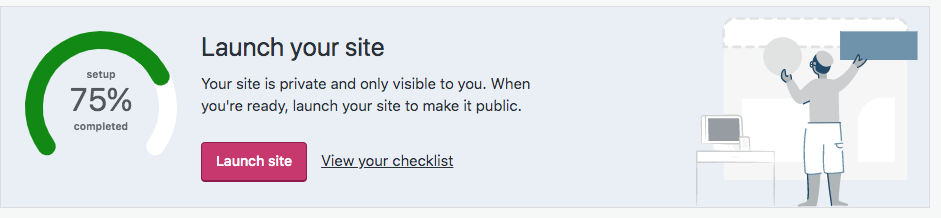
This is what I am seeing:
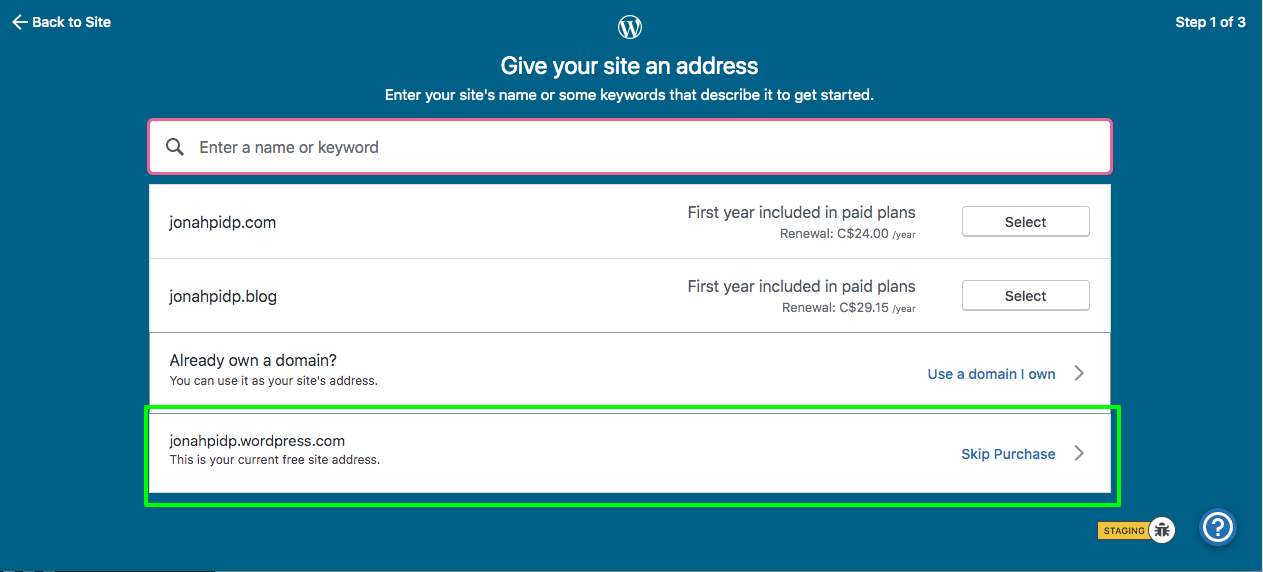
You are not seeing this when you click on that button?
-
No I am definitely not seeing that when I click on the launch button?? I just tried again to confirm.
-
We are definitely keeping an eye on the issues that users are encountering as the launch flow has changed over the last year or so. Definitely continue to tag any threads with this issue with
site launch, and we’ll continue to look into what we can do to make the process easier for users on end.Thank you both.
-
-
Out of interest I’ve just attempted to create another free site. Creating one is easy. Launching it can be very difficult depending what I type/press.
Perhaps a page titled “Give your site an address” isn’t very intuitive when a free site has already been created and that title catches people’s eyes more than the free address and “skip purchase” they need to click on at the bottom.
It appears to me that anyone typing anything, even their new free address in the box where they are prompted to at the top are henceforth only offered paid-for domains.
Once that field is completed even with the new existing free address even the “Launch” button in “Settings” only takes me back around to the same page that only offers paid-for domains and I’m unable to launch my new free site.Only removing all words from that top field again reveals the free address option once more. Perhaps that is where people are going “wrong” when it may appear to be them the “right” thing to do??
-
-
Only removing all words from that top field again reveals the free address option once more. Perhaps that is where people are going “wrong” when it may appear to be them the “right” thing to do??
@themagicrobot – two :thumbsup:
And in all the trials that I’ve run that top field is empty, but some people still report that the free site option is missing for them regardless.
-
I was just wondering if we have made any progress on this?? Am I going to be able to publish my site for free?? thanks
-
@jofo2727 After clicking the “Launch” button are you definitely not seeing a screen that matches the screenshot provided by staff-doublebassd as he took that from your very own site? One click of “skip purchase” should have you on your way.
Did you upload a screenshot to your Media Library of what you do see? How does it differ from the screenshot bearing in mind the top field “Enter a name or keyword” needs to be empty. -
Ok…so it worked that time..I seem to have been able to publish.
“bearing in mind the top field “Enter a name or keyword” needs to be empty.”
this was the key piece of information I was missing but once I changed this I was given the free option.
thanks for all your help


- The topic ‘Launching site’ is closed to new replies.
 WordPress.com Forums