

Lay out Adaption theme
-
Good afternoon,
I have a question. I recently installed the ‘Adaption’ theme with 3 columns. I found out though that one of my readers could only see a 2 columns width and a different lay out. Could you tell me why it can be different my viewers?
Thank you for your response in advance!
Magda Pattiiha
The blog I need help with is: (visible only to logged in users)
-
Hi Magda!
This is currently what I’m seeing:
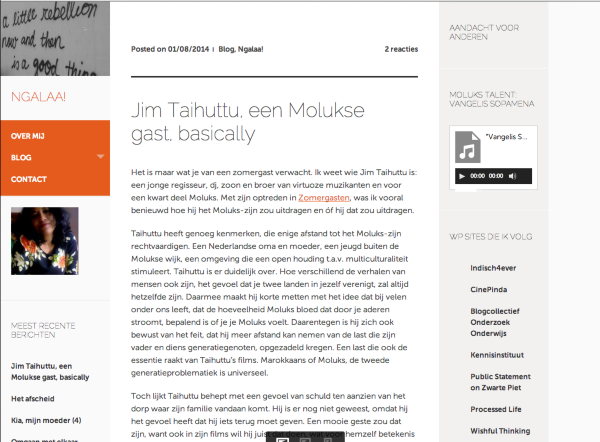
Can you have that reader try clearing out their cache and cookies using the guide below?
It may just be a caching issue. If it’s not, please let me know and I’d be happy to take a further look!
-
Hi Grace,
This might well be the case. I will tell the readers to clear cache and cookies, so they will have a better view.
There’s another question concerning a plug in.
I want to start an online course on my website.
Can you tell me which plug in to use? Also, what is the best lay out to write my lessons, just a WP lay out like my blogs?Thank you for your support concerning the cache and cookies!
Magda
-
Hi there,
Unfortunately, it is not possible to install plugins on WordPress.com, for security reasons. Plugins can only be installed on self-hosted WordPress blogs. If you are wondering how WordPress.com differs from WordPress.org, this support article explains the distinction:
As for creating an online course – what were you thinking about? I’m not quite sure how extensive this course would be, but you can add presentation slides to your site as seen here:
As for building an classroom website I recommend taking a look at this:
http://wordpress.com/classrooms/
Let me know if you have any questions with this!
-
Hello Grace,
First I will start making presentations.
I would like readers to use a password to log in. I have never seen info about this yet.Making a classroom site is a good idea for the coming school year.
Thanks,
Magda
-
HI Magda,
You can set your entire site to private so that you can control who is able to view the site:
http://en.support.wordpress.com/settings/privacy-settings/
If you just want to set a certain page/post to private you may password protect them by going to the Publish Module when you are editing your post/page as seen here:
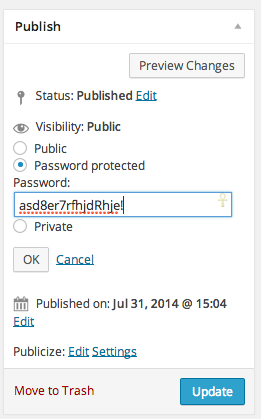
There you can set a password that you can give out to your readers/students to access the post/page.
Let me know if you have any questions with this!
-
Hi Grace,
I already found the password info, but thanks anyway!
That’s what I love about Word Press.com, there is support throughout!
Thank you,
Magda -


- The topic ‘Lay out Adaption theme’ is closed to new replies.


 WordPress.com Forums