

Layout issue, the copy is not aligned with the top of the photo. AND URL
-
I am doing posts in which I add a photo and write copy, then add another photo and write copy. As I was building the post, each new paragraph would automatically align itself with the top of the photo. Then all of a sudden, it stopped doing that and the new paragraph is starting next to the lower portion of a previous photo. How do it get everything to align properly? (The issue is in my PAWS post. I have not published it yet. But if Support can see it, everything is fine until I get to Grey Kitty. From there down, you will see the formatting changes as it relates to new paragraphs with new photos).
While I am here, i have been trying in vein to change the URL for my blog. The one showing below was a place holder that I stuck in while I secured my custom URL. The URL I want is TheDailyBray.com. Why can’t I get that to show up in the WordPress templates?
Thank you!
DebThe blog I need help with is: (visible only to logged in users)
-
Hi Deb,
When I previewed the Paws post I found that the alignment was correct. The paragraph was beginning at the top of the respective image. Try previewing the post and seeing if it is aligned.
As for the URL, I am able to view your site at thedailybray.com as seen in this screenshot:
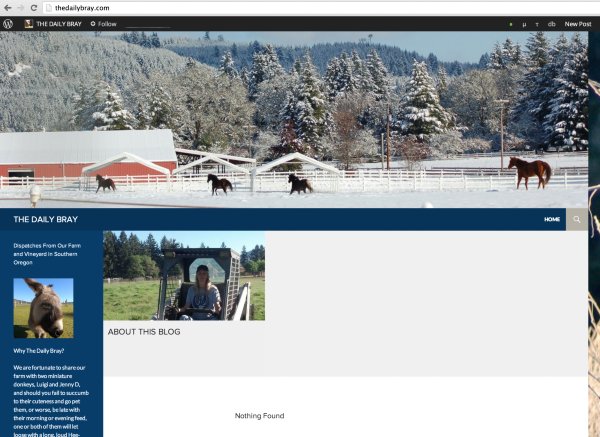
I’m not sure what you mean by the WordPress template, but if you are talking about what you see when you are logged into your Dashboard, please don’t worry about that. No readers can see your URL with .wordpress.com at the end of it. Your site is viewable at thedailybray.com.
Feel free to reach out if you have any questions!
-
Hi,
Thank you for looking at my blog. I finally did get all the text to align with the photos but I still don’ t know how I did it. I just kept deleting and re-posting things until it looked right, which was really time consuming.Is the page formatted to automatically align text with photos? Or does it have to do with the amount of text near a photo. For example, if you post a picture and write one sentence so that the text only runs down half the length of the photo, is the page formatted so that the next paragraph will align with the NEXT photo, or will it simply pick up where the last line of text left off, thus placing it next to the preceding photo? If I knew how the template worked, I could eliminate a lot of frustration.
Also, what does this mean in CSS:
I see that a lot on my text screen. Deleting it SEEMS to help with my alignment issues. But again, I don’t know what it is, what it does and how it gets on my page. If anyone knows, please let me know. It might help me be more efficient.
Thanks!
Debra -
Hi Debra,
Is the page formatted to automatically align text with photos? Or does it have to do with the amount of text near a photo. For example, if you post a picture and write one sentence so that the text only runs down half the length of the photo, is the page formatted so that the next paragraph will align with the NEXT photo, or will it simply pick up where the last line of text left off, thus placing it next to the preceding photo? If I knew how the template worked, I could eliminate a lot of frustration.
It’s a bit difficult to answer this question. It depends on what you want. If you want the images wrapping around the text it would matter on the placement (left, right, center). If you want to place the images below the text and keep the image on it’s own you can do that well. Take a look at this guide and it will probably help:
As for your CSS, it is completely empty at the moment. You can erase everything in that box as it’s only a comment. Anything in between /* */ is not taken into consideration as it is only a comment.
If you want to edit CSS you can add your code there. If you need help with it, most of our CSS support is done in our community forums by both staff and volunteers:
https://en.forums.wordpress.com/forum/css-customization
When you create a CSS-related help request, please make sure to select or link to the WordPress.com blog you’re working on and include a clear description of the change you’re trying to make. It helps a lot.
To learn more about how CSS editing works at WordPress.com, see this help page:
http://en.support.wordpress.com/custom-design/editing-css/
Happy Blogging! :)


- The topic ‘Layout issue, the copy is not aligned with the top of the photo. AND URL’ is closed to new replies.
 WordPress.com Forums