

Layout problems
-
There must be something wrong with WP now? I have to put up a review 10 times and the layout isnt as I want it. Even the other reviews that normally is under looks very strange. So please check under my review Sweet Vengeance.
The blog I need help with is: (visible only to logged in users)
-
This is how my text should look and does in editing but it come up different and has never done before.
Before there has also been a pic beside my other reviews that is Related. That is now gone?MMMM
Starkt och våldsamt
Regi Logan Miller
Skådespelare Ed Harris, January Jones, Jason Isaacs m fl
Western/AmerikanskEn kallblodig men mycket sevärd västern.
Sweet Vengeance börjar som en ordinär västernfilm men ganska så snart börjar man ana att det här är något helt annorlunda än man sett tidigare.Ett lyckligt par försöker börja ett nytt liv in the middle of nowhere, men en “gudsförgäten profet” vill annorlunda.
Det blir början till en hämnd som går i religionens tecken.Ed Harris spelar en sheriff och då Ed är med så händer det saker.
Den luriga och överraskande karaktär han gestaltar är helt suverän.January Jones gör den försmådda hustrun som sätter igång ett blodbad för att få fatt i den skyldiga till hennes mans död.
Jason Isaacs är den svavelosande och sadistiska prästen som helt har missuppfattat Jesus kärleksbudskap.
En förnämlig skara skådespelare tillsammans med välgjord regi av Logan Miller gör det här till månadens dvd. Synd bara att man inte visat den på bio först.
Inte ofta det släpps sådana här kvalitetsfilmer när det gäller västernfilmer.
-
Hi there,
Sorry about that. If you want to create a hard line break, please switch to the Text Editor when you are editing your post and put this in a new line:
<br>This will create a line break.
As for the image, I do not see an image? Can you give me the link to the image that you wanted in that post?
If you are talking about the related images in your post editor, that was a feature of Zemanta that was removed on January 2nd, 2014. You can find more about alternatives here:
https://en.forums.wordpress.com/topic/removing-zemanta-integration?replies=1
-
Thank you but 4 day is a long way to wait for feedback..-(
Before and also now when I write my reviews I dont need any text editor but that review (Sweet Vengeance) is still wrong when it came to layout. I have now tried again several times but the text is jumping up and down from how it really should look, I have also a hard time to get the trialer to be where I put it.
I have already marked about Related post but still no image come up as before beside the review.
-
I give up about this bec it doesnt work as it should. When the video is coming up it says something wrong, try later…This take to much of my time when it should work directly like it has done before..-(
-
Sorry about the long wait. Whenever you want to work on this issue again let me know and I’d be happy to help!
Take a look at this support guide on styling posts:
http://en.support.wordpress.com/editors/styling-individual-posts-and-pages/
Cheers!
-
I have got it right now with that review but it still doesnt look the same at my edit page as it is out on the webb now. The strange thing is that it has only been this review I have had problem with so something technically must have been happening. I have never used the text editor.
Now when I wrote new reviews its working good as it has always been, but can you help me to understand this bec it could be good to know if its happening again. I still didnt get pics beside my related reviews. -
Hi Johnny,
Was this post copied and pasted into the editor? Sometimes the formatting can be off if you write your post in say in Word and then paste it into the editor. Looking into the post I do see some extra tags and certain times it can happen when you are working in the Visual Editor.
If you wrote this post exactly the way you write your other posts it might be a one-time glitch since it’s working okay now. If this happens consistently please let me know and I can see if there’s a bug of some work.
As for the images, which image are you trying to insert? Please provide me a link to the image you are trying to insert, or let me know which image it is in your Media > Library. I’d be happy to insert it for you!
-
Hi, I didnt paste in my review. I use Visual Editor as usual, but even days after I cant get it right and struggle a lot before it looks right out on the web. But still look wrong in the Visual Editor.
About the images. I want to have it like it was before with a small tumb photo beside the related links that come up automatically under every revie. I did as you wrote but there is still only the name of the reviews coming up. Go in and see for yourself and then you see wht I mean.
PS Please dont let me wait for days for next support mail. -
About the images. I want to have it like it was before with a small tumb photo beside the related links that come up automatically under every revie. I did as you wrote but there is still only the name of the reviews coming up. Go in and see for yourself and then you see wht I mean
Are you talking about adding a thumbnail to your Previous Articles sections like this?
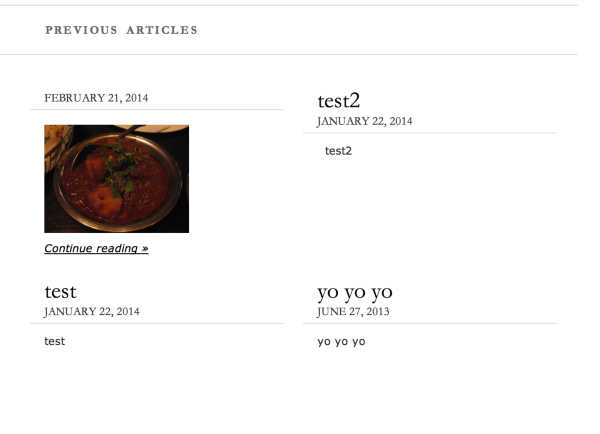
You can do that by going to edit your post and adding a thumbnail image to your Excerpt section. Follows these steps:
First add a thumbnail image to your post as seen here:

Then, go into your Text Editor and copy/cute the code:

Then, paste that code into your Excerpt section of that post (scroll down).
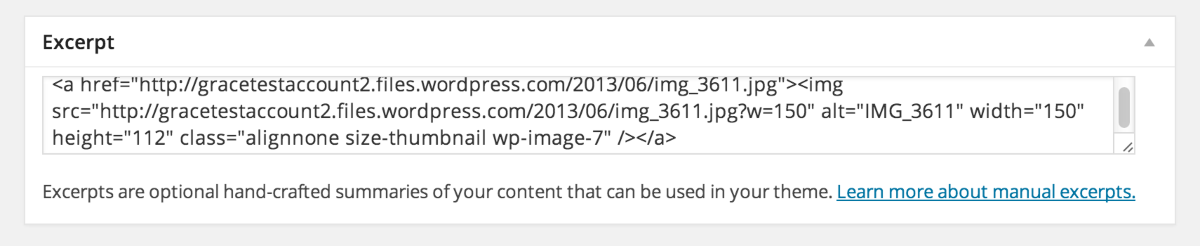
Then it should show up!
-
No, Im not talking about adding thumbnail myself.
I have try to explain in many ways and also ask you to go in to my blogg and look at that review I was talking about. How hard can it be? -
What would you like me to look at? I have seen your posts and your blog. I don’t see anything out of the ordinary besides what we have covered. There are no images in the post besides a Youtube video like this one:
If you want an image in the post you must insert one.
If you are talking about the related images that used to be in the Post Editor, again as I mentioned before, that has been removed.
-
I´ve been talking about the related images the whole time and I know they are gone as you wrote, but you also send me to a link where it should be working, but it didnt work as I wrote back, even if I mark everything on Realted posts that you suggested?
-
I am able to see the related posts as seen in this screenshot:

As it says in the link I provided you:
A post’s featured image will appear as the thumbnail. If you haven’t set a featured image for the post, the feature will pull the first image in the body of the post.
However, you have no images in your posts so there isn’t anything to use for a thumbnail image. For example, in this post there are no images to pull from:
Set a featured image and it should show up.
-
Ok, now I understand why it doenst appear anymore under Film. There I just use trailers, but under my other reviews I use images.
Thank you so much Grace that I learn something new today..-) -
-
Hi, now its working with thumbnails with trailers even if I havent put out any pics beside my reviews and do you know why?
-
Hi there,
It might have been a small glitch. Let me know if it disappears and we can take a further look.
Thanks!
-
Its working like I want if you check related under my reviews. You sad it shouldnt work with pics if I didnt put out photos.
-
Yes, it looks like it’s working. It looks like the thumbnails are be pulled from the videos now.
Cheers!


- The topic ‘Layout problems’ is closed to new replies.
 WordPress.com Forums