

Leave a comment option in the way
-
I want people to be able to comment but on my portfolio page it is to the left of my portfolios which is pushing it to the right, I would like it to be an option on the bottom or better yet on the bottom of the gallery pages, how do I change its location, its not a widget.
The blog I need help with is: (visible only to logged in users)
-
Hello!
The Snaps theme you’re using is ‘floating’ the content to the right, even if the ‘Leave a comment’ link is removed. Are you looking to center the content? If so, then you can add this CSS to ‘Themes’ -> ‘Customize’ -> ‘Additional CSS’
.entry-content-wrap{
margin: auto;
}
Custom CSS does require either a Premium or Business Plan subscription.
Give that a try, and let me know how it goes!
-
Hi Sabrina, could you please clarify the page to which you’re referring?
Currently, you have commenting turned off on your portfolio page here:
https://sabrinamockphotography.wordpress.com/anniversaries/home/
Is this the page you’re referring to?
I want people to be able to comment
If you’d like people to be able to comment on a page or post where you had previously disabled commenting, you’ll need to activate it again on those page or posts.
Open the page or post in the editor, open the More Options panel, and make sure the “Allow comments” box is checked:
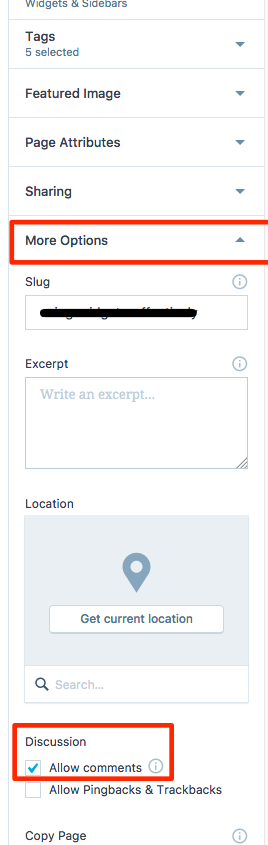
If you need further help or to clarify what you’re asking, just let us know.
-
@joerepublic ahhhh makes sense, I didn’t try it because I only have the free version but thanks for clarification!
@kathrynwp I did want comment options but I was referring to the centering that joe mentioned. Thanks!!
-


- The topic ‘Leave a comment option in the way’ is closed to new replies.
 WordPress.com Forums