

Likes and shares are enabled but don't show up. I'm worried; I need them to show up, How
-
Likes and share are enabled, but don’t show up. I’m worried; I need them to show up, How do I enable them if they are checked but don’t show?? Please help. I read your forums but I couldn’t find help. I hope you work on Thanksgiving. I’m worried. Thanks,
Janice WaldThe blog I need help with is: (visible only to logged in users)
-
Hi Janice,
I just visited your site and the sharing buttons are displaying. You even got a Like on this post:
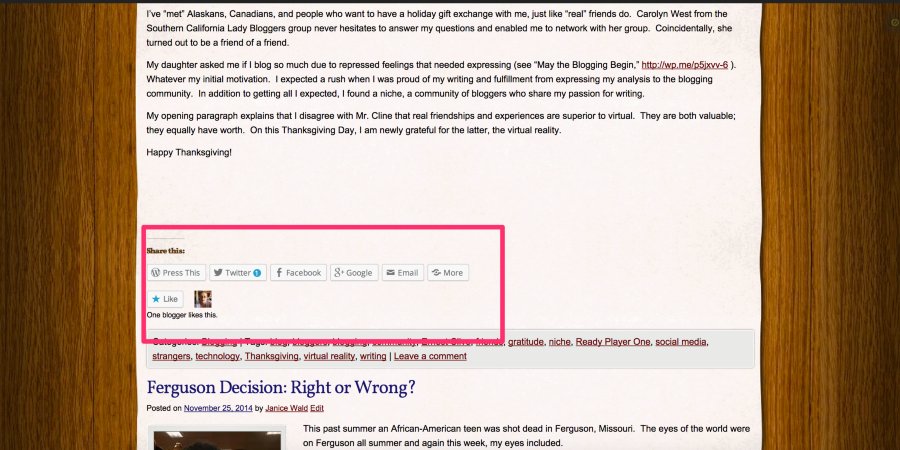
If you don’t see them showing, would try clearing your cache and cookies to make sure your browser is loading the latest version of your site? Instructions on how to do that here:
Or do you have a specific post where the sharing buttons are not appearing? I did a quick look and see the sharing buttons on all of them.
I see you also opened another thread for the same issue, but you also mentioned this:
I don’t know how to put in a page break either, so more posts show at one time, but that isn’t urgent like the rest. Please help. I’m hoping you work on Thanksgiving. Thank you so much.
You’ll want to start using the “More” tag in your posts:
http://en.support.wordpress.com/splitting-content/more-tag/
This will display shorter excerpts on your home page for each post, but display the whole post once someone clicks through. Let me know if you have more questions after reading that article.
Best,
-Alex G.
-
Dear Alex
Do you see a follow button on my site? A person wrote twice to say they couldn’t find it
Also I wrote again asking if you could put in a Pinterest plug In for me. I don’t know how to link Pinterest back to my blog. Can you do it? I’ve already read articles & watched videos. I’ve spent hours trying
Thanks. Please reply
Janice -
Hi Alex
I really need help linking my Pinterest bulletin boards back to my site. Can you do it for me? I’ve already read articles. I can’t find the word Plug In just widget.
Thank you!
Janice -
Dear Alex,
My husband tried to click the “like” button, but WordPress asked him for a password and user name. People shouldn’t need accounts to click the like button. What do I do?
Janice -
Hi,
1. I don’t know how to:
increase traffic if I can’t connect to Pinterest (can’t find the plug in word)
2. I don’t know how to have people without accounts click like. 2. Would they need an account to subscribe too if it says they need an account to click like?
Please help. After spending hours trying to fix these problems myself, I’m awaiting your reply.
Janice -
Hi Janice,
You have several questions here so I’ll try to take them one by one and not duplicate where I can:
Do you see a follow button on my site? A person wrote twice to say they couldn’t find it
If if a user is logged into to WordPress.com, they can click the Follow button in their admin bar:
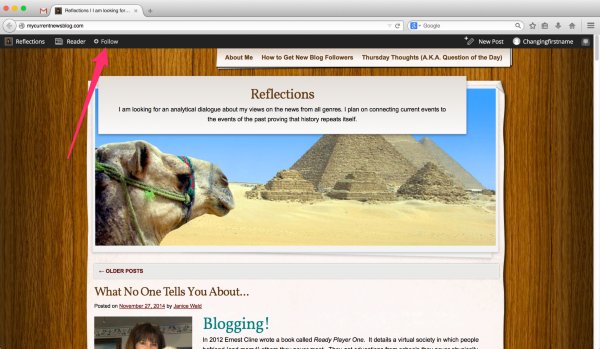
If not logged in, it appears in the bottom corner, and they will need to supply an email address:
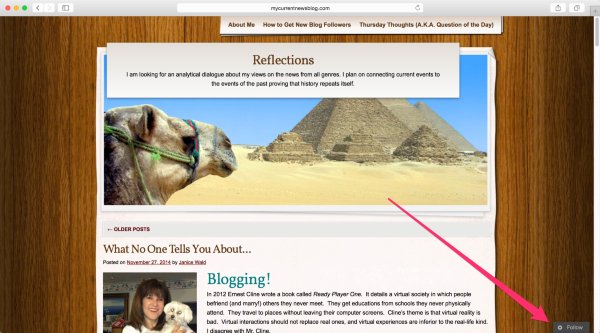
If you like to make Following more prominent, you can add our Follow widget to your site as well:
http://en.support.wordpress.com/widgets/follow-blog-widget/
Also I wrote again asking if you could put in a Pinterest plug In for me. I don’t know how to link Pinterest back to my blog. Can you do it?
WordPress.com has a lot of built-in features that were inspired by popular plugins, but it is not possible to install plugins on WordPress.com, for security reasons. Plugins can only be installed on self-hosted WordPress blogs. If you are wondering how WordPress.com differs from WordPress.org, this support article explains the distinction:
Regarding Pinterest, there are a couple things you can do:
- Enable a “Pin It” button in your sharing buttons (you’ve done this)
- Add a Pinterest Site Verification (Get the code from Pinterest, add it to your site here)
- Embed content from Pinterest onto your site
My husband tried to click the “like” button, but WordPress asked him for a password and user name. People shouldn’t need accounts to click the like button. What do I do?
The Like button is something used across blogs on WordPress.com, not only to let the author know you liked the post, but to find the content again easily in your WordPress.com Reader. It does a require a WordPress account, just like “Liking” a status on Facebook would require a Facebook account, or a “Favoriting” a tweet on Twitter would require a Twitter account.
You can read more about Likes, including how disable them if you don’t like them, here:
Would they need an account to subscribe too if it says they need an account to click like?
They can subscribe over email without a WordPress.com account, either with the Follow button I pointed out earlier in this post, or if you add a Follow widget.
Best,
-Alex G.


- The topic ‘Likes and shares are enabled but don't show up. I'm worried; I need them to show up, How’ is closed to new replies.
 WordPress.com Forums