

Link a post to another page on my site
-
I can’t figure out how to link a post to another page on my site. The option to link to another page does not appear in the option box when I put the url in the way it looks like it should on the support page. This used to be done differently, I think and it doesn’t seem intuitive or easy now.
-
Hi, there.
If I’m understanding right, you want the URL you link to opening in a new page or tab, correct?
When you go to add a link, do you see this?
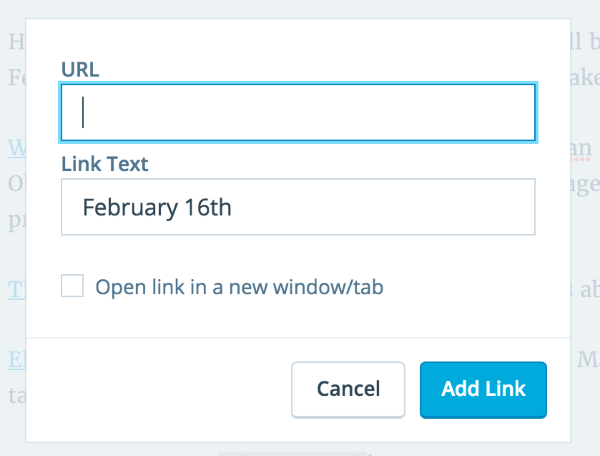
If so, click the checkbox in the lower left to open in a new tab/window.
If you’re not seeing that, or if I’ve misunderstood your issue, let me know and I’ll try to help.
-
I want to link a post to another area of the website.
To explain – So, the post says “Key West” for example. I want to also have that same post open from another part of the site – where I have the itinerary. I want to link that original post to the place in the itinerary which says “Key West” so people can also find the post by clicking the city in the itinerary page.
I do not see what you refer to. https://cloudup.com/c2VTHF8TvbA
-
Okay. So for instance on this page…
where it says “Key West” you want it to link to this post…
Is this correct?
-
-
Alright. Did you see this support page? Or was it another one?
-
I think I understand. You’re not seeing the “or link to existing content” dropdown arrow when trying to add a link?
-
Yes, I read that page but the dropdown box “or link to existing content” doesn’t appear so I don’t know what to do.
-
Okay. I think the new version of the editor doesn’t have that option.
If you go to the classic dashboard at this link…
http://patandnormtravel.com/wp-admin/edit.php?post_type=page
and edit the itinerary pages from there, you should see that “link to existing content” dropdown when adding the links.
Let me know if this doesn’t work, or if it doesn’t make sense.
-
Thanks, the classic dashboard gives me the option, but I still can’t figure out how to get the actual Key West post linked to the “Key West” item in the itinerary. Sorry to be so dense, but this used to be easier, as you will see the early ones are linked.
-
I see that. I’m not sure what has changed on that.
So, you’d open the itinerary page in the classic editor, select the words “Key West” and then click the add link tool button. Once you click on the “link to existing content” you can search for “Key West” and then select the post you’d like to link to once it comes up in results at the bottom of the box.
Make sure to click the “Add Link” button in the lower right of the box, and then the “Update” button in the Publish box in the right sidebar.
Not dense at all. I sometimes find myself forgetting to click update, or something like that, after all these years – and then the work doesn’t get saved.
Let me know if I haven’t explained things well, or if you run into other problems with it.
-
When I open the itinerary page as you direct, I only get the months listed, not the specific locations. Then if I click on the month, the locations come up but they don’t give me edit options. Argggh. more help please. And thank you .
-
When you go here…
http://patandnormtravel.com/wp-admin/edit.php?post_type=page
do you see “January 2016” as one of the pages that’s listed?
-
-
-
Nothing, I tried what you said, but the “key west” item in the itinerary doesn’t change to be a hyperlink. I must be doing something wrong here. I am ready to give up.
-
Nothing. I tried what you said, but nothing changed… I give up
From: WordPress.com Support Forums [mailto:(email visible only to moderators and staff)] Sent: Thursday, January 28, 2016 1:11 PM To: Patricia Mathews Subject: [WordPress.com Forums] Link a post to another page on my site
noebiewan replied to a forum topic that you subscribe to
in response to the topic “Link a post to another page on my site”:
Okay. What happens when you click to edit that page?
Reply View forum topic
Want less email? Unsubscribe from this topic
Thanks for flying with WordPress.com
-
Don’t give up just yet. I’m sorry if my instructions are clumsy.
When you go to the link i posted above, and click on January 2016, it should bring up that post in the classic editor. Does it not do that?
-
Well the problem is that there are multiple destinations in “january 2016”, not just Key West. I think I have the proper url in the top box, I click Key west in the bottom, click to link and update but when I pull up my site, there is no hyperlink on Key West…
-
There must be some simple step we’re missing.
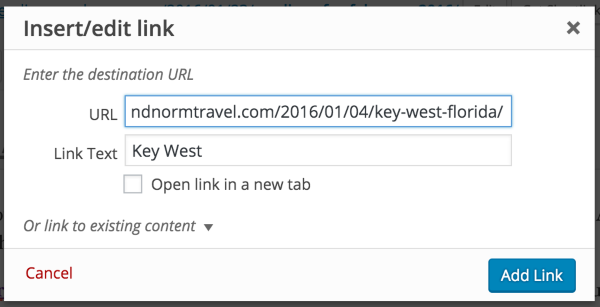
When you’re in editing January 2016, it sounds like you’re able to select Key West, and click to bring up the add link dialog box.
Do you see something that looks like the picture at this link once you do that?


- The topic ‘Link a post to another page on my site’ is closed to new replies.
 WordPress.com Forums