

Link format
-
I don’t understand what it means to post in the formats. I see where to choose your format, and it’s Link that I want to use. But then what? Where do I put the link? And what will it matter if I do?
What I’m hoping to do is post a link and, like happens on Facebook or Google+, a picture from that link displays along with the title of my link, and then I can add my own comments. But I can’t figure out what to do with this at all, and I found nothing in the help feature.
Also, is there a way to force link feature using code when I post by email?
The blog I need help with is: (visible only to logged in users)
-
Are you referring to the Link post format?
http://en.support.wordpress.com/themes/post-formats/
http://en.support.wordpress.com/posts/post-formats/
The Parament theme does not have that feature http://theme.wordpress.com/themes/parament/ -
This is the guide for creating links in posts and pages: http://en.support.wordpress.com/links/
This is the general link model:
<a href="URL HERE">Highlighted anchor text here</a>
This is the visual result – it’s not actually linked.
Highlighted anchor text here1. Enter the anchor text you want to link to first.
2. Then use your mouse to highlight that anchor text. (If you don’t highlight the anchor text the chain icon will remain grayed out and not be useable.)
3. Next click the chain icon in the editor and proceed to create the link.More here > http://onecoolsitebloggingtips.com/2013/05/20/creating-html-hyperlinks-links-in-wordpress/
-
Ah okay, so it’s a theme thing. Thank you. I’ll be seeking through themes that do this. Yeah, it wasn’t HMTL I needed, but thanks for adding that too, because that was very thorough. Lots of help forums barely answer the question but you answered more than I needed just in case. A+
-
Hi again,
There are 25 Dark + Post Formats WordPress Themes
http://theme.wordpress.com/themes/features/post-formats+dark/?sort=free
Thanks so much for the kind words about my responses. :) -
Still having a problem. I’ve chosen three themes that are supposed to allow for the formats, but when I click “new post”, I’m not taken to the menu that this page says I will be:
http://en.support.wordpress.com/posts/post-formats/I’m just taken to the regular post writing page without the ability to choose a link post. I’m confused.
-
I do not ever use this link https://wordpress.com/post/ to create posts. I use this one > Dashboard > Posts > Add New
For you that link is http://redspiderbear.wordpress.com/wp-admin/post-new.phpThe post format is found in the far right hand column.
http://en.support.files.wordpress.com/2010/12/format-module.png?w=688 If you do not see the Format module, check that you have it enabled in your Screen Options. -
I just found that. Sadly, again, I can click that I want a link format, but I have no idea where to put the link. It’s not showing up in the way that it says it will in the instructions.
-
In other words, it says that it’ll show up like in this pic:
http://en.support.files.wordpress.com/2010/12/new-post.png?w=688&h=280But it doesn’t. I can’t just click link and insert a link into the field and have it do that for me automatically. That’s okay. I’m going to see what else can do.
-
I am very sorry for the confusion here. The support document you were using references an old version of our editor at https://wordpress.com/post/ that included a “link” button. While we still make the functionality available, it’s now listed under the Advanced Settings tab on that page. Here’s a screenshot that shows where it is:
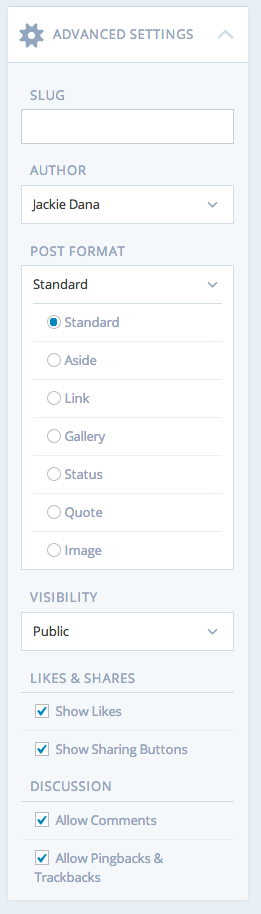
As timethief has already explained, you can also use post formats in the Dashboard editor.


- The topic ‘Link format’ is closed to new replies.
 WordPress.com Forums

