

"Link Target" menu won't appear on menu page. Please help!
-
I want to change my link targets to open in tabs. I have the “Link Target” box checked under Screen Options in the Menu page, but no advanced menu appears whether the box is checked or not.
The blog I need help with is: (visible only to logged in users)
-
Hi there,
I found that when you check “Link Target” under Screen Options, if you go to each item in the Menu Structure and open up dropdown you will see box to check ” Open link in a new window/tab” under the Navigation Label. I have provided you with a screenshot below:
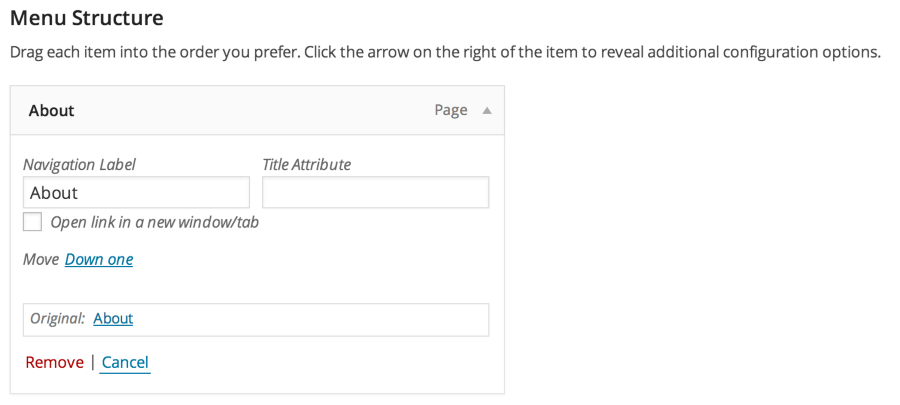
Please let me know if you have any questions!
Cheers!
-
Hi, thank you! This answered my question, but I realize now that this isn’t actually what I was wanting to do. I don’t want my different pages to open in new tabs, rather, I want the external links in my text body on the pages to open in new new tabs (I don’t want clicking on a link I’ve included to navigate the visitor away from my page.) How might I do this?
Thank you again!
-
Hi there,
I see! You can do this too by creating a link within your post. Once you do, a small popup window should appear to Insert/edit link. When you do, please make sure to check: Open link in a new window/tab. I have provided you a screenshot of an example:
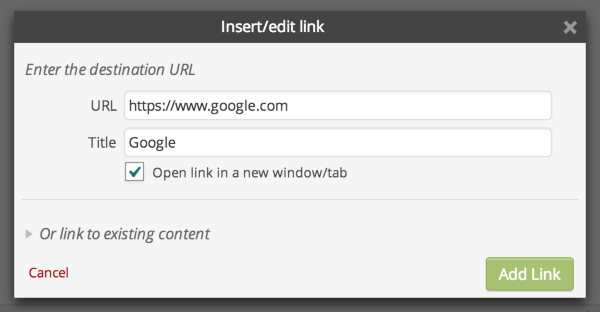
Please let me know if you have any questions!
-
Oh wow, I didn’t even notice that when I added the links. Thank you so much! All fixed now.
-


- The topic ‘"Link Target" menu won't appear on menu page. Please help!’ is closed to new replies.
 WordPress.com Forums