

Links Menu bar
-
Hi, I would like to reorder my links menu bar. How do I do so?
In addition, every post fits into a category. I do not understand why the links menu bar do not contain the posts they should. I realize the links menu bar are like pages and not categories. I would like them to be both.Thank you,
The blog I need help with is: (visible only to logged in users)
-
Hi Dom,
You customize your menu the way you’d like here:
https://domkg.wordpress.com/wp-admin/nav-menus.php
To change the order of each menu item, drag-and-drop them into the order you like. Then click “Save Menu.”
If drag-and-drop isn’t working, you can also open up each item’s options to move it:
In addition, every post fits into a category. I do not understand why the links menu bar do not contain the posts they should. I realize the links menu bar are like pages and not categories. I would like them to be both.
I see that you have some Category Pages, like “Fitness” in your Custom Menu. I’m not sure what you mean that they do not contain the posts they should. It appears to me that all the Category Page links you’ve created do lead to all the posts that have those categories.
Could you please explain the issue a little more?
-Alex G.
-
Hi,
I fixed the problem. Thank you.
I have another question. It seems like if I want to add someone as a contributorm I have to send an invite. Then, I assume that person has access to my WP Admin.
Is it possible to have a contributor without letting that person access my website?
-
Hi Dom,
If you invite someone as a contributor they do have access into your /wp-admin/ — but the only thing they’ll be allowed to do is write new posts and submit them to be reviewed by an Editor or Administrator user. Contributor is the lowest level of access.
One option you could consider is creating a Contributor user, enable Post by Email for that user, then provide your content creators with that post-by-email address but not the username and password for the login. In this way, they’d not know the necessary information to access your site, but they could still create and submit for review their posts via email.
-Alex G.
-
-
Hi,
How can I have a dropdown menu on my main menu?
What I mean is within my Fitness category I would like: diet, training, etc.
I hope such a thing is possible with my theme.Thank you.
-
Hi Dom,
This is definitely possible. We even use it in the demo site:
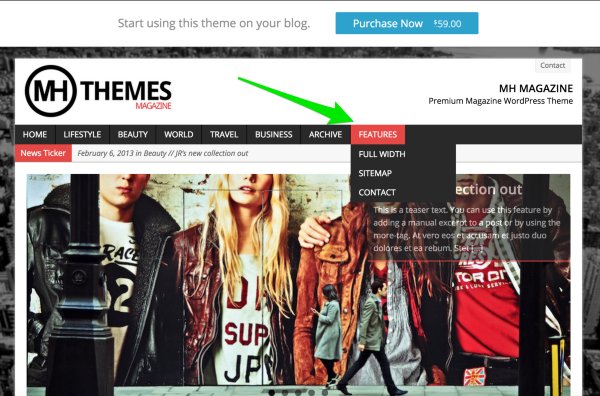
Open up your Custom Menu options here:
https://domkg.wordpress.com/wp-admin/nav-menus.php
Add the item (Page/Category Page / Link, etc) you want into your menu.
Once it’s there, drag-and-drop the item until it’s underneath what will be it’s parent for the drop down.
Next, click on the item and click the “Under *” button.
In this example, I’d be moving “Archive” into a dropdown beneath Business:
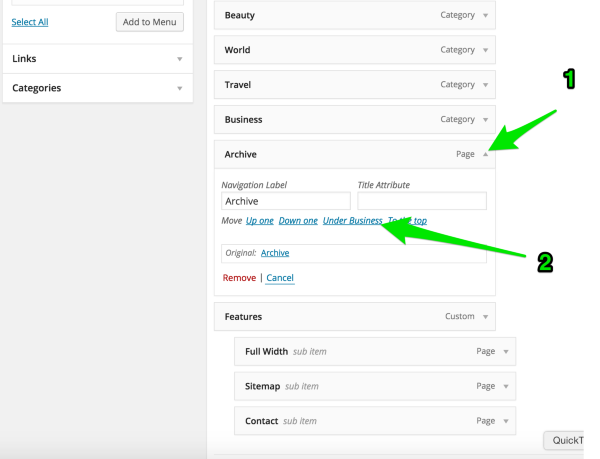
Then Save Menu.
-Alex G.
-
-
Hi,
I would like to add a Pinterest Widget like so: https://business.pinterest.com/en/widget-builder#do_embed_user
This is the code I’m required to enter:
<!– Please call pinit.js only once per page –>
<script type=”text/javascript” async defer src=”//assets.pinterest.com/js/pinit.js”></script>I selected the Text widget, then entered the code above.
The widget wasn’t created.
Could you help me out please?
Thanks.
-
Hi Dom,
That Pinterest widget can’t be added here at WordPress.com, because it includes Javascript code that’s not allowed for security reasons.
Currently, WordPress.com supports Pinterest embeds (including embedding your Pinterest profile) in posts and pages, but not widgets. Our team is looking into the possibility of adding Pinterest embeds in widgets, but we don’t have a timeline for that at this stage.
Another option would be to use something like an Image Widget, and create an image that links back to your Pinterest profile. I know it’s not quite the same, but it could be a workaround if you’d like to have that in a widget.
Please let me know if I can do anything more to help!
-
Hi,
I signed up for Blogging 201. I received confirmation. I can’t acces the Commons. I cleared my cahe and asked to be admitted into the group. Nothing seems to be working.
Here is a conversation I had with support:
domkg Hi, I signed up for Blogging 201. Can’t reach the Commons
Alecia – WordPress.com Hi there!
domkg I asked for help yesterday, nothing as of yet
Alecia – WordPress.com I’m checking – one moment.
domkg ok
Alecia – WordPress.com Here is the link: https://blogging101february2015.wordpress.com/
domkg Yes, I tried that many many times. Last night and this morning
domkg I havn’t gotten any news
Alecia – WordPress.com You mean you haven’t gotten any notifications?
Alecia – WordPress.com You would need to click on Follow at the top of the Commons to get notifications of new things posted in the Commons
domkg I can’t even access the Commons though. I was in Blogging 101 and had no problems. Having problems with Blogging 201 though
domkg Hello?
Alecia – WordPress.com Try this link please https://blogging201february2015.wordpress.com/
domkg I clicked on: request access
Alecia – WordPress.com When did you sign up for the course?
domkg Yes
Alecia – WordPress.com When please?
domkg Last week
domkg Thursday or Friday
Alecia – WordPress.com Ok, they may not have added you to the commons yet. Did you get any type of confirmation email with access information?
domkg Yes, I did
Alecia – WordPress.com Ok, the other thing I would suggest is clearing your cache files just to make sure Chrome isn’t pulling an corrupt version of the page to see if you can access. You can do that by following here: https://support.google.com/chrome/answer/95582
domkg Ok, I have to go now. I’ll try that. Thank you
Alecia – WordPress.com You’re Welcome! Have a great day! If you have any additional questions, feel free to chat with us again. :) -
Hi Dom,
You’re already in the Blogging 201group. When you click on the following link signed in from domkg, are you still seeing a Request Access link?


- The topic ‘Links Menu bar’ is closed to new replies.


 WordPress.com Forums