

Links not showing.
-
I added links several weeks ago. I just noticed they are not showing on the main page. I followed the instructions on setting up a blogroll but the links tab doesn’t even show on my screen.
Also, I added an image to the left sidebar, but can’t get it to show either.
These widgets are a great idea, but I’m having a hell of a time executing them. I’m feeling very frustrated. Please help.
The blog I need help with is: (visible only to logged in users)
-
Hi there,
I added links several weeks ago. I just noticed they are not showing on the main page. I followed the instructions on setting up a blogroll but the links tab doesn’t even show on my screen.
Your links are currently showing up on your site here redwoodcoastmountainbikeassociation.org on my side. Here’s a screenshot of what I’m seeing:
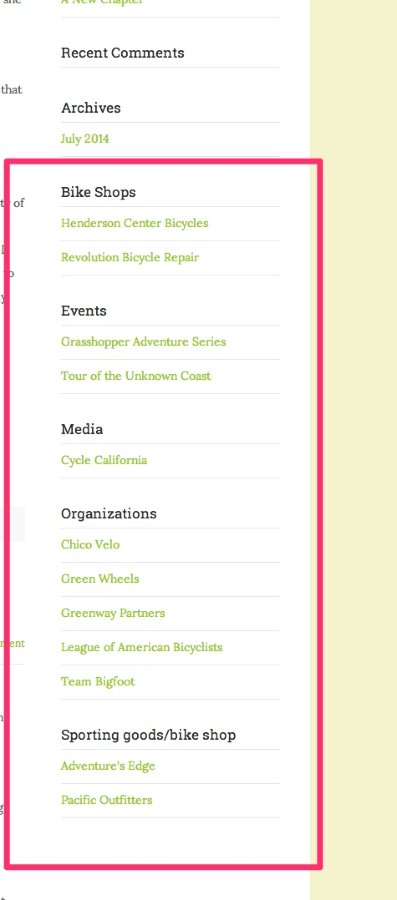
That matches the list you have here:
https://redwoodcoastmountainbikeassociation.wordpress.com/wp-admin/link-manager.php
Are those the links you’re referring to?
Also, I added an image to the left sidebar, but can’t get it to show either.
As you mention, the image widget is added to the left sidebar. This sidebar only displays on pages that are set to the Three Column page template as described here (under heading “Page Template”):
http://theme.wordpress.com/themes/organization/
Can you try moving it to the right sidebar instead?
These widgets are a great idea, but I’m having a hell of a time executing them. I’m feeling very frustrated.
Just to clarify, the right sidebar appears by default so anything you add there should pop-up on every page. However, the left sidebar only appears on pages that are tagged with the “Three Column” template. You can read more about the page templates here:
Does that make sense?


- The topic ‘Links not showing.’ is closed to new replies.


 WordPress.com Forums