

Links on Images when using Media and Text Block
-
Hi, I’m trying to add a link to the image when applying a “Media and Text” block element (under Layout Elements), where there is an image with text beside it.
If I add the image alone, it gives me the option to add a link to the image. But if I use the Media and Text block element, there is no option to add a link to the image. How do I go about this?
-
Hi,
Have you tried steps 3 and 4 in the Adding Links to Images section of the Links support page? Note that there are presently two steps labeled “4,” an error which I’ve brought to the attention of staff and which should be corrected soon.
-
Thanks for the reply. I’ve tried something similar.
I’m using the new block editor. The button to add links does not appear for me when using the “Media and Text” combo block. It only appears when using an Image block on its own.
I can switch to the classic editor and add the link that way, but then it converts the page to a jumble of objects while editing. After publishing and returning to the same page it gives me a message about “recovering” the blocks, but when I do that it removes the links I’ve added to the images.
I can’t achieve the layout I want in the classic editor, and I can’t seem to apply the links in the block editor. =(
-
Thanks for the additional info. I’ve called for staff attention. Staff will respond here ASAP.
-
Hi there,
It looks like adding a link to images within that particular block isn’t yet supported and there isn’t a current timeline in which we can expect that update to happen at this point. As a workaround, have you tried or considered adding image and text into the classic block? It may take a little bit of work, but you may be able to get the desired results.
Hope that helps.
-
Tried the “Classic” Block, it doesn’t have the button to add a URL when selecting an image either.
I tried using the Grid Layout Block with 2 columns, adding the image into the left column and text on the right. I can add a link to the image that way. But the image/text alignment is not that great, especially when viewing on mobile. The text is more aligned with the next block than it is with the image it’s supposed to be accompanying.
Any other suggestions short of an HTML block and some tables? :)
-
Hi there,
Just a correction on the reply above – this is actually being worked on by the team who makes the WordPress software over on WordPress.org. Once this is updated and released on their end, the update should be made on ours as well. You’re welcome to follow along on the progress here:
https://github.com/WordPress/gutenberg/issues/15422
Tried the “Classic” Block, it doesn’t have the button to add a URL when selecting an image either.
The button appears in the classic block toolbar, not the small pop-up toolbar that appears when you click on the image:
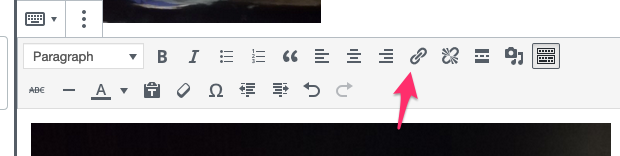
But you don’t need that either. In the classic block, click the image to select it, and then just paste the link. That will add the link to the image same as clicking the link icon will.
-
Any news on this? The last comment on the github thread was that the feature was “testable” on Nov 1. Not sure what that means or when it might be usable by us.
-
Github is where the updates are going to be posted. We don’t have any further information to share.


- The topic ‘Links on Images when using Media and Text Block’ is closed to new replies.
 WordPress.com Forums