

links to original articles
-
None of the links I have created to the original articles work. The site is mideastfreepress.com
Thank you.
Farhad MalekafzaliThe blog I need help with is: (visible only to logged in users)
-
None of the links I have created to the original articles work. The site is mideastfreepress.com
Thank you.
Farhad MalekafzaliThe blog I need help with is mideastfreepress.com.
-
Hi there!
Where are you creating these links that aren’t working? Can you paste one of the links you’re trying to create here?
-
-
-
Shawna,
Could you tell me if there is a way for to link up one of my WordPress sites to a googleplus page I have set up specifically for it without having to deal with my web master. I would like only the postings I want to go to this particular googleplus page. As it is, every post automatically goes to an unrelated googleplus page I have had for a while. The WordPress site is mideastfreepress.com and the googleplus is for Mid East Free Press.
Thank you.
Farhad Malekafzali -
Hi there!
You can disconnect your current Google+ page through Settings > Sharing. Then just link your other page.
We have two different ways you can connect your Google+ account.
1. Publicizing your posts – this will share your posts to your Google+ page as you requested above.
http://en.support.wordpress.com/publicize/#google-profiles-and-pages
2. Connecting your profile – this will display your Google+ contact information on your WordPress.com posts.
http://en.support.wordpress.com/google-plus-profile/
Let me know if I can help with that more!
-
Dear Shawna,
Thank you for your response earlier today.
I did step one as you had suggested. However, my postings on Mid East Free Press continues to go to my other, unrelated googleplus account. Could you help?
Farhad
-
I’m sure we can get this sorted out. Can you give me a link to the Google+ page where you’re posts are going erroneously?
-
Shawna,
The link is this: https://plus.google.com/116540302845354889139/posts
Note: 1. This is googleplus site. The one for Mid East Free Press is a googleplus Business page. 2. Even when I had thought to have posted a selection of articles, every new post has gone into the wrong googleplus.
Thank you again.
Farhad -
Thanks for the link! I don’t see your WordPress.com posts there, have you deleted them?
Can you try publishing a new/test post and leaving it where it gets publicized so that I can see what’s happening? Once I have a change to see it, I’ll let you know and you can go ahead and delete it.
-
Shawna,
I can see them. The first seven or eight postings are from mideastfreepress.com. In fact, I keep deleteing them and they keep reappearing!However, the postings from today are not there. They are posted on mid east free press google plus site where they are suppose to be. Therefore, the problem may have been resolved. I am sorry to have troubled you.
Now, it seems all the postings appear on the aprpriate google site automatically. Is there a way for me to control that. I tought by clicking on google icon at the bottom of every posting I can send that particular posting to google plus. But, it is not working that way.
Thank you again for your patience.
Farhad -
Great! I’m glad everything is working correctly now!
You can control where your posts are published through the Publishing module. Just click on ‘Edit’ next to Publicize and you’ll see this:
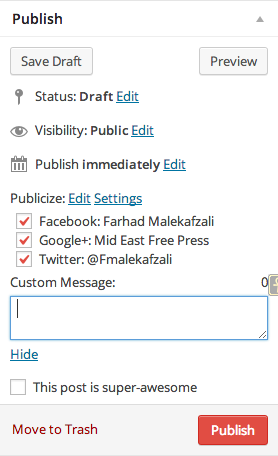
Let me know if I can help further! :)
-
-
Dear Shawna,
I have to bother you again. This email is in regards to: http://farsiknow.com/I am trying to creat a “Contact Us” page and have run into two problems: One, I have “published” the page but it does not show up with my other three pages on the default first screen. Two, when I preview the page, the contact boxes, instead of being blank are filled with my information. I would appreciate to assistance as always.
Thank you.
Farhad -
Hi Farhad!
I have “published” the page but it does not show up with my other three pages on the default first screen.
You’ll need to add the new page to your menu in order for it to show up. You can do this through Appearance > Menus. Just select Pages from the panel on the left and select your Contact page from the list.
Two, when I preview the page, the contact boxes, instead of being blank are filled with my information.
This is just some ease-of-use functionality that WordPress.com offers to logged in users. Anyone logged in will see their own information (not yours!). And anyone logged out will see example text.
Let me know if I can help with anything else! :)
-
Dear Shawna,
I am sorry to bother you again. I have not been able to obtain the kind of help I need from your colleagues.
I would like to change the theme for mideastfreepress.com. However, in the new theme I have been unable to delete the heading “Home” or replace it with something else. In the menu I am supposed to have two pages called Latest News and Persian Gulf. But the headers do not reflect that.
Additionally, I want my old posts to go only to one specific page or just to the archives. As it is the two pages I have created both contain the old posts. I am willing to delete all the old posts and start afresh!
I hope I am not too confusing.
Thank you.
Farhad -
I’m happy to help you out with that!
It looks like you’ve created the new menu like Rachel suggested, but you haven’t enabled it on your site yet. To do this, go to Appearance > Menus and then select Manage Locations at the top:
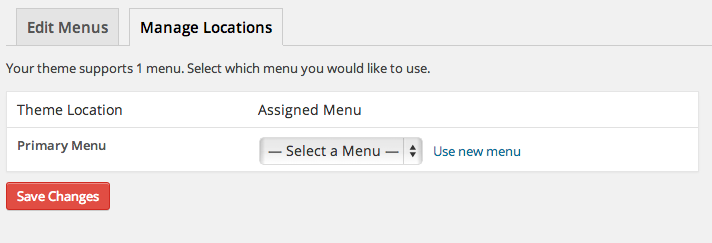
Your theme supports three different native menus. I’ve labeled the Primary and Secondary menus here:
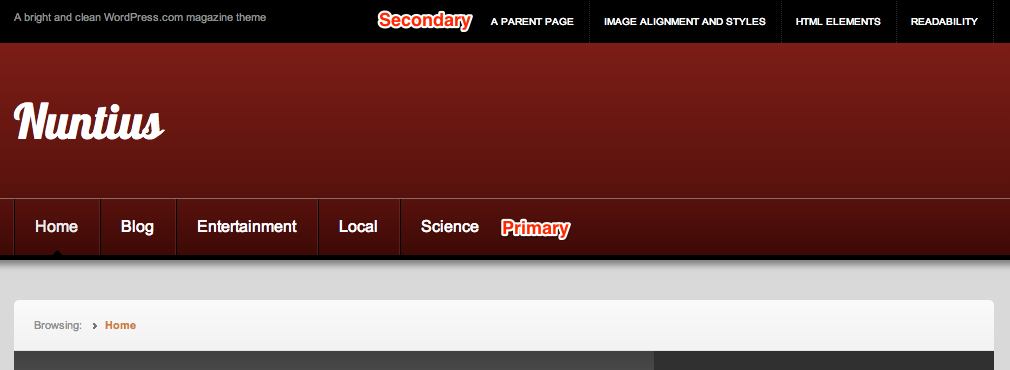
The third menu is in the footer. Just select your menu from the drop down for whichever locations you want it to appear in.
Additionally, I want my old posts to go only to one specific page or just to the archives. As it is the two pages I have created both contain the old posts. I am willing to delete all the old posts and start afresh!
What you could do is categorize all of your old posts with a particular label like ‘Archived’ and all of your new posts with a different category like ‘Latest News’. Then, you’ll just need to create a couple of Category Pages, one for the old posts and one for the new posts.
Otherwise, your best option is to clear out your old posts and just start fresh. Does that make sense?
Let me know if I can help further!
-
Shawna,
Thank you for the advice. Useful as always.
Is it possible to have a front page with this Theme?
Farhad


- The topic ‘links to original articles’ is closed to new replies.
 WordPress.com Forums