

links to original articles
-
Shawna,
Very sorry for bombarding you with questions.
I have been unable to creat categories. When I do Appearance and then Menu I can only see “uncategorized” and cannot change or add any this under this module. Additionally, my old postings still appear under the heading “Persian Gulf.”
Thank you for your assistance in advance.
Farhad -
Don’t worry about it! I’m happy to answer your questions! :)
Is it possible to have a front page with this Theme?
It is! Currently your Front Page is set to “News” and “News” is using the News Template. You can read more about this template on the theme’s page here:
https://wordpress.com/themes/nuntius/
If you’d like to have a static landing page with content (rather than the post slider, etc), you can remove the page template and enter content in the page instead. Let me know if I can help make this look how you want!
I have been unable to creat categories. When I do Appearance and then Menu I can only see “uncategorized” and cannot change or add any this under this module.
In order to add new Categories, you’ll need to go to Posts > Categories. Or you can add a new Category to a post in the post editor. Make sure when you go back to the Menu editor that you select Show All under the Categories header to see all of your new Categories.
Additionally, my old postings still appear under the heading “Persian Gulf.”
This is because “Persian Gulf” is set as your recent posts page under Settings > Reading. The recent posts page shows all of your post in reverse chronological order (with the newest post at the top).
If you don’t want a page that does that, just change the setting under Settings > Reading to “–Select–“.
Does that clarify things? Let me know if I can help further!
-
Shawna,
Thanks for your careful advice. You had offered to further assist me setting up a static landing page.
“If you’d like to have a static landing page with content (rather than the post slider, etc), you can remove the page template and enter content in the page instead. Let me know if I can help make this look how you want!”
What I am looking for is to have something similar to Huffington Post!
Perhaps I am asking for too much out of a free theme.Thank you.
Farhad -
What I am looking for is to have something similar to Huffington Post!
Okay! I’m not sure that Nuntius necessarily has that level of flexibility. However you may be interested in one of our other free Magazine-style themes like The Morning After or Suburbia.
Here’s the theme showcase narrowed down to Magazine style themes that are free:
-
-
-
Hi Shawna,
Predictably I lost the match!
I have switched to Expound theme now (I am begining to sound like a three year old). I would like the layout used by Monica Briano whose site is listed as one of the “Awesome blogs using Expound.”
I would like my posts on the front page be limited to the default 5 and only five or so more underneath those, not the infinite scroll. I would like the rest to go into an archive page for general news or require clicking to see more (if possible).
As for the headings I would like to also follow the example of Monicabriano.com. I would like to have featured images and a short paragraph with a link. At the moment these are static pages.
I hope I am not asking for too much.
Thank you.
Farhad -
Dear Shawna,
I never heard back from you.I was wondering if you could just help me set up some category pages. I have not been able to understand what WordPress Support has on this subject. If you could let me know today I would greatly appreiate it.
Thank you.
Farhad -
It looks like you got some of this set up already! I see that Monica posted a little how-to video. :)
I would like my posts on the front page be limited to the default 5 and only five or so more underneath those, not the infinite scroll. I would like the rest to go into an archive page for general news or require clicking to see more (if possible).
You can turn off Infinite Scroll through your dashboard at Settings > Reading:
https://mideastfreepress.wordpress.com/wp-admin/options-reading.php
You’ll see a menu item that says “To infinity and beyond.” Just uncheck the box next to it and save your changes.
You can also limit the number of posts that load per page above that setting at “Blog pages show at most”. Just change it to 5 and save your changes.
Once those two settings are changed, your page will display 5 posts, and then you’ll need to click to load the next page.
As for Category Pages, this document didn’t make sense?
http://en.support.wordpress.com/category-pages/
It looks like currently you haven’t set your custom menu to display, so your menu bar is just showing an automatically generated menu based on your published Pages.
What you’ll want to do is instead of creating Pages, you’ll want to create Categories for the topics you want. You can do this through Posts > Categories.
Once the Categories are created, head back to Appearance > Menus. On the left side, you’ll want to select the Categories. Click on View All, check the ones you want to include, and select Add to Menu.
Once your menu is set up the way you want, select the location of your menu from the check boxes at the bottom of the settings, and save your changes:
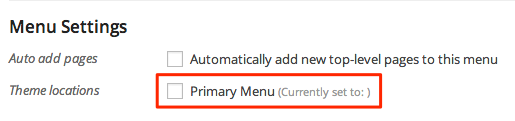
Let me know if anything is unclear or if I can help with anything else! :)
-
Shawna,
Many thanks for taking the time to explain everything to me and to do so with care.
One minor issue: 1- Is it possible to change the little tags attached to the smaller pictures on the “Front Page” to say “News” instead of “Front Page”?
Farhad -
Is it possible to change the little tags attached to the smaller pictures on the “Front Page” to say “News” instead of “Front Page”?
Sure! “Front Page” is the Category you gave those articles. Try adding the Category “News” to those articles instead.
You can do this through the Post editor or through the Quick Edit menu:

Let me know if there’s anything else I can help with!
-
Shawna,
Thanks again. You have been more than patient. You deserve a break from me!
Farhad
-
I’m more than happy to answer your questions! :)
Definitely let me know if I can help with anything else!


- The topic ‘links to original articles’ is closed to new replies.
 WordPress.com Forums