

Lodestar on WP .org
-
I have recently changed to self hosted wordpress.org and would like to continue using the Lodestar theme but I am finding its not transferring the same… I am not sure why, I was under a premium account on .com but now that I am self hosted not sure if thats even possible but for example I was previously able to use my logo on the front page and am now not given that option… Also the third panel of the Lodestar theme I had two testimonials which were visible on .com but not on .org. Am I missing something?
The blog I need help with is: (visible only to logged in users)
-
for example I was previously able to use my logo on the front page and am now not given that option…
Hmm – can you tell me where you’re not seeing the option to add a logo? I just tested and I can see the logo uploader in the Customizer’s Site Identity panel, are you looking somewhere else?
For testimonials, I can see that you’re running the necessary Jetpack plugin, but I can’t verify whether you have testimonials or not, since the automatically geneated archive at /testimonial/ redirects to one of your pages (/testimonials-2/). Could you try setting that page to draft to let the automatic views take over?
Tell you what, could we continue the troubleshooting of your self-hosted site over at WordPress.org? These forums are meant for WP.com users.
https://wordpress.org/support/forum/themes-and-templates
Tag your post with wpcom-theme in the tags area to be sure it will get attention:
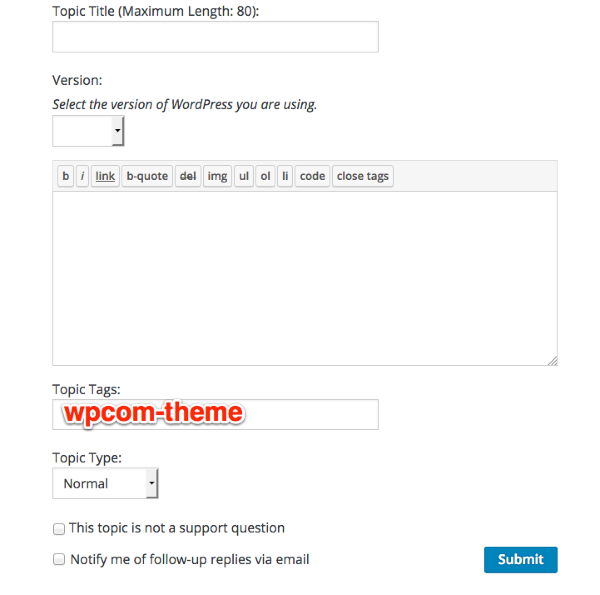
You’ll need a free WordPress.org account to post – if you don’t already have one, you can register here:
https://wordpress.org/support/register.php
Thanks!
-
Hi Kathryn
I have just had exactly the same problem and I really struggled with this because it’s not a theme supported over at WP.com. First, I would download the lodestar theme from the bottom of the Lodestar Theme Info page (rather than anywhere else on the web) to make sure you get the most recent version.
Secondly, Jetpack is the answer. Make sure not only that it is activated over at your WP.org dashboard, but that you have gone through the Jetpack set-up process. Then it will emulate your lodestar at wp.com properly and you’ll find the facility to add a logo restored (as well as your facility to add portfolio items and testimonials).
-
alicepeakeart – glad you figured things out. FYI – Lodestar has been submitted to WordPress.org and is just waiting for a review before it becomes available over there. If you need further help in the meantime, feel free to post over at WordPress.org following the instructions I gave above.


- The topic ‘Lodestar on WP .org’ is closed to new replies.


 WordPress.com Forums