Log In Page
-
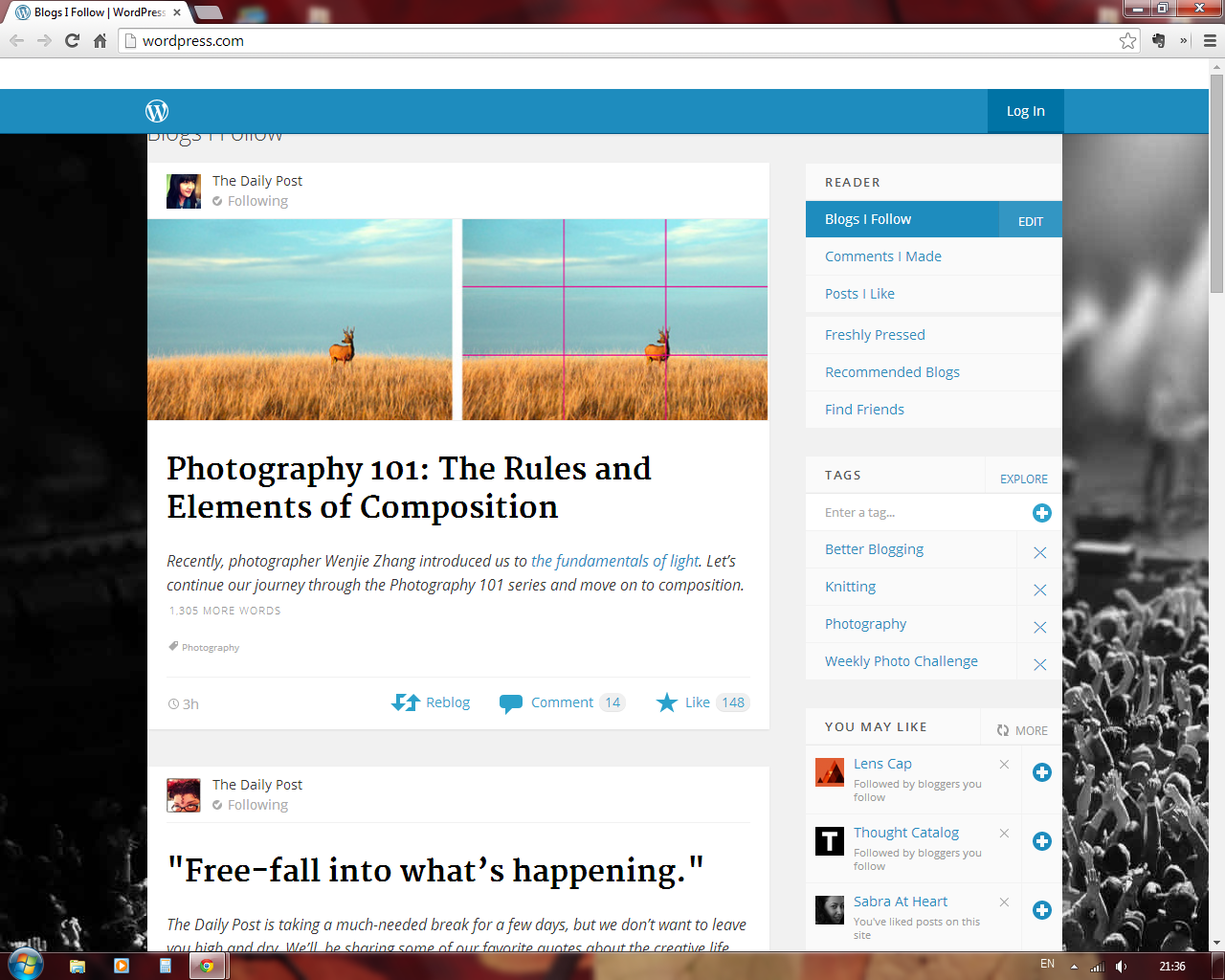
When I log in today it takes me to a “blogs I follow” page. I want to get to the dashboard/stats/posying page, etc. and I can’t get past this “blogs I follow” page.
What gives?
Thanks in advance.
The blog I need help with is: (visible only to logged in users)
-
What happens when you log out clear your browser cache and cookies http://en.support.wordpress.com/browser-issues/ and then log in again here > http://bbandm.wordpress.com/-wp-admin
That is the login link to your own blog’s dashboard. -
Nothing, it goes to the same page. It was happening on my home computer as well early this morning.
-
Starting from the beginning this is what happens:
– I click on wordpress.com and it takes to a page that reads, “Create your new website for free” (which is new to me today.)
– I click on the log-in button on the upper right
– I log in and it takes me to the “blogs I follow page” and I can’t get past that. On that page is another log in button, I hit that, log in and it takes me right back to the “blogs I follow page.” Again this is happening on my home computer and here at work.
-
We had some reports of this yesterday and it should be fixed now. Please try clearing your browser cache again, and if that doesn’t work, let me know.
Also, are you able to access your Dashboard from http://bbandm.wordpress.com/wp-admin/ ?
-
<
Starting from the beginning this is what happens:
– I click on wordpress.com and it takes to a page that reads, “Create your new website for free” (which is new to me today.)
– I click on the log-in button on the upper right
– I log in and it takes me to the “blogs I follow page” and I can’t get past that. On that page is another log in button, I hit that, log in and it takes me right back to the “blogs I follow page.” Again this is happening on my home computer and here at work.
>I am having the exact same issue, and has been going on for the past 6 hours. I’ve cleared browsing history; closed and reopened Firefox; and still have to go to one of my original posts, in order to have access to the dashboard and extra features.
Once I’ve logged in, I can only view my Reader page, with no other options found on that page.
It comes to mind that there was a Java update that was installed in the past 24 hours, and this behavior has happened since that update.
Thanks in advance for your time and trouble.
Michael
-
@michaelconen thanks for the update. Are you able to use the direct link to access your Dashboard via http://michaelconen.wordpress.com/wp-admin/ ?
-
-
-
After logging in, the ‘log in’ tab remains and all the main menu options have disappeared and aren’t accessible till I go to http://www.thedessertedgirl.com and go to the menu from there.
Yesterday, WordPress.com also led me to a page that said ‘add a new blog’ though I didn’t want to and wasn’t planning to change my domain name.
Please help!
-
<@michaelconen thanks for the update. Are you able to use the direct link to access your Dashboard via http://michaelconen.wordpress.com/wp-admin/ ? >
Hello Jackiedana,
Yes, if I click on the direct link you posted, once I’ve signed in, it will take me to the dashboard. I will try the same without a prior log-in, and see what happens.
Thanks for getting back to me.
-
Hi again, Jackiedana,
I’ve just checked with logging in via my administration link, and that takes me to where I can actually navigate back to where I wish to be.
Thank you very much for the assistance!
Regards,
Michael
-
Ditto. Same problem with the reader page. I even uninstalled and re-installed Google Chrome. Then I tried to access my blog feed on Internet Explorer–and the page doesn’t even load. It must be an issue with the website. I can use all of the other features through my blog page though.
-
I just cleared my cache, plug-ins, and cookies. All is as it should be now. Thanks Jackiedana!
-
-
-
I just had the opportunity to clean out history/cache/cookies/etc and that cleared up the issue.
Thanks!
-
Here’s what I’m seeing now if I click on the WordPress.com link in the blue bar above (not the icon in the black Admin Bar). (screenshot)
-
@justjennifer Can you confirm that you’ve tried logging out, clearing your cache, and logging back in?
-
Yep, mentioned it in the other thread that was closed, but I can try it again of course.


- The topic ‘Log In Page’ is closed to new replies.
 WordPress.com Forums